6
* The contents of this manual apply to the latest specifications as of the publishing date. To obtain the latest manual, access the Yamaha website
then download the manual file. Since specifications, equipment or separately sold accessories may not be the same in every locale, please
check with your Yamaha dealer.
Troubleshooting
No sound comes from the satellite
speakers or subwoofer.
The power cord is not properly
plugged into the wall outlet.
Insert the power cord firmly into the wall outlet.
The [ ](Standby/On) Switch on the
subwoofer is set to OFF.
Set the [ ](Standby/On) Switch to ON.
Connections are faulty or incomplete. • Make sure the connections are secure.
• Make sure to use the included power cord.
The volume is set too low. • Turn the [MASTER VOLUME] clockwise to increase the vol-
ume.
• Turn the subwoofer [BASS VOLUME] control clockwise to
increase the volume.
• Raise the volume on your drum module.
Sound is distorted. The volume is set too high. • Turn the [MASTER VOLUME] counterclockwise to decrease
the volume.
• Turn the subwoofer [BASS VOLUME] control counterclock-
wise to decrease the volume.
• Lower the volume on your drum module.
The levels of the low frequency ranges
in the Master EQ settings of your drum
module are set too high.
Lower the Master EQ settings of your drum module. For
details, refer to the Owner’s Manual that came with your drum
module.
Sound is interrupted. The level of the signal being input is
too high.
Turn down the volume on the instrument and/or the subwoofer
speaker.
Noise occurs in the sound. Connections are faulty or incomplete. • Make sure the connections are secure.
• Make sure to use the included power cord.
The speakers produce a “pop”
sound whenever the power is
turned ON or OFF.
The subwoofer is turned on before the
drum module is turned on.
First turn on the drum module, and then turn on the subwoofer.
Specifications
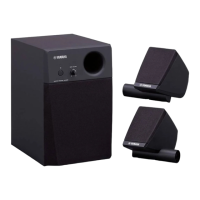
Output power Satellite speakers 20 W + 20 W (2 kHz, 4 Ω)
Subwoofer 20 W (60 Hz, 8 Ω)
Frequency response Satellite speakers / Subwoofer speaker 40–20000 Hz (-10 dB)
Speaker unit Satellite speakers Tweeter: 2 cm (0.8") dome (5 Ω)
Midrange: 8 cm (3") cone (4.5 Ω)
Subwoofer 16 cm (6.5") cone (8 Ω)
Dimensions (W × H × D) Satellite speakers 110 × 183 × 138 mm
(4 5/16" × 7 3/16" × 5 7/16" ) not including holder
Subwoofer 221 × 351 × 343 mm
(8 11/16" × 13 13/16" × 13 1/2")
Weight Satellite speakers 1.0 kg (2 lb, 3 oz) × 2
Subwoofer 6.5 kg (14 lb, 5 oz)
Accessories Pipe clamps* (2), combination cable (8 pin mini DIN to phone and RCA pin) (1), cable band (1),
power cord (1), Owner’s Manual (this document) (1)
* Can be attached to straight vertical pipes of 1.5-inch (38.1-mm) diameter.


 To Next Page