Instrument and control functions
5-3
1
2
3
4
5
6
7
8
9
10
11
12
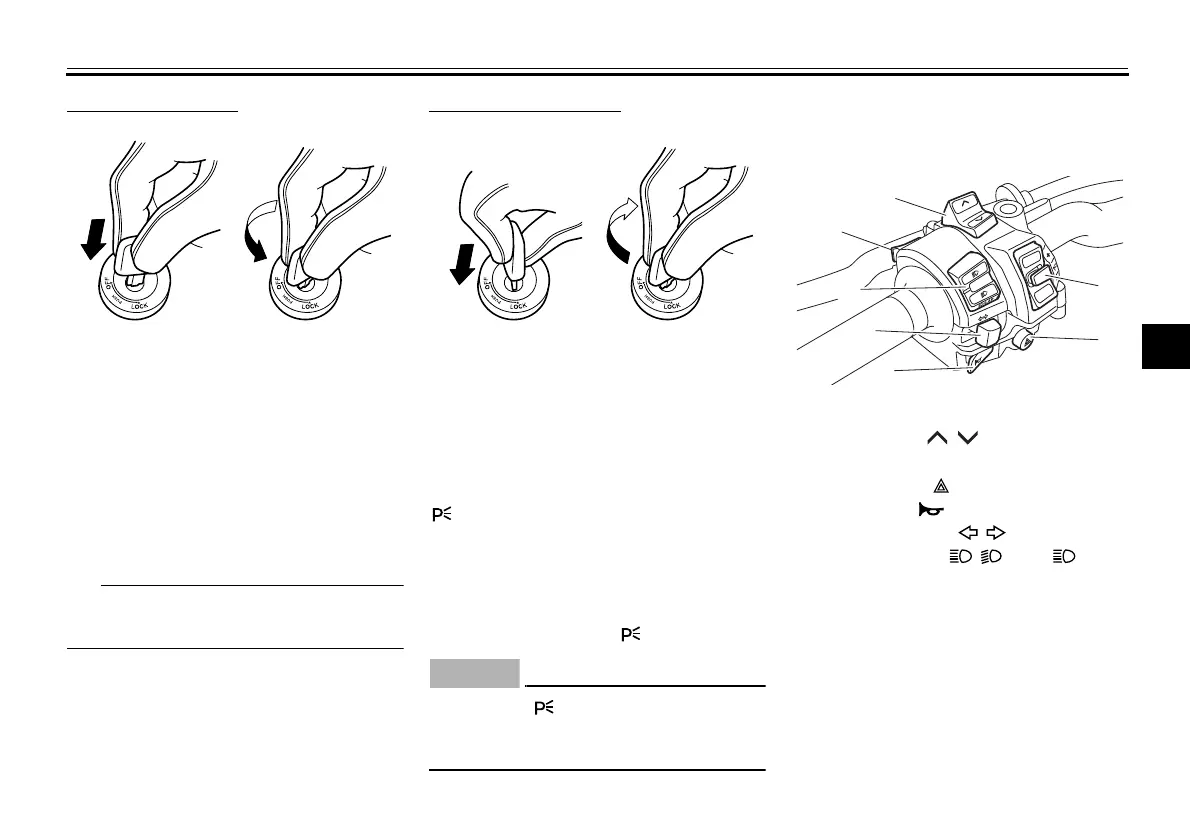
To lock the steering
1. Turn the handlebars all the way to
the left.
2. With the key in the “OFF” position,
push the key in and turn it to
“LOCK”.
3. Remove the key.
If the steering will not lock, try turning
the handlebars back to the right slightly.
To unlock the steering
From the “LOCK” position, push the
key in and turn it to “OFF”.
EAU74220
(Parking)
The hazard lights can be turned on, but
all other electrical systems are off. The
key can be removed.
The steering must be locked before the
key can be turned to “ ”.
ECA23640
Using the “ ” (parking) position for
an extended length of time may
cause the battery to discharge.
EAU66054
Handlebar switches
Left
1. Push.
2. Turn.
1. Push.
2. Turn.
1. Mode switch “MODE”
2. Select switch “ / ”
3. Cruise control switches
4. Hazard switch “ ”
5. Horn switch “ ”
6. Turn signal switch “ / ”
7. Headlight switch “ / ” and “ /LAP”
R
E
S
SE
T
MODE
BW8-9-20_1.book 3 ページ 2016年12月13日 火曜日 午前11時18分












 To Next Page