Instrument and control functions
5-16
1
2
3
4
5
6
7
8
9
10
11
12
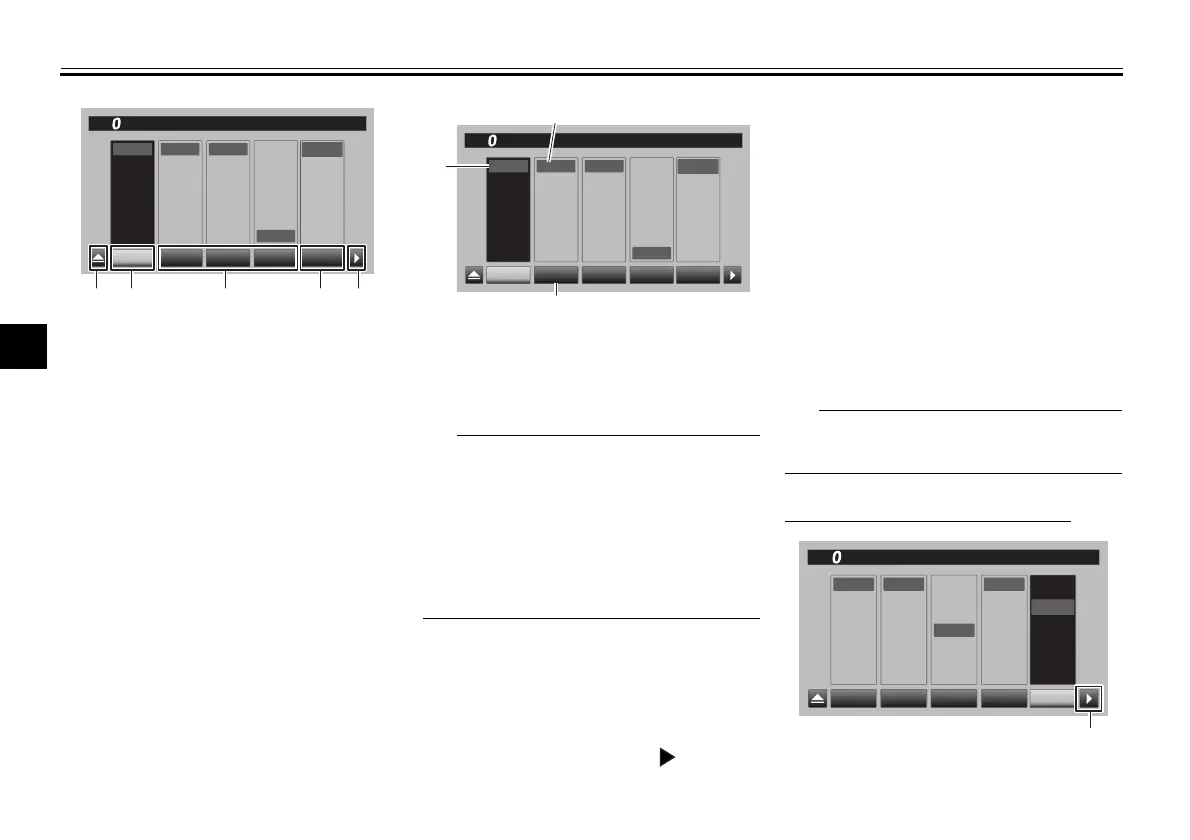
3. Select the YRC item; PWR, TCS,
QSS, or ERS that you want to ad-
just.
When a YRC item is selected, the
current setting level is indicated by
a blue-framed square and the fac-
tory preset level is indicated in a
grey box.
Factory preset levels vary depend-
ing on the selected YRC mode.
4. To customize other YRC modes or
adjust individual YRC items, re-
peat from step 2. When finished,
select the triangle mark on the far
left to return to the MENU screen
or select the symbol “ ” mark to
fine tune the ERS mode settings.
ERS
There are two automatic setting
modes; A-1, and A-2. A-1 and A-2 can
be adjusted to within a -5 to +5 offset of
their factory preset settings.
There are three manual setting modes;
M-1, M-2, and M-3. When a manual
mode is selected, the SCU does not ac-
tively adjust the suspension compres-
sion and rebound damping forces.
Manual mode suspension settings are
adjustable to 32 levels.
Spring preload is manually adjusted.
(See pages 5-33 and 5-34.)
To adjust the ERS mode settings
1. Triangle mark
2. YRC mode box
3. YRC item
4. ERS mode
5. To ERS menu
D
C
B
A
1
2
3
1
2
3
ON
OFF
A
-
1
A
-
2
M
-
2
M
-
3
M
-
1
YRC
P
W
R
TCS QSS
YRC
P
W
R
TCS QSS
12
:
00
YRC Setting
km/h
ERS
13452
1. YRC mode
2. YRC item
3. Current level setting
D
C
B
A
1
2
3
1
2
3
ON
OFF
A
-
1
A
-
2
M
-
2
M
-
3
M
-
1
YRC
P
W
R
TCS QSS
YRC
P
W
R
TCS QSS
12
:
00
YRC Setting
km/h
ERS
2
1
3
1. To ERS menu
D
C
B
A
1
2
3
1
2
3
ON
OFF
P
W
R
TCS QSS
YRC
P
W
R
TCS QSS
12
:
00
YRC Setting
km/h
ERS
A
-
1
A
-
2
M
-
2
M
-
3
M
-
1
1
BW8-9-20_1.book 16 ページ 2016年12月13日 火曜日 午前11時18分



 To Next Page