EasyManua.ls Logo

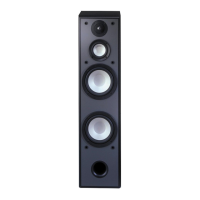
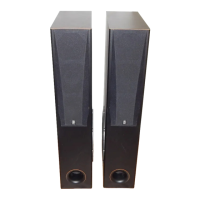
Yamaha NS-P300 - User Manual

Yamaha NS-P300
17 pages
Print Icon
To Next Page IconTo Next Page
Loading...
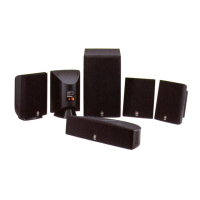
HOME CINEMA SPEAKER PACKAGE
SYSTEME D ’ENCEINTES HOME CINEMA
NS-P300
Active Servo
Technology
U C A
CONTENTS
SAFETY INSTRUCTIONS ...............................2
PROFILE OF THIS SYSTEM .........................3
CAUTION ........................................................4
SUPPLIED ACCESSORIES ............................4
SETTING UP THE SPEAKERS ......................5
CONNECTIONS ..............................................8
USING THE SUBWOOFER (SW-P30) ..........12
CONTROLS AND THEIR FUNCTIONS .....12
ADJUSTMENT BEFORE USING THE
SUBWOOFER ............................................13
ACTIVE SERVO TECHNOLOGY
(for SW-P30)................................................14
TROUBLESHOOTING (for SW-P30) ............15
SPECIFICATIONS .........................................16
TABLES DES MATIERES
PRESENTATION DE CE SYSTEME ............17
ACCESSOIRES FOURNIS ...........................17
PRECAUTIONS D’USAGE ...........................18
DISPOSITION DES ENCEINTES .................19
CONNEXIONS ..............................................22
UTILISATION DU SUBWOOFER
(SW-P30)........................................................26
LES COMMANDES ET LEURS
FONCTIONS ..............................................26
REGLAGE AVANT D’UTILISER LE
SUBWOOFER ............................................27
ACTIVE SERVO TECHNOLOGY
(pour SW-P30).............................................28
EN CAS DE DIFFICULTE (pour SW-P30) .....29
CARACTERISTIQUES TECHNIQUES .........30
OWNER’S MANUAL
Thank you for selecting this YAMAHA.
MODE D’EMPLOI
Nous vous remercions pour avoir porté votre
choix sur ce YAMAHA.

Questions and Answers

  • J
    Jessica CoxJul 30, 2025
    Why do my Yamaha NS-P300 Home Cinema speakers have no sound?
    • L
      Laura MurrayJul 30, 2025
      If your Yamaha Home Cinema speakers aren't producing sound, first ensure that the VOLUME control isn't set to 0; if it is, turn the VOLUME control to the right. Also, check that the speaker cords are securely connected; if not, connect them securely.
  • A
    Audrey JonesAug 4, 2025
    What to do if my Yamaha Home Cinema speakers won't turn on?
    • R
      russellbowenAug 4, 2025
      If power isn't being supplied to your Yamaha Home Cinema speakers even when the POWER switch is ON, the power plug might not be securely connected. Ensure it is connected securely.
  • B
    Brittany BarnesAug 9, 2025
    How to fix low sound level on Yamaha NS-P300?
    • R
      rasmussenalexanderAug 9, 2025
      If the sound level from your Yamaha Home Cinema speakers is too low, there could be several reasons: * Speaker cords may be connected incorrectly. Ensure they are connected correctly: L (left) to L, R (right) to R, “+” to “+” and “–” to “–”. * A source sound with few bass frequencies may be playing. Try playing a source sound with bass frequencies or set the HIGH CUT switch to the “HIGH” position. * Standing waves might be influencing the sound. Try re-positioning the subwoofer or disrupting parallel surfaces by placing bookshelves along the walls.
  • M
    Madison DayAug 14, 2025
    Why my Yamaha NS-P300 won't turn on automatically?
    • L
      laurenblackAug 14, 2025
      If your Yamaha Home Cinema speakers won't turn on automatically, consider these potential causes: * The POWER switch may be in the OFF position. Ensure it is set to the ON position. * The AUTO STANDBY switch could be set to the OFF position. Set the AUTO STANDBY switch to the “HIGH” or “LOW” position. * The level of input signal might be too low. Try setting the AUTO STANDBY switch to the “HIGH” position.
  • R
    Rebecca GravesAug 18, 2025
    What to do if Yamaha NS-P300 turn into standby mode unexpectedly?
    • M
      Mike WalkerAug 19, 2025
      If your Yamaha Home Cinema speakers unexpectedly enter standby mode, the level of the input signal might be too low. Try setting the AUTO STANDBY switch to the “HIGH” position.
  • A
    Andrew CraigAug 25, 2025
    Why do my Yamaha Home Cinema speakers turn on unexpectedly?
    • M
      Mitchell ShafferAug 25, 2025
      If your Yamaha Home Cinema speakers are turning on unexpectedly, it could be due to noise generated from external equipment. Try moving the unit farther away from such equipment and/or changing the position of connected speaker cables. Alternatively, set the AUTO STANDBY switch to the “OFF” position.

Summary

Safety Instructions

Setting Up the Speakers

Connections

Connecting Speakers to Amplifier

How to connect speakers to amplifier terminals.

Connecting the Subwoofer

Connecting subwoofer via speaker or line outputs.

Single Main Speaker Output Terminals

Specific connection setup for single main speaker outputs.

Subwoofer to Line Output Terminals

Connecting subwoofer using line output (pin jack) terminals.

Using the Subwoofer (SW-P30)

Controls and Their Functions

Explanation of subwoofer controls and their operation.

Adjustment Before Using the Subwoofer

Troubleshooting (for SW-P30)

Specifications

Yamaha NS-P300 Specifications

General IconGeneral
TypeHome Cinema Speaker System
Configuration5.1
Impedance6 ohms
Power Handling (Subwoofer)50 W
Magnet ShieldingYes

Related product manuals