EasyManua.ls Logo

Yamaha NX-E700 - Page 22

Yamaha NX-E700
71 pages
Print Icon
To Next Page IconTo Next Page
To Previous Page IconTo Previous Page
Loading...
22
DRX-730/NX-E700
DRX-730/NX-E700
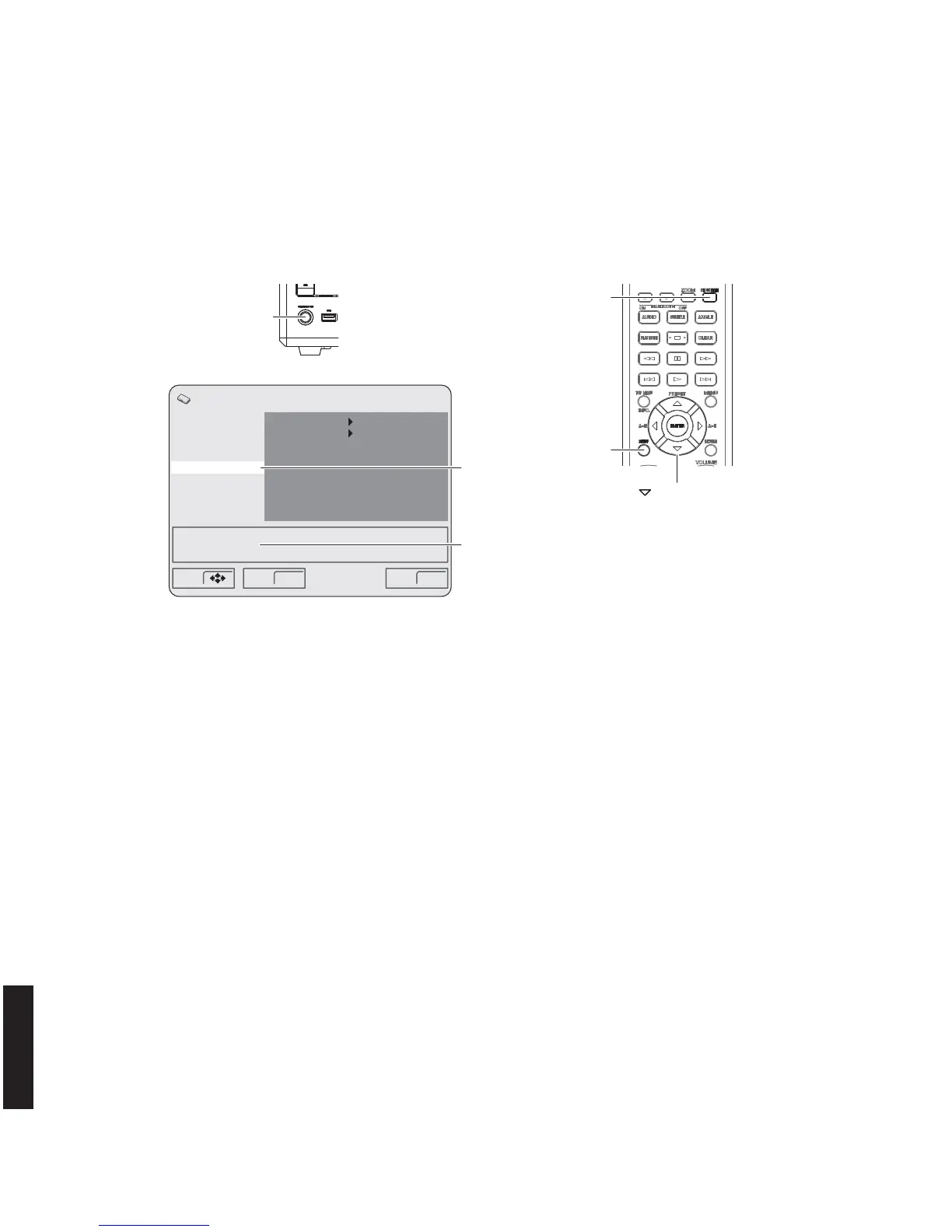
Remote control
"STANDBY/ON" key
This unit
"SETUP" key
" " (down) key
"ON SCREEN" key
REGION : 1
ROM VERSION : x.xx
Digital Audio Out
Video Output
Language
Display
Options
Parental Lock
DTS Downmix
DivX(R) VOD
Off(us)
STEREO
Initial Settings
Move Select ExitENTER SETUP
"Options" select
ROM version is displayed
7. Move the cursor to [Options] by pressing the “DOWN” key on the remote control repeatedly and press the “ON
SCREEN” key. (Fig. 7)
The ROM version is displayed. (Fig. 7)
8. Press the “SETUP” key on the remote control to end the SETUP procedure. (Fig. 7)
9. Press the “STANDBY/ON” key of this unit to turn off the power. (Fig. 7)
Fig. 7

Other manuals for Yamaha NX-E700

Related product manuals