30
DRX-730/NX-E700
DRX-730/NX-E700
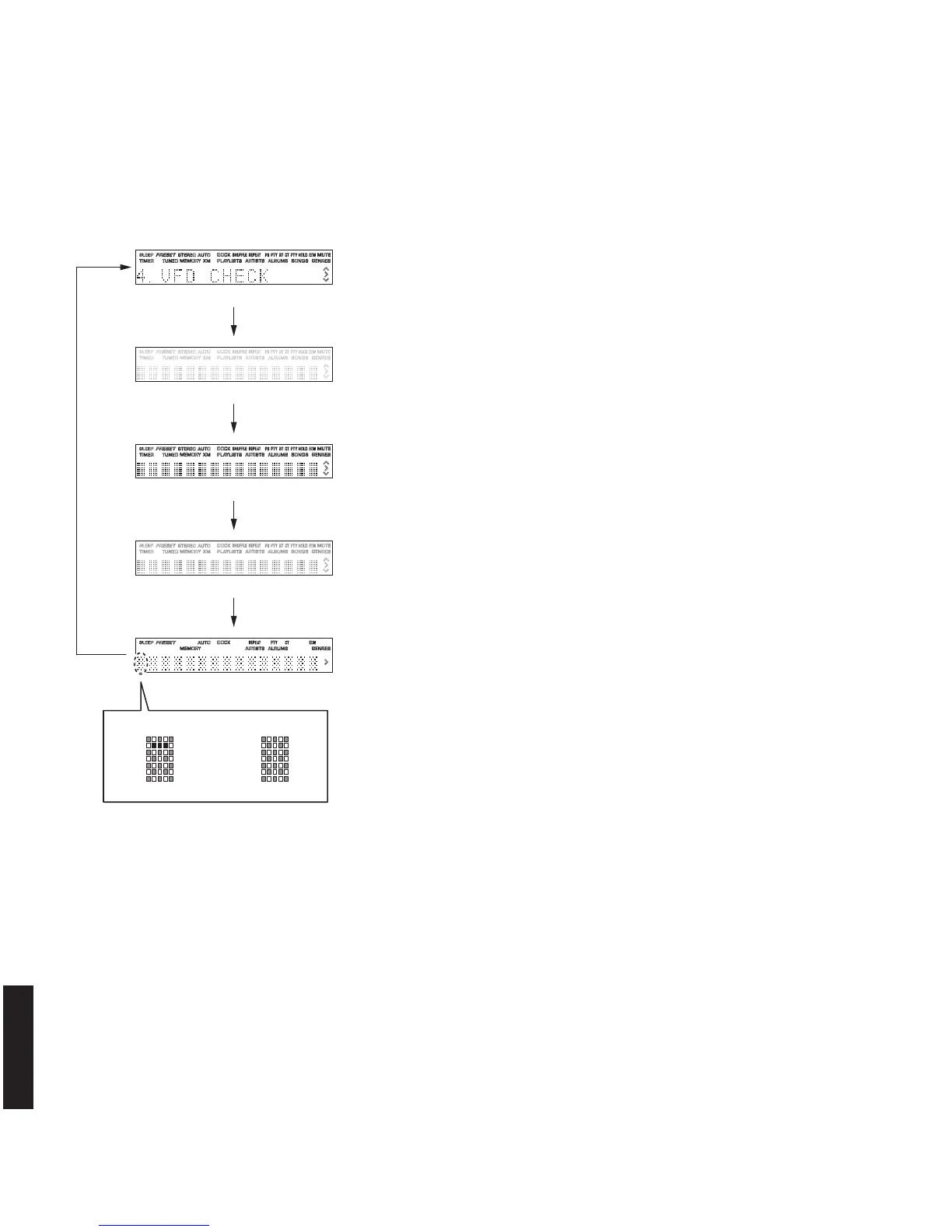
All segments OFF
All segments ON (dimmer 100%)
All segments ON (dimmer 50%)
Lighting of segments in lattice
Lighting in lattice
NormalShort
Initial display
4. DISPLAY CHECK
This menu is used to check the FL display section.
The display condition varies as shown below according to the sub-menu operation.
Segment conditions of the FL driver and the FL tube are checked by turning ON and OFF all segments. Next, the operation
of the FL driver is checked by using the dimmer control.
Then a short between segments next to each other is checked by turning ON and OFF all segments alternately (in lattice). (In
the above example, the segments in the second row from the top are shorted.)
Checking FL display section
Initial display
All segments OFF
All segments ON (dimmer 100%)
All segments ON (dimmer 50%)
Lighting of segments in lattice



 To Next Page