31
DRX-730/NX-E700
DRX-730/NX-E700
Note) Be sure to return the shorted pins to their original condition after executing this test.
5.DOCK:NGNNNN
1 2
19
3 4 56
10 k-ohms
1/4 W
7 8
9 10 1112 1314
15 16 17 18
20 21
5.BTV:--------
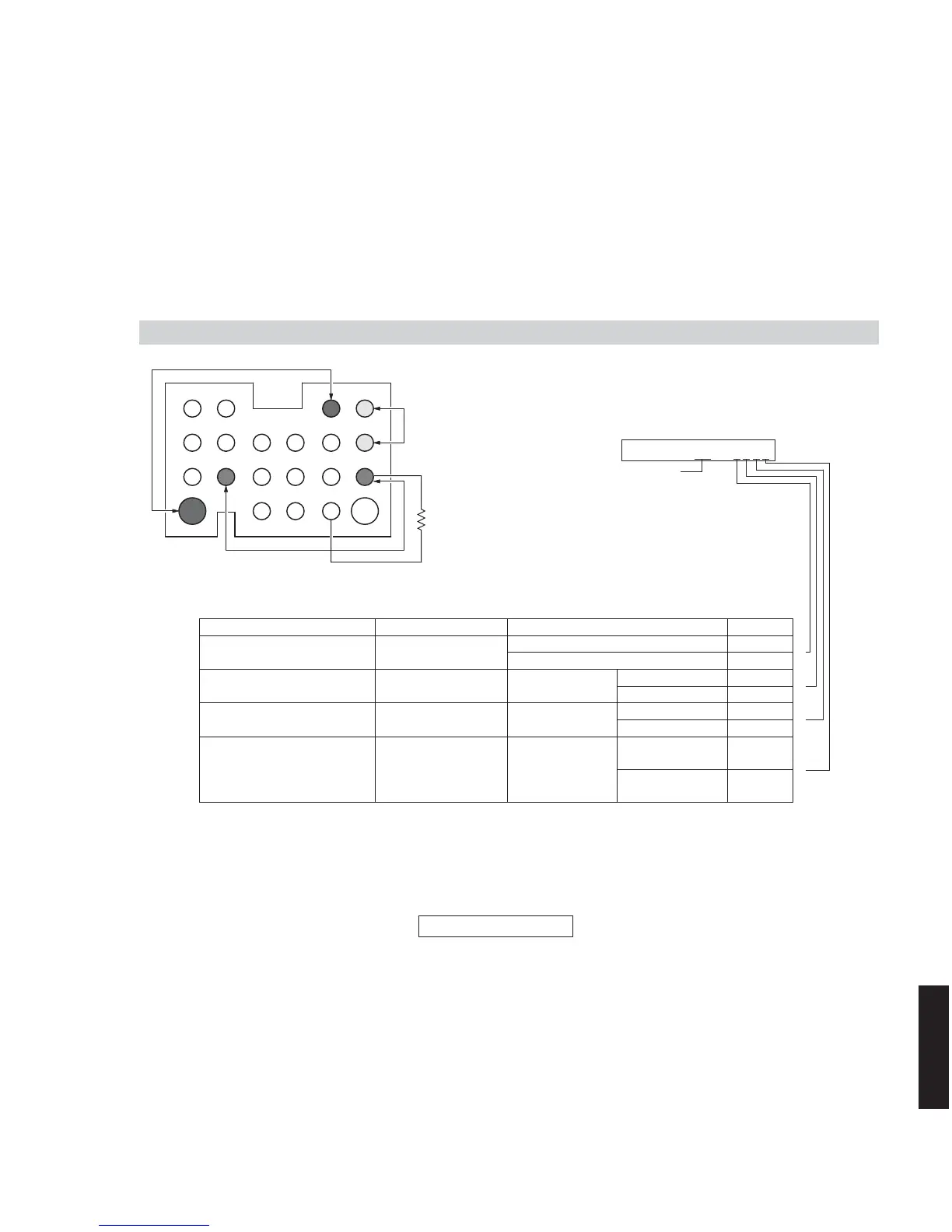
5. DOCK CHECK
This menu is used to check the DOCK connector without the iPod itself.
DOCK loop back check
After turning off the power, short between pins No. 14 (TX) and No. 18 (RX), between pins No. 1 (PWR) and No. 17 (ACCPOW)
and between pins No. 4 (iPDET) and No. 8 (DGND).
(Make sure that the power is turned off when shorting pins.)
Start the self-diagnostic function and select the menu.
The check result is displayed according to the following display specifications.
Bluetooth adapter version
The firmware version of the YBA-10 (YAMAHA) connected to the DOCK is displayed.
DOCK connector
OK = all Y
NG = others
Check item Short pins Result Display
UART loop back test
Pins No.14 (TX)
– No.18 (RX)
OK Y
NG N
iPAP (iPod accessory power)
detection
Pins No.1 (PWR+)
– No.17 (ACCPWR)
IC11 pin No. 38
High Y
Low N
iPDET (iPod installation to
DOCK) detection
Pins No.4 (iPDET)
– No.8 (DGND)
IC11 pin No. 40
Low Y
High N
DKID (DOCK ID) detection
Pins No.21 (DKID)
– No.8 (DGND)
* 10 k-ohms, 1/4 W
pull down
IC11 pin No. 90
10 k-ohms, 1/4 W
pull down
Y
Other N
⎫
⎬
⎭
⎫
⎬
⎭
⎫
⎬
⎭
⎫
⎪
⎬
⎪
⎭



 To Next Page