EasyManua.ls Logo

Yamaha Piaggero NP-32 - User Manual

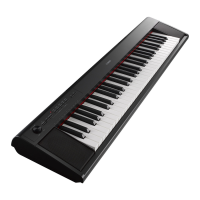
Yamaha Piaggero NP-32
28 pages
Print Icon
To Next Page IconTo Next Page
Loading...
EN
NP-32 NP-12
Owner’s Manual
Before using the instrument, be sure to read “PRECAUTIONS” on pages 5 - 7.

Questions and Answers

  • C
    Christina ThomasJul 27, 2025
    How to fix a Yamaha Musical Instrument that won't turn on?
    • J
      Jordan VasquezJul 27, 2025
      If your Yamaha Musical Instrument isn't turning on, make sure the AC adapter is securely connected to both the DC IN jack on the instrument and the AC outlet. Also, check the batteries. If they are low or dead, replace them with new ones or use recharged Ni-MH batteries, or use the included AC adapter.
  • J
    Joanne GarzaJul 31, 2025
    Why is the volume low or no sound on my Yamaha Piaggero NP-32?
    • D
      David LutzJul 31, 2025
      If the overall volume is low or you're not hearing any sound from your Yamaha Musical Instrument, first, check the volume level and turn it up if it's too low. Also, make sure that headphones or a conversion adapter aren't connected to the [PHONES/OUTPUT] jack. Disconnect them if they are. Check if the Local Control is off and turn it on. Finally, check the batteries and replace them if they are low or dead.
  • A
    Angela GentryAug 4, 2025
    What to do if I hear noise from Yamaha Piaggero NP-32 Musical Instrument speakers or headphones?
    • E
      Eric WilkersonAug 4, 2025
      If you're hearing noise from the speakers or headphones of your Yamaha Musical Instrument, it might be due to interference from a nearby mobile phone. Try turning off the mobile phone or moving it further away from the instrument. Also, ensure that the batteries are not low or dead. If they are, replace them with new batteries or recharged Ni-MH batteries, or use the included AC adapter.
  • M
    Matthew MillerAug 8, 2025
    Why is the sound distorted on my Yamaha Piaggero NP-32 Musical Instrument?
    • A
      Anne MontgomeryAug 8, 2025
      If the sound from your Yamaha Musical Instrument is distorted, and you are using manganese batteries, try turning down the volume. Alternatively, use new batteries, recharged Ni-MH batteries, or the AC adapter.
  • J
    John LopezAug 13, 2025
    What to do if Yamaha Piaggero NP-32 footswitch/foot pedal produces the opposite effect?
    • G
      georgebatesAug 13, 2025
      If the footswitch or foot pedal on your Yamaha Musical Instrument seems to be producing the opposite effect, the polarity may be reversed because the footswitch/foot pedal was pressed when the power was turned on. Turn the power off and then on again to reset the function.
  • J
    Jason FitzpatrickAug 17, 2025
    Why does the sustain pedal have no effect on my Yamaha Musical Instrument?
    • M
      Michael CardenasAug 17, 2025
      If the sustain pedal has no effect on your Yamaha Musical Instrument, make sure the pedal plug is securely inserted into the [SUSTAIN] jack.
  • J
    johnhuffAug 21, 2025
    How to stop noise from Yamaha Piaggero NP-32 when using iPhone/iPad/iPod touch app?
    • U
      ujuarezAug 21, 2025
      When using your Yamaha Musical Instrument with an application on your iPhone/iPad/iPod touch, it is recommended to set “Airplane Mode” to “ON” on your device.

Summary

PRECAUTIONS

For AC Adaptor

Safety guidelines for using the AC power adaptor with the instrument.

For NP-32;NP-12 Instrument

General safety precautions for operating the NP-32/NP-12 instrument.

General Safety and Operation Guidelines

Battery Safety Precautions

Essential safety measures for battery usage and handling.

Instrument Malfunction Procedures

Steps to take when the instrument shows abnormal behavior.

Setup and Handling Safety

Guidelines for safe placement, connections, and general instrument handling.

Important Notices and Information

Handling, Maintenance, and Data Saving

Advice on proper handling, cleaning, and data saving procedures.

Panel Controls and Connectors

Setting Up

Using an AC Adaptor

Instructions for connecting and using the AC power adaptor.

Using Batteries

Instructions for installing and using batteries as a power source.

Using the Metronome

Recording Your Performance

Recording a Performance

Step-by-step guide to recording a musical performance on the instrument.

Deleting Recorded Songs

Instructions on how to erase previously recorded performances.

Backing up Data and Initializing Settings

Initializing Instrument Settings

How to reset the instrument's settings to factory defaults.

Troubleshooting

Common Problems and Solutions

Lists typical issues and their corresponding solutions for the instrument.

Specifications

Yamaha Representative and Distributor Information

Yamaha Piaggero NP-32 Specifications

General IconGeneral
Number of Keys76
Key TypeGraded Soft Touch
Polyphony64
Voices10
Amplifiers6W + 6W
Speakers12 cm x 2
Sound SourceAWM Stereo Sampling
Reverb4 types
Dual/LayersYes
Demo Songs10
MetronomeYes
TransposeYes
TuningYes
Dimensions1244 x 259 x 105 mm
Weight5.7 kg
Power SupplyAC Adaptor (PA-150 or an equivalent recommended by Yamaha) or six "AA" size batteries
Touch SensitivitySoft, Medium, Hard, Fixed
ConnectivityUSB TO HOST
EffectsReverb
Battery LifeApprox. 7 hours (with alkaline batteries)
Included AccessoriesMusic Rest, Owner's Manual

Related product manuals