PSR-E353 Owner’s Manual
40
The Functions
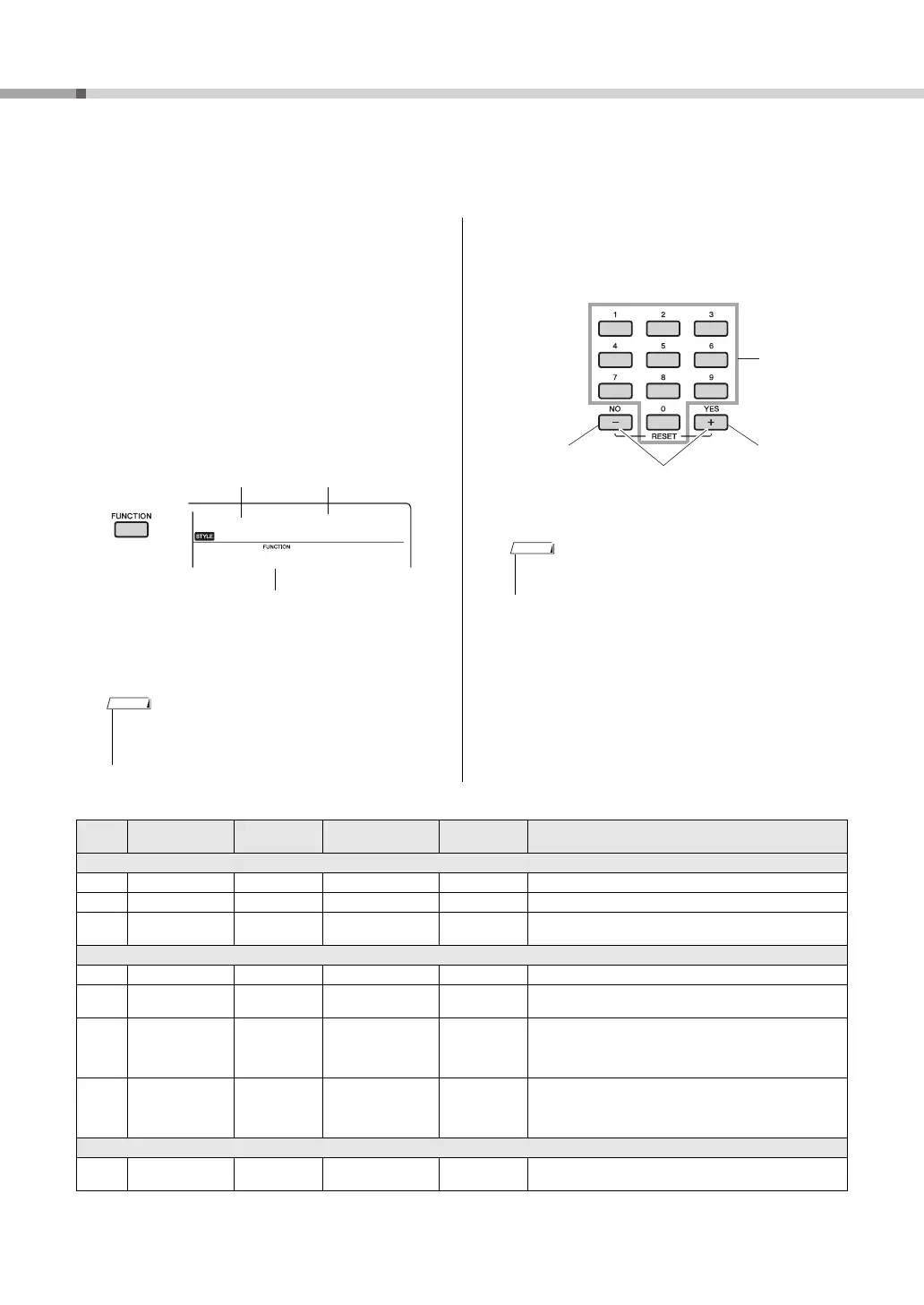
The Functions settings provide access to a range of detailed instrument parameters
such as Tuning, Split Point, Voices and Effects.
1
Press the [FUNCTION] button several
times until the desired item appears.
Each time the [FUNCTION] button is pressed, the
Function number increases one by one. To
decrease the Function number by one, simultane-
ously hold down the [FUNCTION] button and
press the [-] button briefly. To increase the Func-
tion number by one, simultaneously hold down
the [FUNCTION] button and press the [+] button
briefly. Simply pressing only the [+] or [-] button
does not change the Function number.
After a few seconds, the Function name may be
replaced with the setting value depending on the
selected Function.
2
Set the value by using the number but-
tons [0]–[9], [+], [-].
Function List
• The Function number does not appear in the display
during Song, Style or metronome playback. The beat
value appears instead.
Current value
Function number
Function name
• To exit the Function settings, press one of these buttons;
[SONG], [VOICE] or [STYLE].
Direct numeric
entry.
• Increment
value by 1.
•Yes
•On
Press simultaneously
to recall the default
setting.
• Decrement
value by 1.
•No
•Off
Function
Number
Function name Display Range/Settings Default Value Descriptions
Volume
001 Style Volume StyleVol 000–127 100 Determines the volume of the Style. (page 22)
002 Song Volume SongVol 000–127 100 Determines the volume of the Song. (page 27)
003 AUX IN Volume AuxInVol 000–127 100
Determines the volume of the external audio device connected to
the instrument’s [AUX IN] jack. (page 30)
Overall
004 Transpose Transpos -12–12 0 Determines the pitch of the instrument in semitone increments.
005 Tuning Tuning 427.0Hz–453.0Hz 440.0Hz
Determines the fine tuning of the pitch of the entire instrument in
approx. 0.2Hz increments.
006 Split Point SplitPnt 036–096 (C1–C6) 54 (F#2)
Determines the highest key for the Split Voice and sets the Split
“point”—in other words, the key that separates the Split (lower)
and Main (upper) Voices. The Split Point setting and Accompani-
ment Split Point setting are automatically set to the same value.
007 Touch Response TouchRes
1 (Soft),
2 (Medium),
3 (Hard),
4 (Fixed)
2 (Medium)
Higher values produce greater (easier) volume variation in
response to keyboard dynamics. When 4 (Fixed) is selected,
Touch Response is off and the volume level does not change at all
regardless of whether you play the keyboard soft or hard.
Style file
008 Style Register StyleReg 001–nnn –
Select and register a Style file from flash files that are loaded from
computer (page 23).



 To Next Page