EasyManua.ls Logo

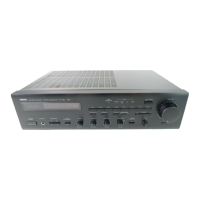
Yamaha RX-485 - User Manual

Yamaha RX-485
20 pages
Print Icon
To Next Page IconTo Next Page
Loading...
IMPORTANT!
Please record the serial number of this
unit in the space below.
Model:
Serial No.:
The serial number is located on the rear
of the unit.
Retain this Owner’s Manual in a safe
place for future reference.
WARNING
TO REDUCE THE RISK OF FIRE OR
ELECTRIC SHOCK, DO NOT EXPOSE
THIS UNIT TO RAIN OR MOISTURE.
The lightning flash with arrowhead
symbol, within an equilateral triangle,
is intended to alert you to the
presence of uninsulated “dangerous
voltage” within the product’s
enclosure that may be of sufficient
magnitude to constitute a risk of
electric shock to persons.
The exclamation point within an
equilateral triangle is intended to alert
you to the presence of important
operating and maintenance
(servicing) instructions in the
literature accompanying the
appliance.
Explanation of Graphical Symbols
Natural Sound Stereo Receiver
65W + 65W (8) RMS Output Power, 0.04% THD, 20 – 20,000 Hz (RX-485)
45W + 45W (8) RMS Output Power, 0.04% THD, 20 – 20,000 Hz (RX-385)
High Dynamic Power, Low Impedance Drive Capability
Continuously Variable Loudness Control
40-Station Random Preset Tuning
Automatic Preset Tuning
Preset Station Shifting Capability
IF Count Direct PLL Synthesizer Tuning System
Remote Control Capability
Pure Direct Switch to Reproduce the Purest Source Sound (RX-485 Only)
RX-485/385
OWNER’S MANUAL
CONTENTS
Safety Instructions ...................2
Supplied Accessories ..............4
Connections.............................5
Operations ...............................9
Tuning Operations ..................12
Preset Tuning .........................13
Remote Control Transmitter ...16
Notes about the Remote
Control Transmitter ................17
Troubleshooting......................18
Specifications .........................19
RISK OF ELECTRIC SHOCK
DO NOT OPEN
CAUTION: TO REDUCE THE RISK OF
ELECTRIC SHOCK, DO NOT REMOVE
COVER (OR BACK), NO USER-SERVICEABLE
PARTS INSIDE, REFER SERVICING TO
QUALIFIED SERVICE PERSONNEL.
CAUTION
Thank you for selecting this YAMAHA stereo receiver.

Other manuals for Yamaha RX-485

Questions and Answers

  • A
    Angelica NelsonAug 18, 2025
    What to do if my Yamaha Stereo Receiver has no sound?
    • K
      Kayla HunterAug 18, 2025
      First, ensure the output cords are correctly connected; if the problem persists, the cords might be defective. Also, make sure the appropriate input selector button is pressed, corresponding to your input source.
  • E
    Emma LopezAug 21, 2025
    What to do if my Yamaha Stereo Receiver fails to turn on?
    • J
      John BennettAug 21, 2025
      Make sure the power cord is firmly plugged into the outlet.
  • B
    Bryan DawsonAug 23, 2025
    Why does the sound suddenly go off on my Yamaha Stereo Receiver?
    • T
      travissuttonAug 23, 2025
      The protection circuit may have activated due to a short circuit or similar issue. Try turning the Yamaha Stereo Receiver off and then on again to reset the protection circuit.
  • Q
    qfarrellAug 26, 2025
    Why is FM stereo reception noisy on my Yamaha Stereo Receiver?
    • A
      Ashley BlakeAug 26, 2025
      Noisy FM stereo reception can occur when the transmitter is too far away or the antenna input is poor. Check the antenna connections and consider using a multiple element FM antenna to improve reception.
  • S
    susan22Aug 28, 2025
    What to do if my Yamaha Stereo Receiver only outputs sound from one speaker?
    • J
      James MunozAug 28, 2025
      Check the BALANCE control and adjust it to the appropriate position. Also, ensure the speaker cords are correctly connected; if the problem continues, the cables may be defective.
  • J
    Joshua HawkinsAug 30, 2025
    What to do if my Yamaha Stereo Receiver's remote control doesn't work?
    • R
      Reginald MilesAug 30, 2025
      Ensure that direct sunlight or strong lighting isn't hitting the remote control sensor on the main unit; if so, change the unit's position. Also, replace the remote control batteries with new ones, as weak batteries can cause this issue.
  • M
    michellesaundersSep 2, 2025
    Why does my Yamaha Stereo Receiver sound hum?
    • S
      Steven GarciaSep 2, 2025
      First, check and firmly connect the audio plugs. If the issue continues, the cord may be defective. Also, ensure there is a GND connection between the turntable and the Yamaha unit if you're using a turntable.
  • T
    Terri MontgomerySep 4, 2025
    What causes distortion and clear reception issues on my Yamaha Stereo Receiver, even with a good FM antenna?
    • A
      alyssaclarkSep 5, 2025
      This issue may be due to multipath interference. Try adjusting the antenna placement to minimize this interference.
  • A
    Allison LloydSep 7, 2025
    What to do if a desired station cannot be tuned in with Auto tuning on my Yamaha Stereo Receiver?
    • L
      Lisa HollandSep 7, 2025
      If a station is too weak to be tuned in automatically, switch to Manual tuning mode. Consider using a high-quality directional FM antenna for better reception.
  • J
    John SanchezSep 9, 2025
    What to do if my Yamaha Stereo Receiver has continuous crackling and hissing noises?
    • J
      Jerry GreenSep 9, 2025
      These noises often result from electrical equipment like lightning, fluorescent lamps, motors, or thermostats. Using an outdoor antenna and a ground wire may help reduce these noises, but complete elimination is difficult.

Summary

Safety Instructions USA

FCC Compliance Information

Supplied Accessories

Audio and Antenna Connections

Antenna Connections

How to connect FM and AM antennas to the unit.

AM Loop Antenna Connection

Instructions for connecting the AM loop antenna.

Basic Operations

Playing a Source

Guide on selecting and playing audio sources.

Manual Preset Tuning

Storing Stations Manually

Procedure for saving favorite radio stations.

Recalling Preset Stations

How to access stored radio stations.

Automatic Preset Tuning

Automatic Station Storage

How the unit automatically stores strong FM stations.

Recalling Automatically Stored Stations

Accessing stations found via automatic tuning.

Remote Control Transmitter Functions

Unit Control Functions

Key functions for controlling the receiver with the remote.

Component Control Functions

How the remote controls other Yamaha components.

Troubleshooting Common Issues

Technical Specifications

Yamaha RX-485 Specifications

General IconGeneral
Frequency response10 Hz-100 kHz (+0 dB, -3 dB)
Total harmonic distortion0.019% (20 Hz-20 kHz, 8 ohms)
Weight10.3kg
Tuning rangeFM
Signal to noise ratio100 dB (line)
Channel separation50 dB (1 kHz)
Signal-to-Noise Ratio100 dB (line)

Related product manuals