- 2 -
When connection and installation is nished, set up the speaker parameters
automatically
5
.
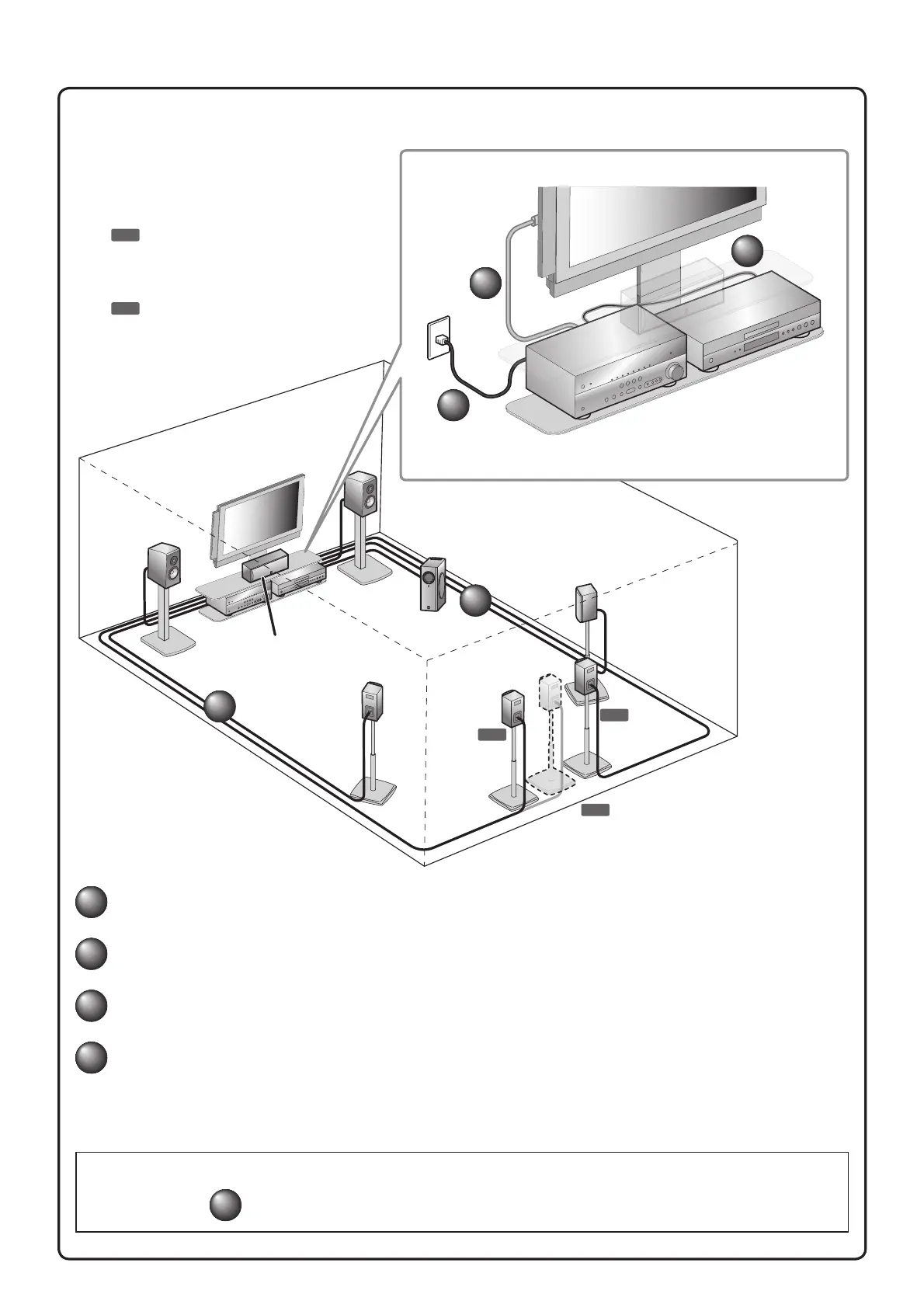
Connect and install as follows the rst time you use this unit.
See the following explanations for the connections for each number.
1
Connect the speakers
2
Connect a TV
3
Connect playback device such as BD/DVD players and recorders
4
Set the VOLTAGE SELECTOR and connect the AC power cable
(Asia and General models)
Connect the AC power cable
(Other models)
6.1
7.1
7.1
This unit
TV
Subwoofer
1
1
2
3
4
BD/DVD player
(recorder)
Center speaker
Surround
speaker R
Surround
speaker L
Surround back
speaker L
Surround back
speaker
Surround back
speaker R
Front
speaker R
Front
speaker L
7.1
Connect when using with 7.1-channel
speaker layout. Place the surround back
speakers (L/R) 30 cm or more away from
each other.
6.1
Connect when using with 6.1-channel
speaker layout. Place the surround back
speaker behind the listening position.
RX-V567_QRG_English.indd 2 2010/1/27 10:18:45



 To Next Page