49
RECORDING CHORD CHANGES
To record chord changes in the chord track at specific clock locations in the
song, first you must access the Chord Assign feature.
■ ACCESSING CHORD ASSIGN
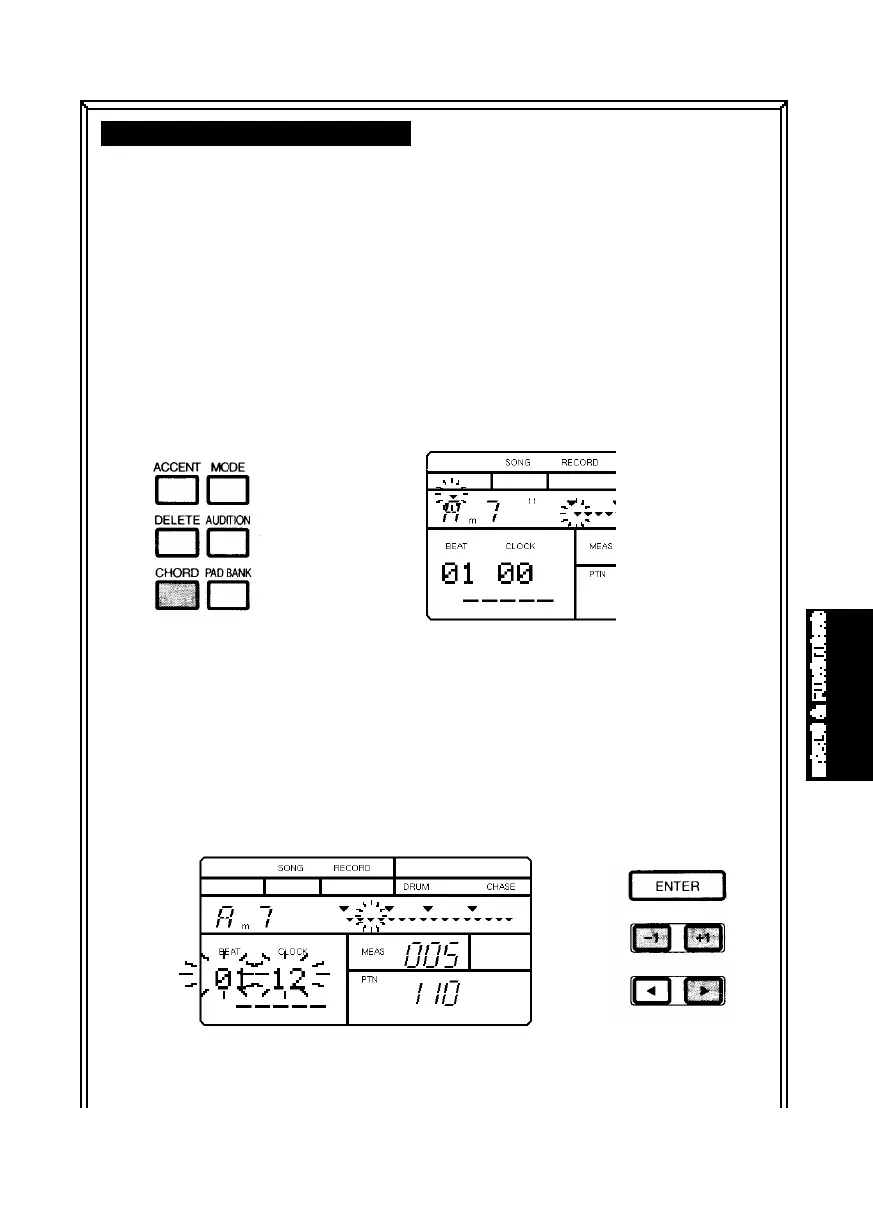
- From within Step Record Mode, press
[CHORD]. The words “BEAT” and “CLOCK”—which display the current
beat and clock location of the currently selected measure—will appear in
the lower left area of the LCD, and a small inverted triangle will appear
over the Chord Root in the upper left area of the LCD. (You can press [2]
and [1] to position the flashing cursor over the Chord Root, Chord Type or
beat/clock position.)
■ SPECIFYING A CLOCK - After pressing [CHORD], press [BWD] and [FWD]
to select a measure. If you want to enter the chord change at a clock
position other than at the top of each measure, press [-1] and [+1] to
specify a particular clock in the measure. You can select the precise
clock position in a measure to change the chord by pressing [1] twice to
position the flashing cursor over the beat/clock.
MODES&FUN.QX99.11.176:02PMページ49



 To Next Page