BEFORE YOU BEGIN
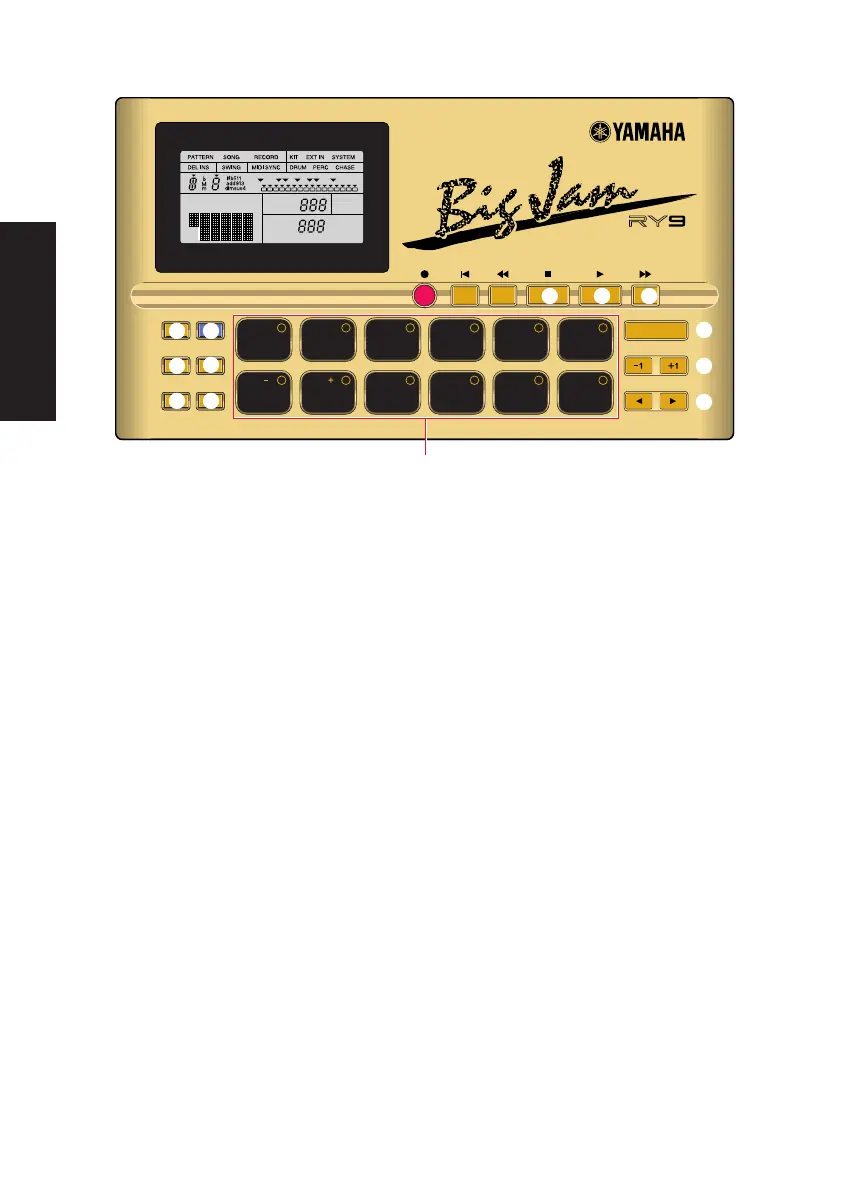
5 [STOP] BUTTON
For stopping the song or pattern playback or realtime recording.
6 [PLAY] BUTTON
For starting song or pattern playback or realtime recording from the current
measure location. Pressing [PLAY] immediately after pressing [STOP] will
continue the song or pattern playback from the stop location. To start the song
or pattern from the beginning, or the top, press [TOP] before pressing [PLAY].
7 [FWD] BUTTON
For fast-forwarding the song through a series of measures when the song
playback is stopped. Pressing [FWD] in Pattern Play Mode returns the pattern
measure location to the top, or the first measure. Pressing [FWD] in Pattern
Record Mode lets you select the clock position.
8 [ACCENT] BUTTON
For adding an accent to a drum beat, by pressing and holding [ACCENT] while
hitting a drum pad. In Pattern Step Record Mode, you can record an accent by
simply pressing [ACCENT] at the desired drum beat clock location. You can assign
the accent level for each drum pad of a User drum kit in Drum Kit Mode.
9 [MODE] BUTTON
For accessing the various modes, by pressing and holding down [MODE] while
pressing a mode button, and for accessing the various functions within each
mode, by holding down [MODE] while pressing [PAGE-] and [PAGE+].
TOM1
BD1 BD2 SD1 SD2 CRASH
TOM2 TOM3 CLOSED1
CLOSED2
HH
OPEN
HH
HH
RIDE
RHYTHM PROGRAMMER
REC
ACCENT MODE
PATTERN
PAGE PAGE MUTE BALANCE TRANS-
POSE
SONG KIT EXT IN SYSTEM TEMPO
DELETE
AUDITION
CHORD
PAD BANK
TOP BWD STOP PLAY FWD
ENTER
2 3 4 510
8 9 10 1176
NEXT
EMPTY
PTN
SONG
PAD
SONG
BEAT
PART
CLOCK
MEAS
KIT
REPEAT
CHAIN
MUTE
$
5 6
8 9
!)
#@
%
^
&
7
8
PDF02_E.qx 6/2/99 5:47 PM Page 8


 To Next Page