4. SIDE & REAR PANELS
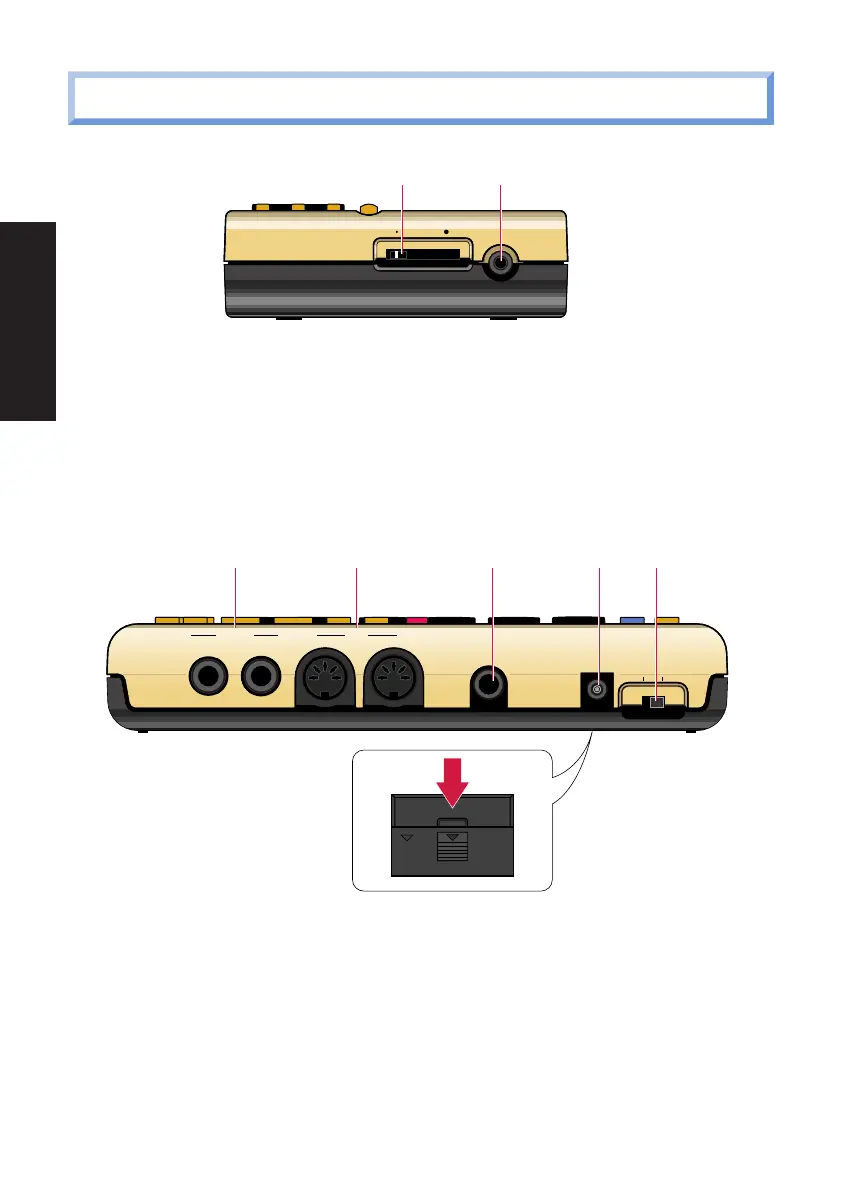
1 [VOLUME] SLIDER
For setting the master volume output level from the [OUTPUT] and [PHONES]
jacks.
2 [PHONES] MINI JACK
For plugging in a pair of headphones with a mini stereo plug for private
listening.
3 [OUTPUT] JACKS
For connecting the RY9 to a mixer, or a stereo amplifier, or amplified speakers.
In the case of mono output, use the [L/MONO] jack.
4 [MIDI] JACKS
For connecting the RY9 to other MIDI devices such as a synthesizer or music
sequencer, or to a MIDI data storage device (or another RY9) for bulk dumping
of User song, pattern and kit data.
OUTPUT
MIDI
R
OUT IN
EXT IN DC IN
ON STANDBY
L
/
MONO
3 4 5 6 7
8
MIN VOLUME MAX PHONES
1 2
10
BEFORE YOU BEGIN
PDF02_E.qx 6/2/99 5:47 PM Page 10


 To Next Page