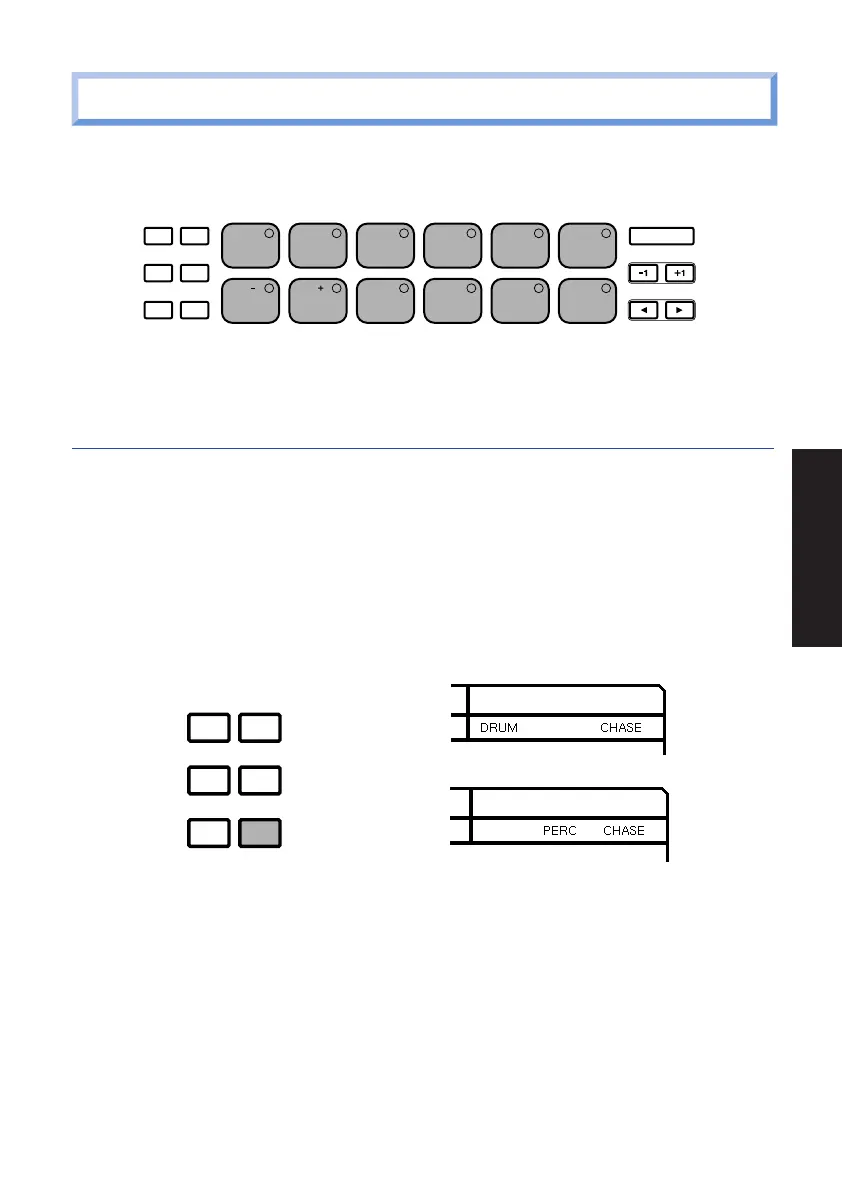
7. PLAYING THE DRUM PADS
At power-on, you can start hitting the drum pads right away. Try listening to the
sounds of the currently selected drum kit.
The Drum Voice List and Drum Kit List are provided on pages 84 and 86.
SELECTING THE PAD BANKS.
Each of the twelve drum pads has two drum voices assigned to it. These are
organized in “Drum” and “Percussion” Pad Banks.
■ To switch back and forth between the two Pad Banks, press [PAD BANK].
■ Either the word “DRUM” (for Drum Pad Bank) or the word “PERC” (for
Percussion Pad Bank) will appear in the LCD screen as you switch back and
forth between each.
ACCENT MODE
DELETE
AUDITION
CHORD
PAD BANK
TOM1
BD1 BD2 SD1 SD2 CRASH
TOM2 TOM3 CLOSED1
CLOSED2
HH
OPEN
HH
HH
RIDE
ACCENT MODE
PATTERN
PAGE PAGE MUTE BALANCE TRANS-
POSE
SONG KIT EXT IN SYSTEM TEMPO
DELETE
AUDITION
CHORD
PAD BANK
ENTER
2 3 4 510
8 9 10 1176
19
GETTING STARTED
PDF02_E.qx 6/2/99 5:48 PM Page 19


 To Next Page