MODES & FUNCTIONS
33
■ ASSIGNING A SWING FACTOR TO THE PATTERN -
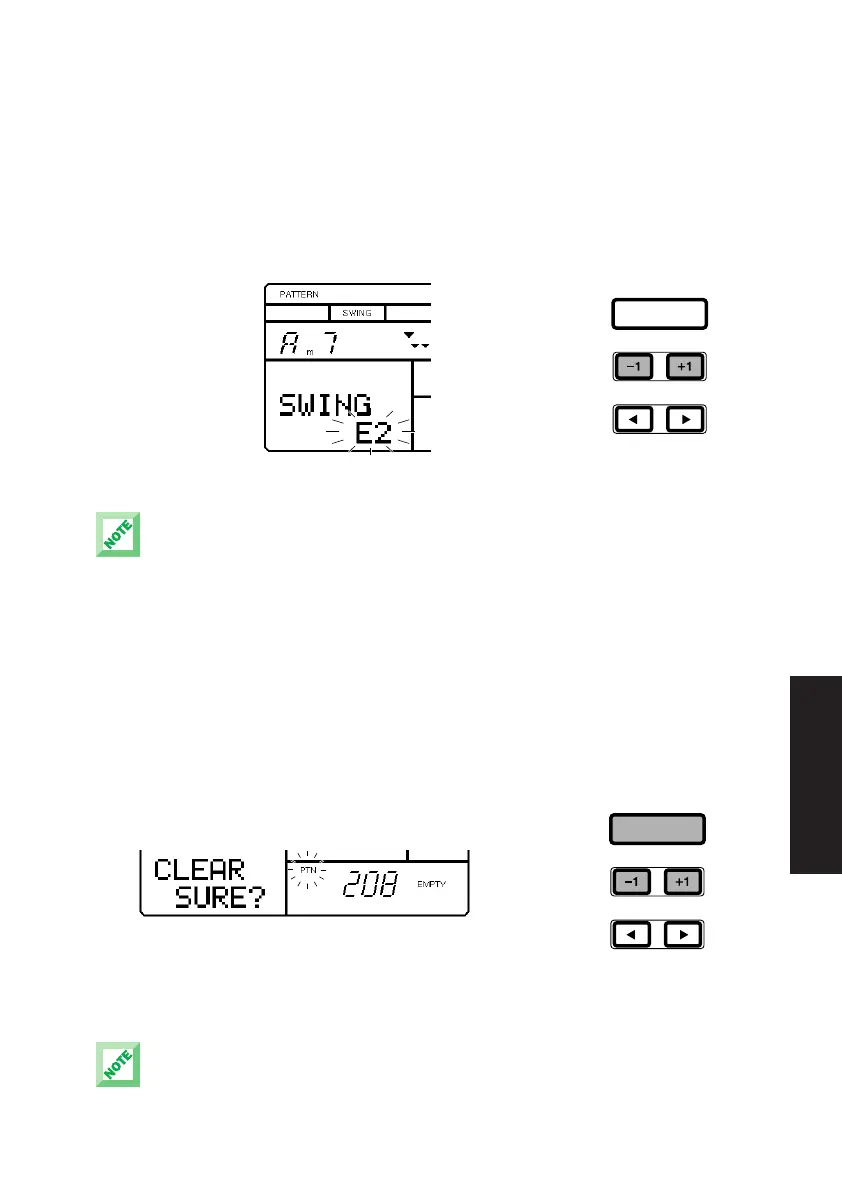
Hold [MODE] and press
[PAGE-] or [PAGE+] once or more to access the Swing function. The word
“SWING” will appear in the LCD, as will the current Swing setting (OFF, E1 ~
E9, S1 ~ S5). To assign a Swing factor to the currently selected pattern,
press [-1] or [+1]. The Swing setting also affects the backing accompaniment.
When a Swing setting is assigned to a pattern, whenever the pattern is
selected, the word “SWING” will appear in the upper area of the LCD.
There are two types of Swing factors. “E” factors represent 8-beat, and “S” factors represent
16-beat. Depending on the selected Swing type or selected patterns, the Swing function may not
produce an apparent effect.
■ CLEARING A USER PATTERN - When the pattern is stopped, hold [MODE]
and press [PAGE-] or [PAGE+] to access the Pattern Clear function. The
words “CLEAR SURE?” will appear in the LCD. Press [-1] and [+1] to select
a User pattern number (#200 ~ #249). Then, press [ENTER] to clear the
data from the pattern. The word “EMPTY” will appear beside the pattern
number in the LCD. (To exit the Clear function, hold [MODE] and press
[PAGE-].)
If the word “PRESET” temporarily appears in the LCD when you press [ENTER], this means you are
attempting to clear a Preset pattern. If this happens, simply select a User pattern number (#200 ~
#249) and try again.
ENTER
ENTER
PDF03_E.qx 6/2/99 5:51 PM Page 33


 To Next Page