Smartphone Connectivity System
5-7
5
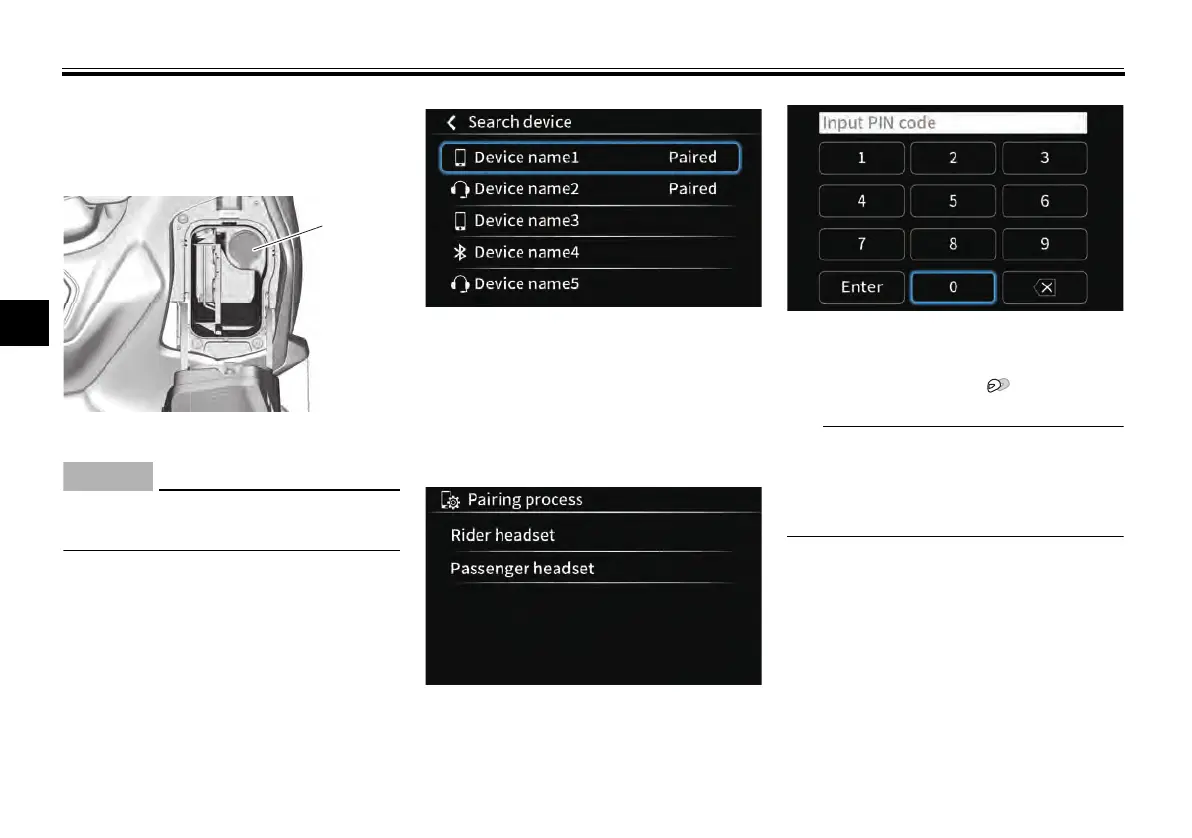
USB connection
Connect smartphone devices via the
USB jack located in the front storage
compartment. (See page 6-39.)
ECA27740
Take care to avoid damaging the
USB jack.
Bluetooth Headset Pairing
1. Make your headset discoverable
via its Bluetooth settings.
2. Navigate to: “Pop-up menu > Ap-
plications > Settings > Connec-
tions > Bluetooth > Search Device
> Headset”
After some time, your headset de-
vice name should appear on the
list of available devices. Select it
from the list.
3. Select to pair as a rider or passen-
ger headset.
At this point, a PIN code may need
to be input for some headset
models.
When connected, the display will
switch to “Paired device list” and
the headset icon “ ” will appear.
Once paired, a headset can be
switched between rider-passenger in
the “Paired device list”. (See page
6-17.)
1. USB jack
UBBVE0E0.book Page 7 Tuesday, February 8, 2022 7:29 AM



 To Next Page