EasyManua.ls Logo

Yamaha TSS-10 - User Manual

Yamaha TSS-10
20 pages
Print Icon
To Next Page IconTo Next Page
Loading...
Active Servo
Technology
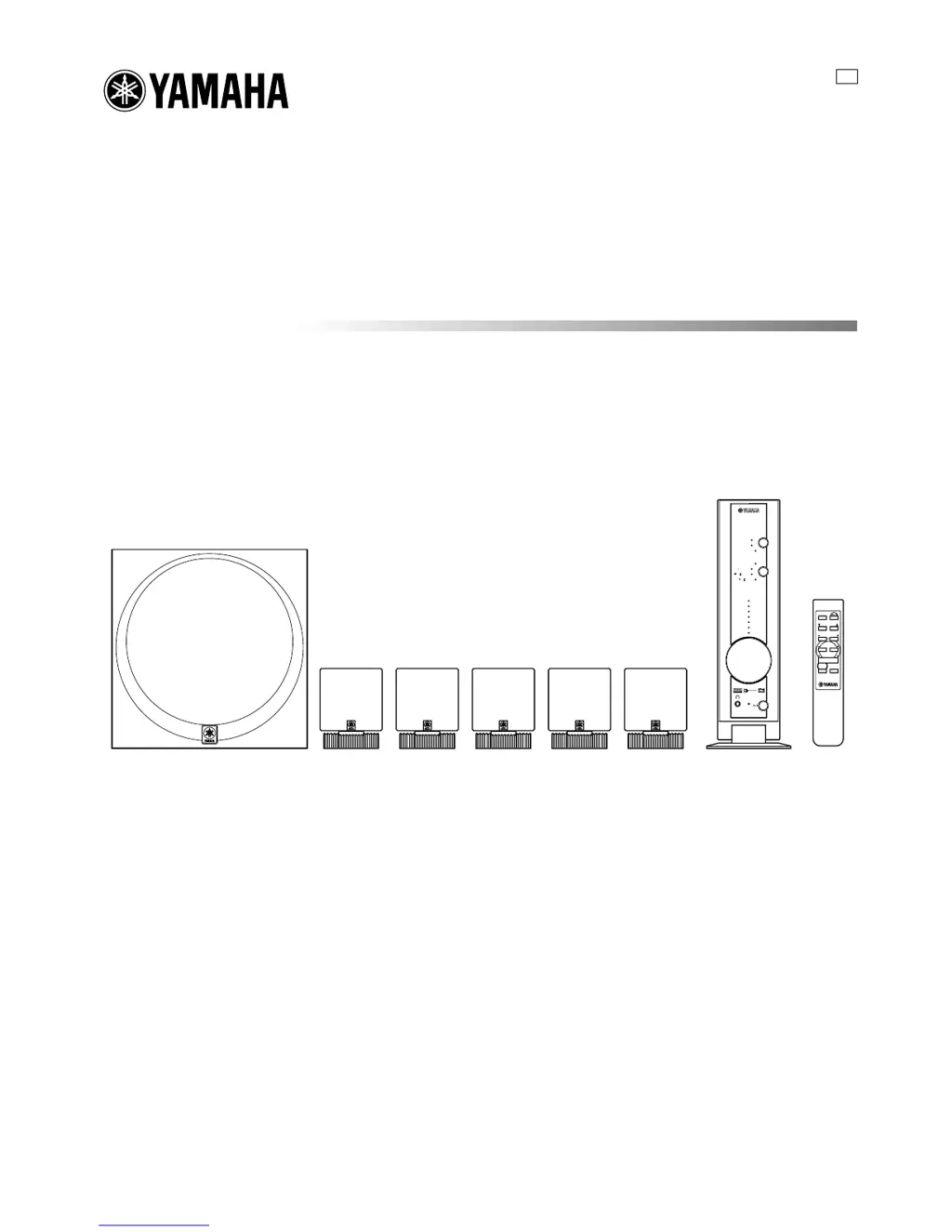
TSS-10
HOME THEATER SOUND SYSTEM
SILENT
DIGITAL 1
DIGITAL 2
ANALOG
DTS
INPUT
MODE
VOLUME
DIGITAL
7
6
5
4
3
2
1
+6
+4
+2
0
–2
–4
–6
TRIM
PL MOVIE
PL
MUSIC
INPUT
MODE
REAR
MUTE
TEST
S.WOOFER
VOLUME
STANDBY/ON
TSS-10
U B
HOME THEATER SOUND SYSTEM
OWNER’S MANUAL
TSS-10(H1)(UB)a 02.7.31, 2:34 PM1

Other manuals for Yamaha TSS-10

Questions and Answers

  • S
    Stephen GarrisonAug 17, 2025
    Why Yamaha Home Cinema remote control does not work?
    • J
      Jamie HallAug 17, 2025
      If you're experiencing remote control issues with your Yamaha Home Cinema system, ensure you're within 6 meters (20 feet) and within a 30-degree angle of the front panel. Also, make sure that direct sunlight or lighting isn't interfering with the remote control sensor. Finally, replace all the batteries with new ones.
  • J
    James JimenezAug 20, 2025
    Why is there no sound from my Yamaha TSS-10?
    • Q
      qfergusonAug 20, 2025
      If you're not getting any sound from your Yamaha Home Cinema speakers, first, make sure the input cables are correctly connected and not defective. Then, select the appropriate input source using the INPUT button. Check that the speaker connections are secure and that the volume isn't turned down or muted. Press MUTE or any operation buttons to cancel a mute and adjust the volume.
  • D
    Daniel MartinezAug 23, 2025
    How to fix Yamaha Home Cinema amplifier that won't turn on?
    • J
      Jamie BlairAug 23, 2025
      If your Yamaha Home Cinema amplifier unit isn't turning on or enters standby mode shortly after being powered on, ensure the power cable is firmly connected. If that doesn't work, the unit might have been exposed to a strong electric shock. In that case, put the unit in standby mode, disconnect the power cable, plug it back in after 30 seconds, and then try operating it again.
  • E
    elizabeth22Aug 26, 2025
    What to do if Yamaha Home Cinema amplifier is not operating properly?
    • A
      Anna GardnerAug 26, 2025
      If your Yamaha Home Cinema amplifier unit isn't working correctly, it might be due to the internal microcomputer freezing from an external electric shock or a low voltage power supply. Try disconnecting the power cable from the outlet and plugging it back in after about 30 seconds.
  • R
    Ryan MaxwellAug 28, 2025
    How to stop humming sound from Yamaha Home Cinema speakers?
    • W
      wchandlerAug 28, 2025
      If you can hear a humming sound from your Yamaha Home Cinema system, firmly connect the audio plugs to the ANALOG INPUTS jacks. If the problem continues, the cables may be defective.
  • C
    Christina RogersAug 31, 2025
    Why no sound from rear speakers on Yamaha Home Cinema?
    • A
      Ashley SchneiderAug 31, 2025
      If you're not getting any sound from the rear speakers of your Yamaha Home Cinema system, first, increase the level of the rear speakers by pressing the REAR + button on the remote control. If that doesn't work, make sure the surround mode is enabled by pressing the MODE button to select the appropriate surround mode.
  • C
    callahanchelseySep 2, 2025
    Why is sound distorted on Yamaha Home Cinema?
    • S
      Sean KelleySep 2, 2025
      If the sound from your Yamaha Home Cinema system is distorted, turn down the output level on the connected component.
  • B
    Brian GonzalesSep 5, 2025
    How to eliminate noise interference in Yamaha TSS-10?
    • D
      Deborah MasonSep 5, 2025
      To address noise interference in your Yamaha Home Cinema system, move the amplifier unit further away from digital or high-frequency equipment.
  • J
    John WhiteSep 8, 2025
    How to troubleshoot noise in Yamaha Home Cinema system?
    • A
      Andrew MartinezSep 8, 2025
      To troubleshoot noise issues with your Yamaha Home Cinema system: 1. Turn up the output level on the connected component. 2. Make the connections again. 3. Place the amplifier unit away from the monitor.
  • M
    Maria EdwardsSep 12, 2025
    Why no sound from center/rear Yamaha TSS-10 in DTS/DIGITAL mode?
    • S
      Stephen FischerSep 12, 2025
      If you're not getting sound from the center and rear speakers in DTS or DIGITAL mode on your Yamaha Home Cinema system, and the DTS or DIGITAL mode indicator is dimly lit, press the MODE button to select the appropriate surround format. This will make the indicator turn bright and enable sound from the center and rear speakers by decoding the surround format.

Summary

For U.K. Customers

Special Instructions for U.K. Model

Specific guidance for UK models regarding mains lead wiring and plug fitting.

CHECKING THE ACCESSORIES

CONTROLS AND FUNCTIONS

SETTING UP THE SYSTEM

Recommended Speaker Placement

Provides guidelines for optimal speaker positioning for sound quality.

CONNECTIONS

Connecting Speakers and Subwoofer

Instructions for connecting the amplifier unit to the front, rear, center speakers and subwoofer.

Connecting the Power Cable

Steps to connect the AC adapter and power cable to the amplifier unit and wall outlet.

ADJUSTING SPEAKER OUTPUT LEVELS

Using the Test Tone for Speaker Balancing

How to use the test tone generator to balance speaker output levels for optimal sound.

PLAYING A SOURCE

SELECTING THE SURROUND MODE

TROUBLESHOOTING

Yamaha TSS-10 Specifications

General IconGeneral
BrandYamaha
ModelTSS-10
CategoryHome Cinema speakers
LanguageEnglish

Related product manuals