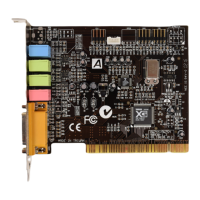
The YMF724 PCI Sound Card is a series of audio adapters, including models "YMF724 D10", "YMF724 G50", "YMF724 J80A", and "YMF724 J80B", designed to provide next-generation PCI audio performance for PC systems. These adapters aim to meet the demands of advanced PC audio applications and integrate a complete multimedia subsystem onto a single adapter.
Function Description:
The YMF724 PCI Sound Card serves as a comprehensive audio solution for PCs, offering a wide range of features for both modern and legacy audio requirements. It supports full-duplex playback and capture, advanced wavetable synthesis, and hardware acceleration for direct sound and direct music. The card is designed to be compliant with major industry standards, ensuring broad compatibility with existing software and hardware.
Important Technical Specifications:
- PCI Compliance: PCI 2.1 compliant.
- Power Management: PCI Bus Power Management rev. 1.0 compliant.
- Audio Processing: PCI Bus master for PCI Audio.
- Full Duplex: True Full Duplex Playback and Capture with different Sampling Rates.
- Synthesizer: Maximum 64-voice XG capital Wavetable Synthesizer, including GM compatibility.
- Hardware Acceleration: Direct Sound Hardware Acceleration and Direct Music Hardware Acceleration.
- Downloadable Sound (DLS): DLS level-1 support.
- Legacy Audio Compatibility: Genuine OPL3, Hardware SoundBlaster Pro compatibility, MPU-401 UART mode MIDI interface, and Joystick support.
- DMA Support: Supports PC/PCI and distributed DMA for Legacy DMAC (8237) emulation.
- AC-Link: Supports AC-1 interface.
- Crystal Operation: Single Crystal operation (24.576 MHz).
- Power Supply: 5V Power supply for I/O, 3.3V Power supply for internal core logic.
- AC'97 Compliance: Compliant with AC'97 Requirements.
- Inputs: 4 Stereo Inputs (LINE, CD, VIDEO, AUX), TAD connector for mono In and Output for modem Audio, 1 MIC Input.
- Outputs: Stereo LINE Output/ Speaker Output.
- MIC Amplifier: 20 dB MIC Amplifier.
- Analog Characteristics: A/D S/N: 85 dB, D/A S/N: 90 dB.
- Power Consumption: Low Power Consumption.
- Power Amplifier: Built-in 2-Channel Power Amplifier.
Connectors (Vary by model, general overview):
- External Jack Ports: Typically include 3.5mm Phone Jacks for LINE IN, MIC IN, LINE OUT, SPEAKER OUT, and a connector for MIDI/JOYSTICK. Some models may feature an RCA Jack for SPDIF OUT.
- Internal Connectors:
- Audio Inputs: Internal connectors for LINE IN (optional), MIC IN (optional), CD AUDIO IN (ATAPI and JST), AUX IN, TAD/VOICE MODEM, VIDEO IN.
- Audio Outputs: Internal connectors for LINE OUT (optional), SPEAKER OUT (optional).
- Digital Output: SPDIF (optional).
- System Integration: PC/PCI Legacy Audio SIDEBAND SIGNAL, PC SPEAKER (optional), PC-BEEP (optional).
- Extension: Extension connector for 6-Channel AUDIO (optional).
Specific Model Connector Details:
- YMF724 D10:
- External: J1 (LINE IN), J2 (MIC IN), J3 (LINE OUT), J4 (SPEAKER OUT), J5 (MIDI/JOYSTICK).
- Internal: J6 (LINE IN optional), J7 (MIC IN optional), J8 (LINE OUT optional), J9 (SPEAKER OUT optional), J10 (CD AUDIO IN ATAPI), J11 (CD AUDIO IN JST), J12 (AUX IN), J13 (TAD/VOICE MODEM), J14 (VIDEO IN), J15 (SPDIF optional), J16 (PC/PCI Legacy Audio SIDEBAND SIGNAL).
- YMF724 G50:
- External: J1 (LINE IN), J2 (MIC IN), J4 (AUDIO OUT), J5 (MIDI/JOYSTICK).
- Internal: J6 (LINE IN optional), J7 (MIC IN optional), J9 (AUDIO OUT optional), J10 (CD AUDIO IN), J11 (CD AUDIO IN), J12 (AUX IN), J13 (TAD/VOICE MODEM), J14 (VIDEO IN), J16 (PC/PCI Legacy Audio SIDEBAND SIGNAL), J19 (PC SPEAKER optional), J20 (SPDIF optional), JP1 (Jumper for switching between LINE OUT/SPEAKER OUT).
- YMF724 J80A/J80B (referred to as J80 and J81 in the manual for connector details):
- External (J80): J1 (LINE IN), J2 (MIC IN), J3 (LINE OUT), J4 (SPEAKER OUT), J5 (MIDI/JOYSTICK).
- External (J81): J1 (LINE IN), J2 (MIC IN), J3 (AUDIO OUT), J4 (RCA Jack for SPDIF OUT), J5 (MIDI/JOYSTICK).
- Internal (J80/J81, common connectors listed): J6 (LINE IN optional), J7 (MIC IN optional), J8 (LINE OUT/AUDIO OUT optional), J9 (SPEAKER OUT optional for J80), J10 (CD AUDIO IN ATAPI), J11 (CD AUDIO IN JST), J12 (AUX IN), J13 (TAD/VOICE MODEM), J14 (VIDEO IN), J16 (PC/PCI Legacy Audio SIDEBAND SIGNAL), J19 (PC-BEEP optional), J20 (SPDIF optional), CN3 (Extension connector for 6-Channel AUDIO optional), JP1 (Jumper for switching between LINE OUT/SPEAKER OUT for J81).
Usage Features:
- Audio Output Jumper Settings (JP1): Allows users to configure the audio output for either SPEAKER OUT with Power Amplifier (default) or LINE OUT without Power Amplifier. This provides flexibility depending on whether external amplification is desired or if the card's built-in amplifier is sufficient.
- SPDIF Cable Support: If the package includes an SPDIF cable, it can be inserted into the bracket slot for digital audio output, enhancing audio quality and connectivity with digital audio systems.
- CD Audio Connectivity: The card supports connecting to CD-ROM drives via J10 (ATAPI) or J11 (JST) connectors, allowing for direct audio input from the CD-ROM.
- PC/PCI Legacy Audio Sideband Signal: For motherboards supporting this feature, connecting the corresponding cable to J16 on the sound card ensures optimal compatibility with legacy DOS applications.
Maintenance Features:
- Handling Precautions: The manual emphasizes the importance of handling the PCI Sound Card with care to prevent damage from static electricity. Users are advised to touch a metal expansion slot cover before opening the static protective bag, avoid touching exposed printed circuitry, prevent others from touching the card, and limit movement to minimize static build-up.
- Installation Steps: A clear, step-by-step guide is provided for hardware installation, including turning off the system, disconnecting power, removing the system cover, identifying an unused PCI slot, installing the card, connecting speakers/amplifiers, connecting CD audio cables, and finally, reassembling the system and verifying connections. This structured approach helps users correctly install the card and avoid common errors.

 Need help?
 General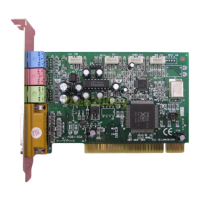

 To Next Page