EasyManua.ls Logo

Yard force COMPACT 280R - Operation; Control Panel; Start Mowing

Yard force COMPACT 280R
11 pages
Print Icon
To Next Page IconTo Next Page
To Previous Page IconTo Previous Page
Loading...
10 11
GB GB
Operation
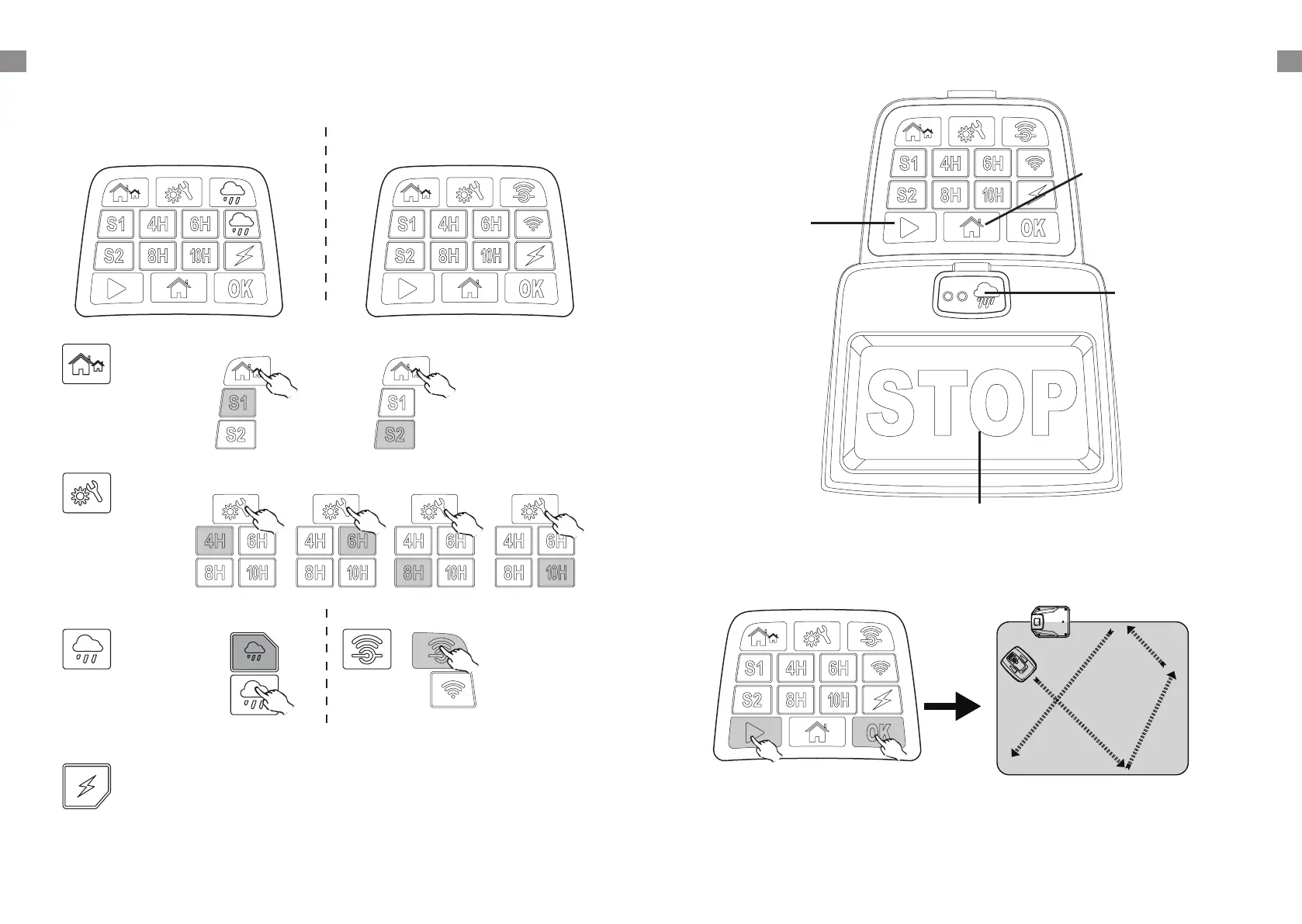
Control panel
Signal select button:
Select either S1 or S2.
Working time
select button:
Select working time.
Rain sensor button:
Switch rain sensor ON/OFF.
Charging indicator:
Flashes when Charging
Wifi configuration
button
LED will flash slowly
when there is no Wifi
connection.
LED will remain on when
ready to connect to Wifi.
LED will flash quickly
when successfully
connected to Wifi.
Start mowing
1 2
Compact 280R Compact 400Ri
Rain sensor
indicator
Robotic Mower will
return to docking
station when it rains.
Start button:
Frist press the Start
button and then press
the OK button, robotic
Mower will start to
work.
Home button:
First press the Home
button and the press
the OK button, robotic
Mower will return to
docking station.
STOP button:
Press this buttion. Robotic
Mower will stop immediately.

Related product manuals