
 Need help?
Do you have a question about the Yealink MVC S90 and is the answer not in the manual?
Explains how to connect and use the WPP30 for wireless screen sharing.
Describes how to access and control the UVC86 camera settings.
Details the process for pairing a RoomSensor with the system.
Covers general safety and handling guidelines for device use.
Specifies conditions for device placement and operation.
Provides instructions on how to clean the device safely.
 General
| Microphone | Yealink VCM34 |
|---|---|
| Connectivity | Wi-Fi, Bluetooth, USB |
| Compatibility | Microsoft Teams, Zoom |
| Microphone Technology | Beamforming technology |
| Operating System | Android |
| Microsoft Teams Rooms | Yes |
| Audio | Full-duplex |
| Content Sharing | Wireless and wired sharing |
| Display | Supports up to 2 displays |
| Power Supply | AC 100~240V |
| Video Resolution | Up to 4K UHD |
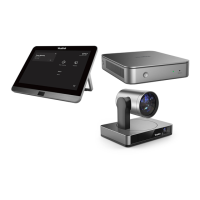
| Dimensions | Varies depending on components (Mini-PC, Camera, Microphones, Touch Panel) |
| Weight | Varies depending on components |


 To Next Page