EasyManua.ls Logo

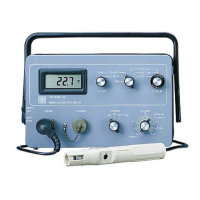
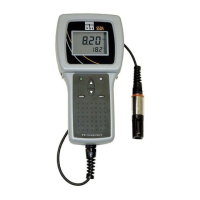
YSI 550A - User Manual

YSI 550A
18 pages
Print Icon
To Next Page IconTo Next Page
Loading...
Operations
Manual
YSI 550A
Dissolved Oxygen Instrument

Questions and Answers

  • J
    John HendersonJul 27, 2025
    Why does my YSI 550A Measuring Instruments display “Over” or “Undr” during calibration?
    • K
      Kristen CharlesJul 27, 2025
      If your YSI Measuring Instruments displays “Over” or “Undr” during calibration, try replacing the membrane and electrolyte and recalibrating. Cleaning the probe electrodes may also help. If the problem persists, the system may need to be returned for service.
  • D
    David WilsonAug 2, 2025
    Why won't my YSI 550A Measuring Instruments calibrate?
    • T
      Theresa ChungAug 2, 2025
      If your YSI Measuring Instruments will not calibrate, try replacing the membrane and electrolyte. Also, try cleaning the probe electrodes. If the issue persists, the system may require professional service.
  • S
    Steven WillisAug 8, 2025
    Why are my YSI 550A readings inaccurate?
    • R
      Robert BradleyAug 8, 2025
      Inaccurate readings on your YSI Measuring Instruments can stem from several factors. First, ensure that the calibration altitude and salinity settings are correct, and then recalibrate the instrument. If you're still experiencing issues, the probe may not have been in 100% water-saturated air during the calibration; try moistening the sponge in the calibration chamber before recalibrating. Another potential cause is the membrane and electrolyte needing replacement, so replace them and recalibrate. Also, ensure the probe electrodes are clean. If none of these steps resolve the issue, the system may require professional service.
  • B
    Beverly ChenAug 13, 2025
    What to do if my YSI Measuring Instruments displays “Over” or “Undr"?
    • S
      Samantha GreenAug 13, 2025
      If the main display of your YSI Measuring Instruments reads “Over” or “Undr”, it could be due to the sample's oxygen concentration being more than 60 mg/L or 500%, or less than –0.02 mg/L or -0.3%. Also, verify the calibration altitude and salinity settings are correct and recalibrate. Replacing the membrane and electrolyte and recalibrating might resolve the issue. Cleaning the probe electrodes can also help. If problems persist, the system may need to be returned for service.
  • A
    Alyssa JonesAug 20, 2025
    How to fix a YSI 550A that locks up?
    • W
      wwilsonAug 20, 2025
      If your YSI Measuring Instruments "locks up", try removing the batteries, waiting 15 seconds for the system to reset, and then replacing the batteries. Replacing the batteries may also resolve the issue. If the problem continues, the system may require professional service.

Summary

General Description of YSI 550 A

YSI 550 A Warranty and Registration

YSI 550 A Instrument Features

Dissolved Oxygen Probe Preparation

Dissolved Oxygen Calibration Process

Calibration in % Saturation Mode

Detailed procedure for calibrating the instrument to measure dissolved oxygen in percent saturation.

Salinity Compensation Calibration

Calibration in mg;L Mode

Detailed procedure for calibrating the instrument to measure dissolved oxygen in mg/L.

YSI 550 A Probe Operation

Stirring Requirements for Measurement

Explains the necessity and method for stirring samples during dissolved oxygen measurement.

Measurement Procedure Steps

Step-by-step guide on how to insert the probe, stir, and record dissolved oxygen readings.

Probe Electrode Maintenance

YSI 550 A Technical Specifications

Troubleshooting Common Issues

Power On and Low Battery Errors

Solutions for instrument not turning on, low battery warnings, or flashing 'OFF' messages.

Calibration Failure Troubleshooting

Steps to resolve issues when the instrument fails to calibrate, including probe and electrolyte checks.

YSI 550A Specifications

General IconGeneral
BrandYSI
Model550A
CategoryMeasuring Instruments
LanguageEnglish

Related product manuals