04
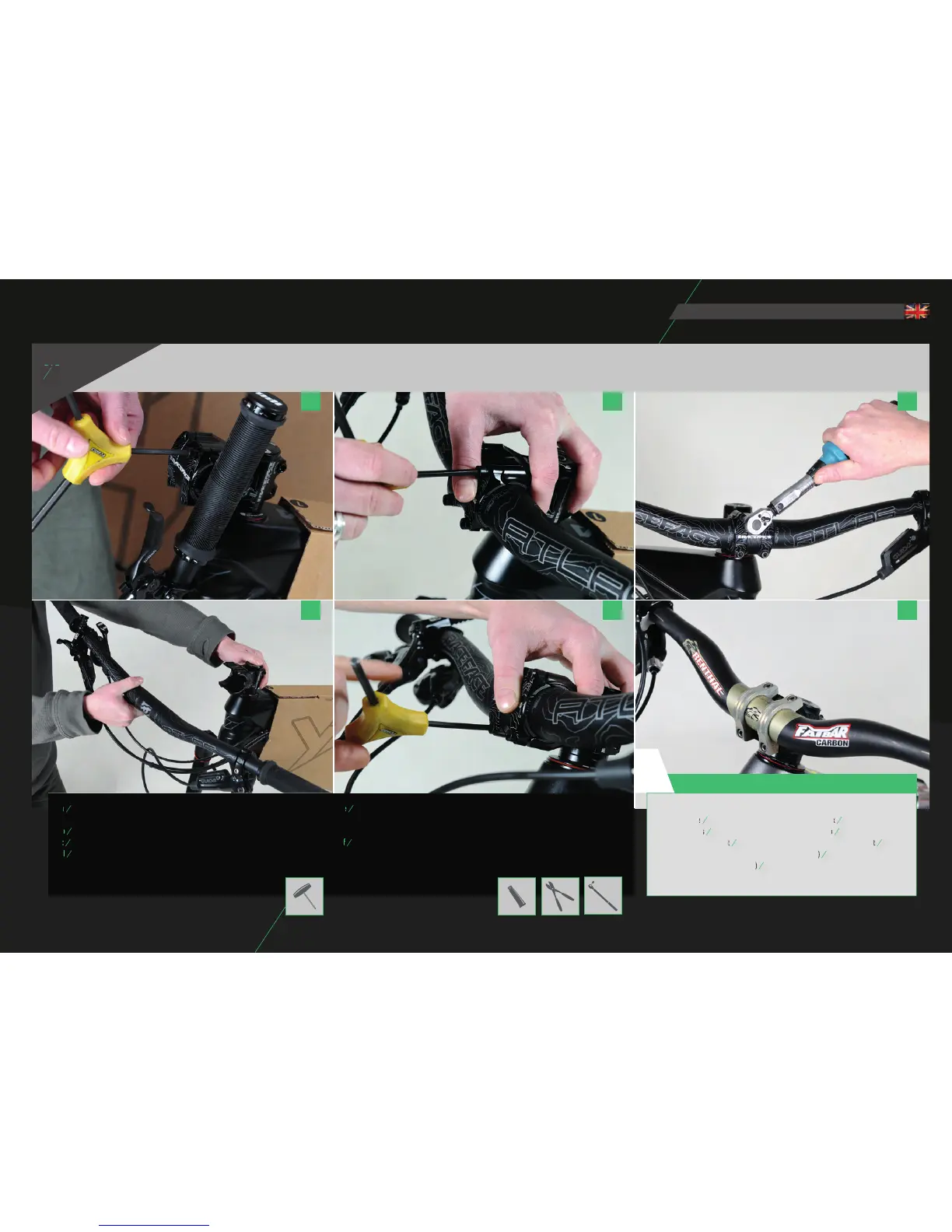
INSTALLING THE HANDLEBAR
a
Remove the handlebar clamp on the stem by removing all screws
using an Allen wrench (4 mm Allen wrench).
b
Mount the handlebar on the stem. (4 mm Allen wrench)
d
Tighten the screws gradually with only one turn per screw in an X pattern.
This is the only way to achieve even clamping of the handlebar in the stem.
e
Adhere to the guidelines of the manufacturer of the stem and/or handlebar when
torquing the screws. Make sure that the clamp gap is even and that the handlebar is
centered and inserted correctly. The adjustment lines will help you with this.
f
Installing carbon handlebars requires great care and precision. Do not exceed the
specifi ed torque under any circumstances. The stem cannot have any sharp edges or
ridges. Only carbon assembly paste may be used.
During assembly, please adhere to the torque specifi cations of the manufacturers:
a c e
b d f
CAUTION:
KORE Repute
8,4 - 9,6Nm
RaceFace Direct Mount
5Nm
YT Industries Direct Mount
YT Industries Direct Mount
5Nm
Renthal Integra/Integra II: Fork bridge screws (large)
Renthal Integra/Integra II: Fork bridge screws (large)
10Nm;
Handlebar clamp screws (small)
Handlebar clamp screws (small)
6Nm
(Last updated 2015)
!
eng



 To Next Page