source is 220-240V AC supply, use the Tandem Blade type which attached
with ground conductor power cord that meets the safety regulations.
z Do not overload wall outlets or power cords.
z Do not leave the power and extension cords in the place with high
humidity and close to the high magnet influence.
Environment
z Place the monitor on a flat and leveled surface.
z Place the monitor in a well-ventilated place.
z Keep the monitor away from:
Overly hot, cold or humid places, places directly under sunlight, dusty
surroundings, equipment that generate strong magnetic fields.
B. CONTROL FUNCTION
a.
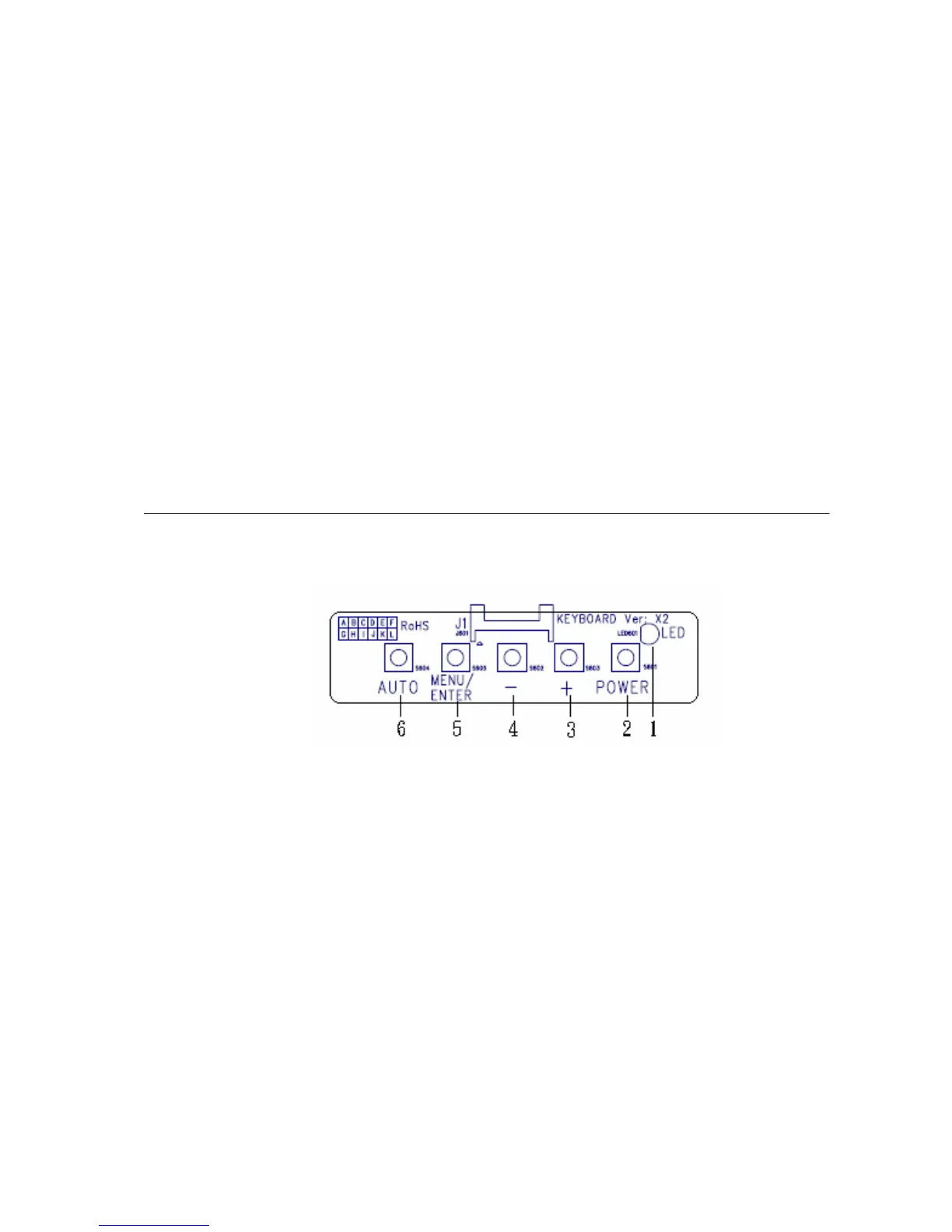
OSD Button
Front View:
1.「Power LED」: Green light means with the signal. Orange light means out of
signal or extraordinary.
2.「Power Switch」: Pressing this button turns the display system power on or off.
3.「
+」: This button is used to adjust the increasing value of selected OSD control
option.
4.「
-」: This button is used to adjust the decreasing value of selected OSD control
option.
5.「MENU/ENTER (EXIT)」: Pressing this button that may enter the OSD menu on
the screen and select the OSD control options on the
screen.
6.「AUTO」: Automatically sizes, centers and fine tunes the video signal to
eliminate “noise” and distortion.
- 4 -


 To Next Page
 Loading...