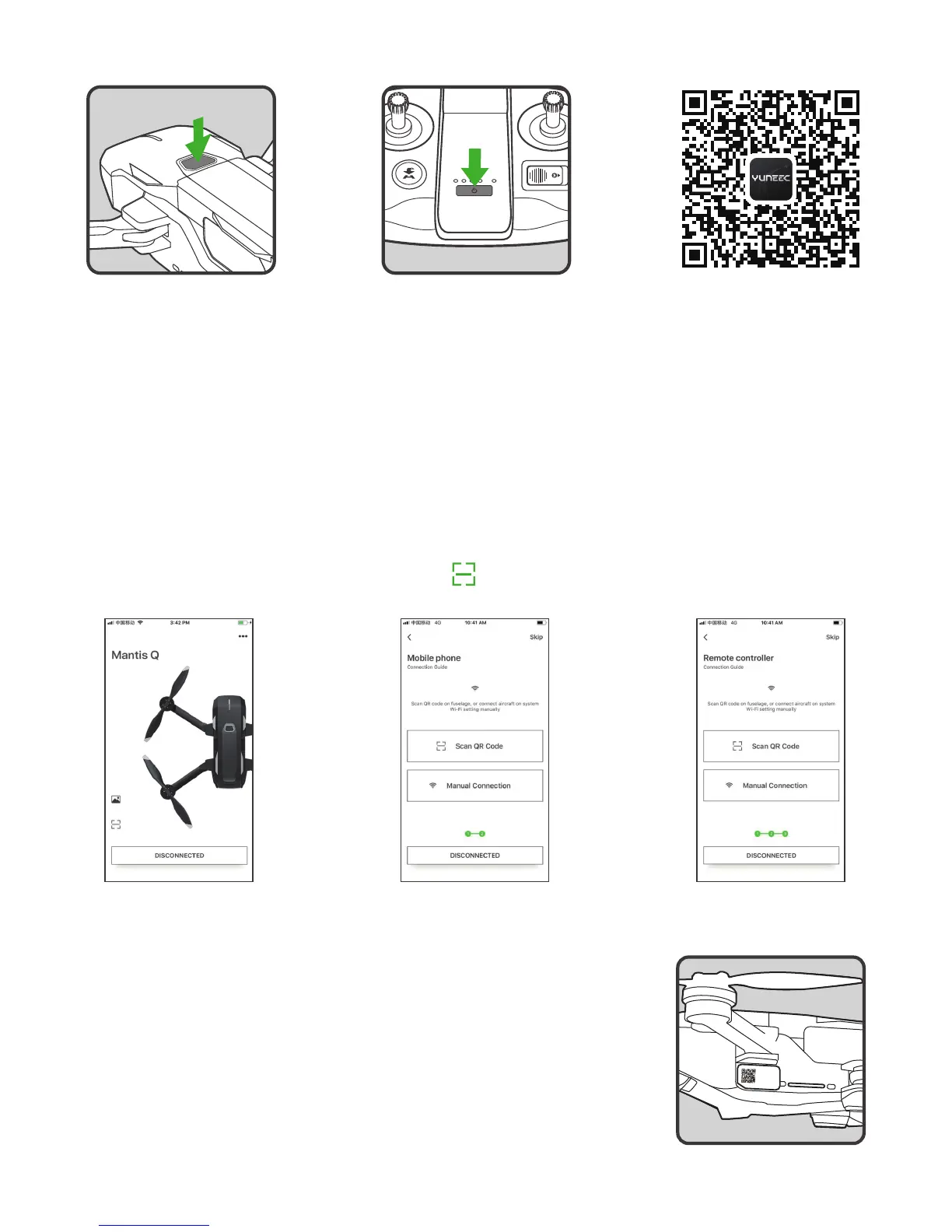
BINDING PROCEDURES
Method A Method B Method C
Power on the Mantis Q
Power on the controller
Scan the QR code and
download the App
1. Scan the QR Code
NOTICE:
Please turn on the WiFi of your smart phone before scanning the QR code.
STEP 1:
Launch Yuneec pilot app, and tap the icon [ ] whenever you see this icon in the App.
STEP 2:
Scan the QR code at the front of the aircraft.
STEP 3:
Wait for a few seconds till you hear the aircraft emit the acknowledge
tone, which indicates the binding is successful.
10
NOTICE:
If the all LED blinks white quickly and gives warning alarm, the initialization has failed. The aircraft
needs to be powered on again. To power off the aircraft, press and hold the power button until the aircraft emits
a falling tune.
SSID:
Mantis xxxx
Password:
xxxxxxxxxx


 To Next Page