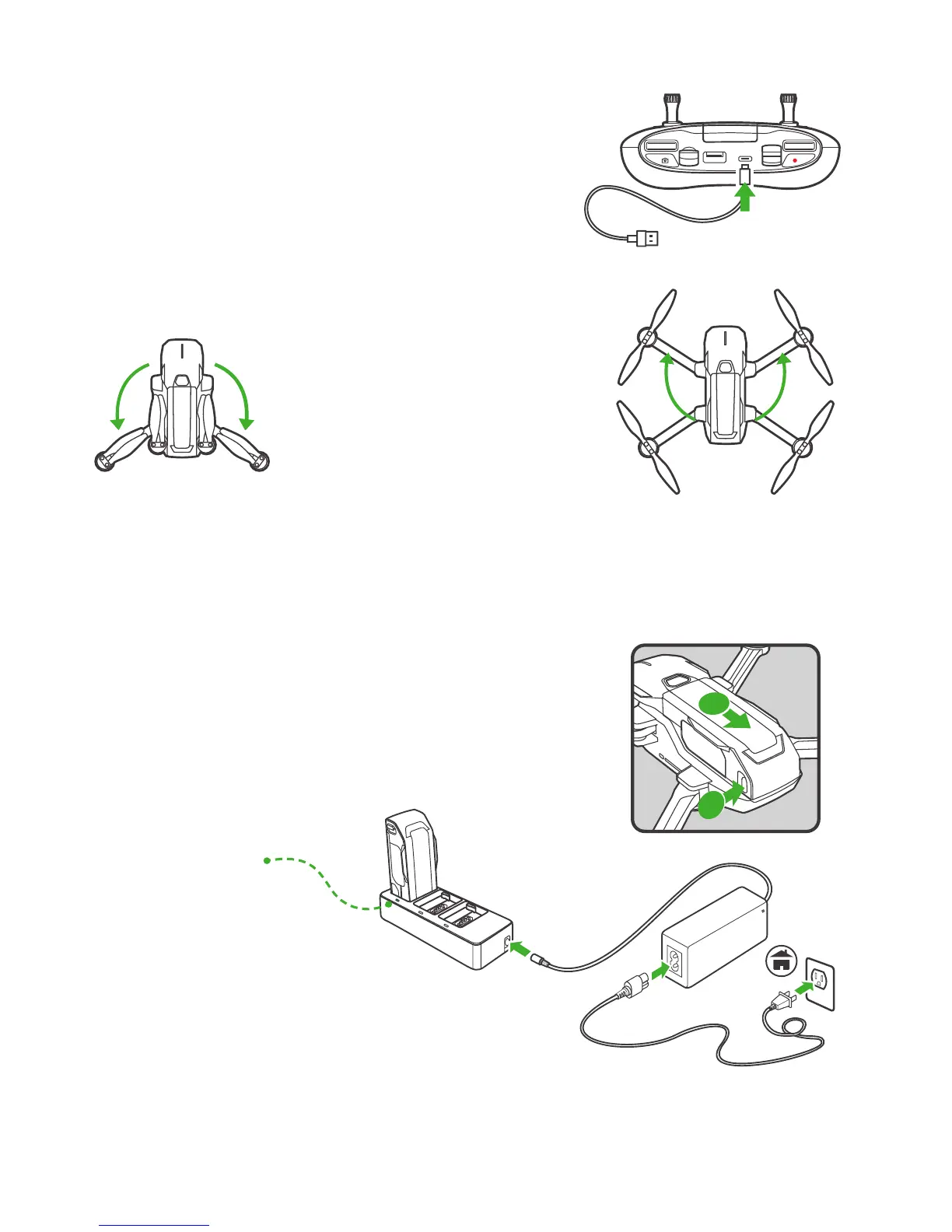
CHARGING THE REMOTE CONTROLLER
PREPARING THE AIRCRAFT
NOTICE:
All arms and propellers must be unfolded before powering on.
NOTICE:
To fold the Mantis Q, reverse the unfolding instructions.
CHARGING THE FLIGHT BATTERY
STEP 1:
Unfold the Rear Arms
STEP 1:
Press the battery locking button and remove the battery.
STEP 2:
Plug the flight battery to the supplied charger as shown below.
STEP 2:
Unfold the Front Arms
Use USB Type-C to charge, approx. 2.5 hours.
The LED indicator is solid green when the charger is powered on and ready to charge. The LED indicator flick-
ers green while the battery is charging ( charging time is approximately 1 hour ), and turns solid green once
charging is complete.
08
Solid Green:
Charge Completed
Green Flashing:
Error
Green Flickering:
Charging
Solid Green:
Power Standby


 To Next Page