30
7. In cab control description and use
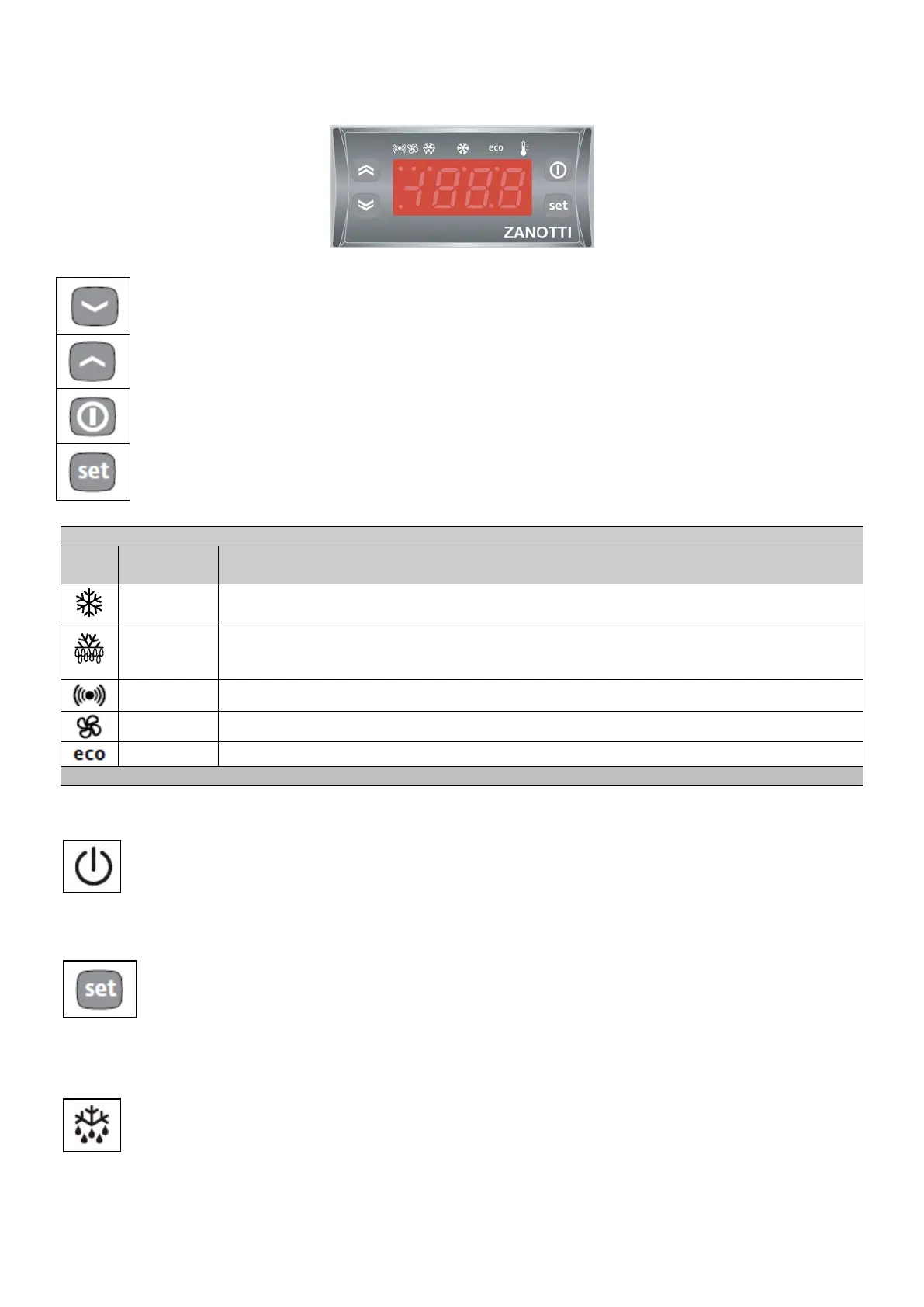
DOWN Button
Scrolls through the menu items Decreases the values.
UP Button
Scrolls through the menu items Increases the values.
ON – OFF Button
Start / Stop the unit
SET Button
Accesses the set point – Accesses the Menus – Confirm the commands
Led
Status
Compressor
ON for compressor on; blinking for delay, delay or enabling
blocked.
Defrosting
ON when defrosting in progress; blinking when activated
manually or with digital input.
Allarm ON for active alarm; blinking for silenced alarm.
Fans ON when fan is on.
ON when Reduced set is ACTIVE.
7.1 The On/Off function
At start-up the instrument performs a Lamp Test; the display and LEDs flash for a few seconds to
check that they are working correctly. When it’s stopped on the display remain the decimal point led
on.
7.2 How to see the setpoint
To access the Machine Status menu, press the “set” button.
The “Set” folder label appears.
To display the Setpoint value, press the “set” button again. The Setpoint value appears on the display.
To change the Setpoint value, use the “UP” and “DOWN” buttons within 15 seconds.
7.3 Defrost (Optional)
The defrost is automatically managed by the instrument. To activate the defrost cycle manually, press
the “UP” button (if configured =1) for 5 seconds.


 To Next Page