Page 39
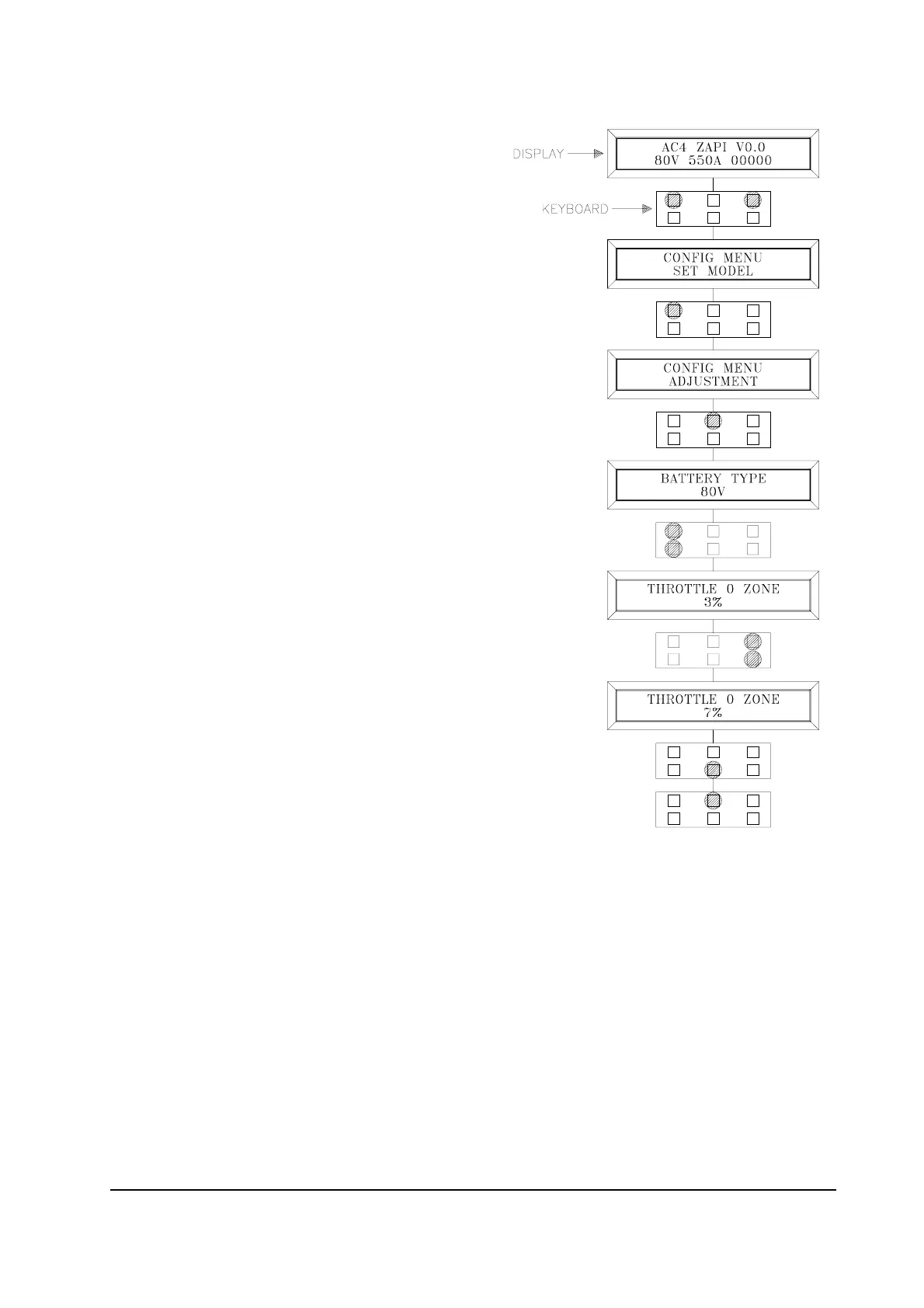
Flow chart showing how to make changes to ADJUSTMENT Menu
1) Opening Zapi Menu
2) Press Top Left & Right Buttons to enter
CONFIG Menu.
3) The display will show: SET MODEL
4) Press ROLL UP or ROLL DOWN button
until ADJUSTMENTS Menu appears.
5) ADJUSTMENTS appears on the display.
6) Press ENTER to go into the ADJUSTMENTS
Menu.
7) The display will shows SET BATTERY TYPE.
8) Press ROLL UP or ROLL DOWN button until
the desired parameter is reached.
9) The desired parameter is appears.
10) Press SET UP or SET DOWN button to modify
the adjustment.
11) Press OUT.
12) Press ENTER to confirm.
13) Repeat the same from 5 to 12 points for the
other adjustment.



 To Next Page