EasyManua.ls Logo

Zapp Z710i - Data Folder

Default Icon
48 pages
Print Icon
To Next Page IconTo Next Page
To Previous Page IconTo Previous Page
Loading...
PHONE MANAGE
PHONE MANAGE
5352
1.
Press [ ].
2.
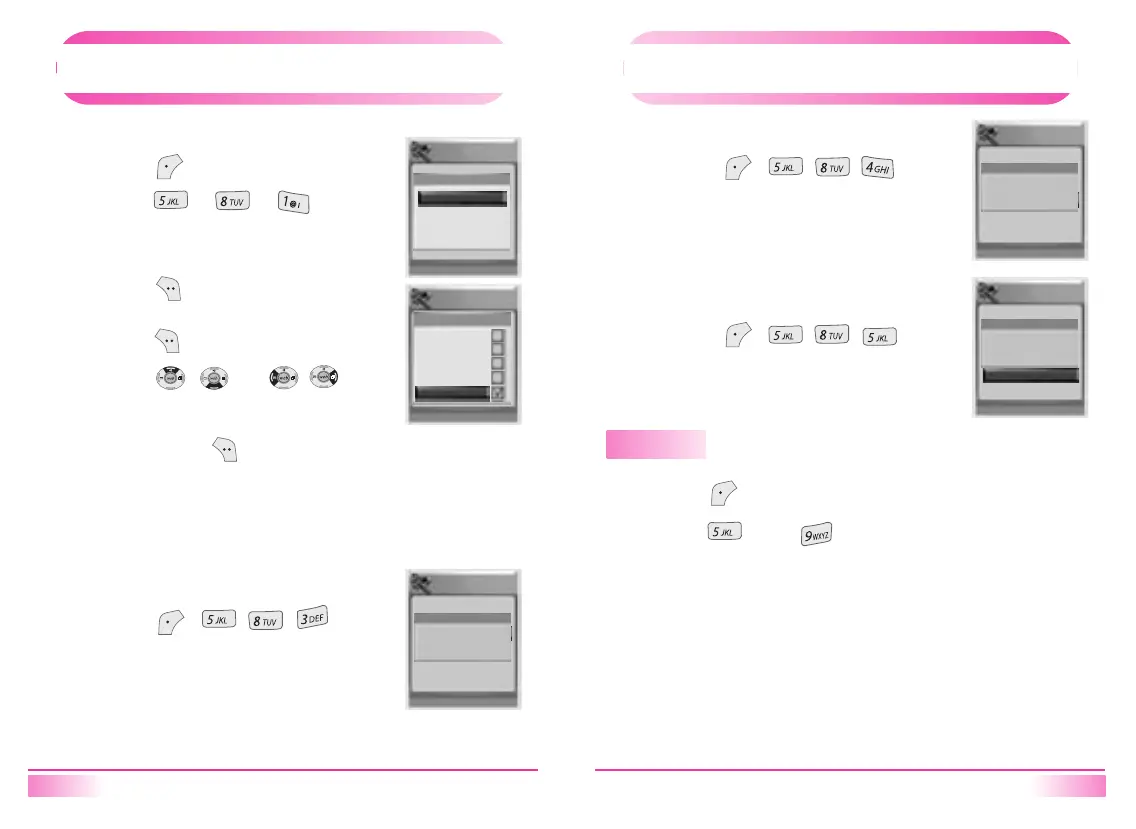
Press [ ] [ ] [ ]
Select “Termination/ Service Type/ PPP Auth’’
with the navigation key.
3.
Press [ ] to confirm.
-
It depends on the network service.
4.
Press [ ].
5.
Press [ , ] or [ , ]keys
to move to item which user wants to
change to.
6.
To save, press [ ].
[ 2. Data Service ]
1.
Press [ , , , ].
[ 3. S/W Version ]
System
Back Select
System
Back Select
1:Privacy
2:Data Service
3:S/W Version
4:LAST SID
5:PRL ID
Data Service
Data Termination
Termination
Service Type
PPP Auth
Modem
Modem Once
Fax
Fax Once
Cancel
System
Back
1:Privacy
2:Data Service
3:S/W Version
4:LAST SID
5:PRL ID
S/W Version
Jan 15 2004
456E. 06
PHONE MANAGE
PHONE MANAGE
1.
Press [ , , , ].
[ 4. Last SID ]
1.
Press [ , , , ].
[ 5. PRL ID ]
Displays the phone’s PRL ( Preferred Roaming List ).
Data Folder
1.
Press [ ].
2.
Press [ ], then [ ].
System
Back
1:Privacy
2:Data Service
3:S/W Version
4:LAST SID
5:PRL ID
Last SID
00000
System
Back
1:Privacy
2:Data Service
3:S/W Version
4:LAST SID
5:PRL ID
PRL ID
- No info -

Table of Contents