Page 7 | ZvSync-NA User’s Manual www.zeevee.com
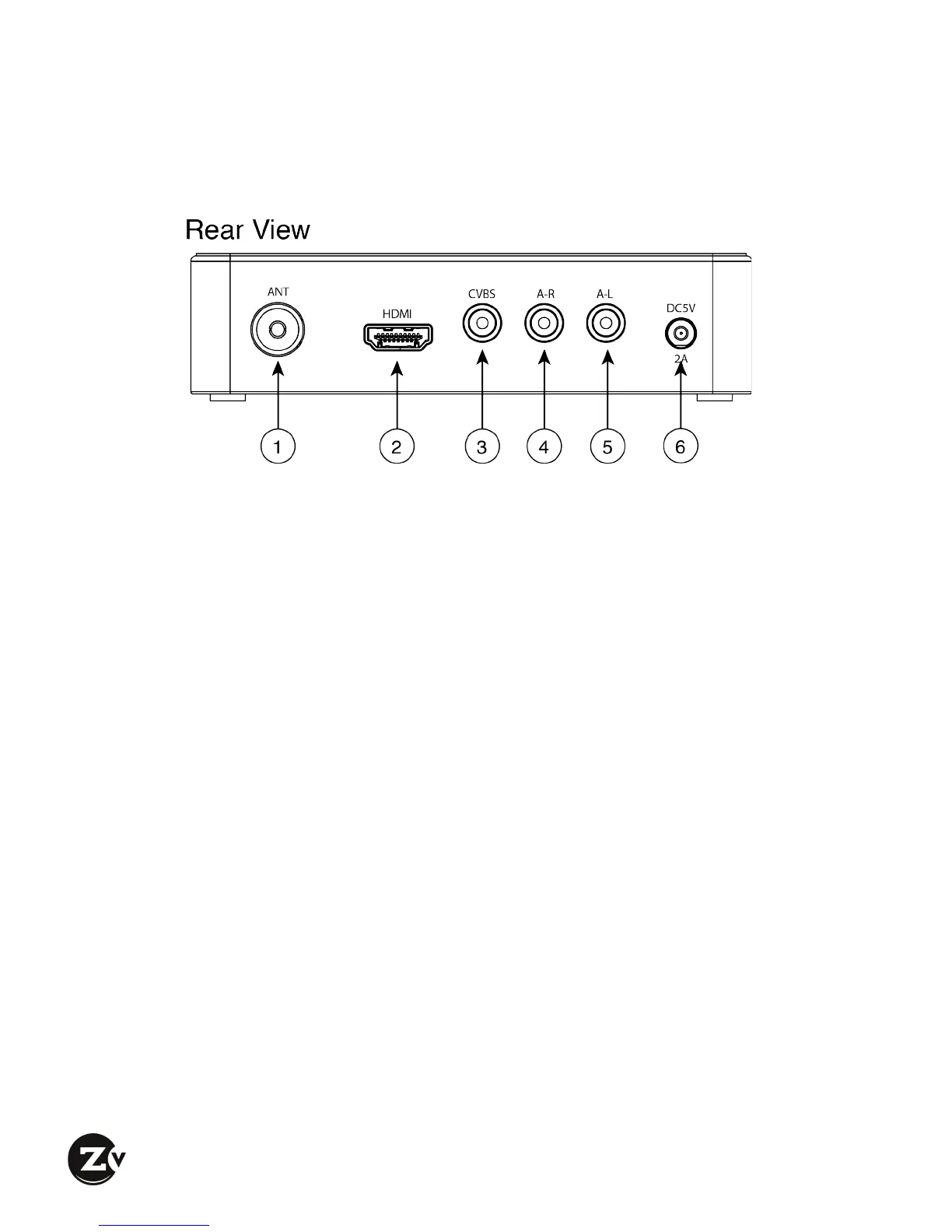
1.2 Rear'Panel'
q Aerial/Cable/RF Input (F-type) – Connect to antenna for ATSC over-the-air
reception or to a cable feed for Clear QAM reception
w HD Video Output – Most commonly used video output from the receiver
unit. Connect to the HDMI digital input of the display device (typically a
television). Both high definition video and digital audio are carried.
e CVBS Video Output – Should composite video output be desired, connect
the CVBS Video output to the appropriate composite video input of the
display device (typically a television or monitor).
r Right Audio Output – Should analog audio be desired, connect to the
appropriate ‘Right’ analog audio input on the display device (typically a
television or amplifier).
t Left Audio Output – Should analog audio be desired, connect to the
appropriate ‘Left’ analog audio input on the display device (typically a
television or amplifier).
y Power Connector – Connect to the plug on the supplied wall-mount power
supply.


 To Next Page