6.0 PRINCIPLES OF OPERATION
ZEKS Eclipse
TM
90-5,000ZPB Desiccant Dryers
www.zeks.com
9
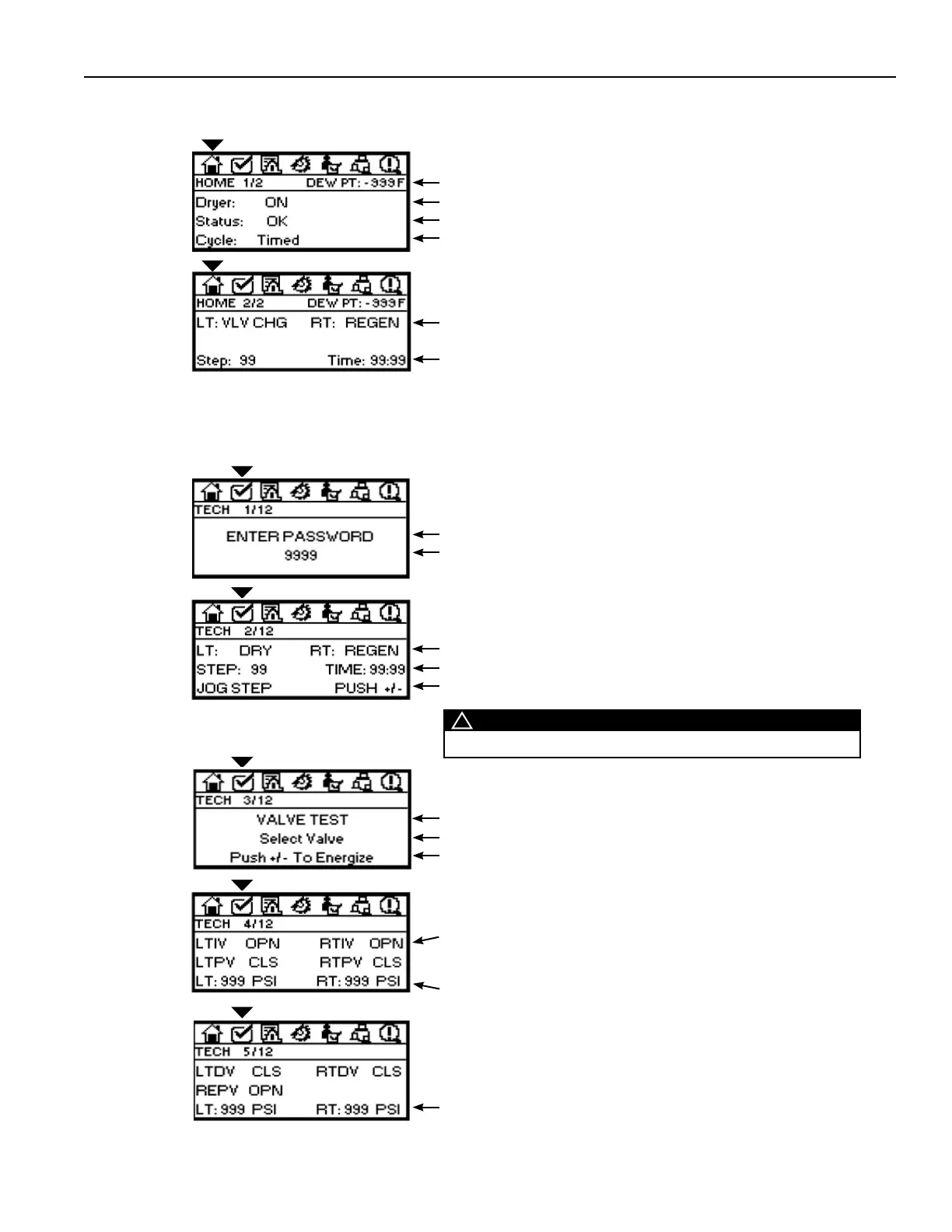
DEW PT: Indication of outlet air quality
Dryer Operation: Displays “ON”, “OFF” or “Shutting Down”
Status: “OK” if no active alarms; “ALARM” if an alert or alarm is triggered
Cycle: Indicates operation in standard “Timed” cycle or “MLC” cycle
HOME
SCREEN 1/2
Tower Status: Indication of Left Tower and Right Tower operating status
Step: Step in operating cycle and time remaining within that Step
HOME
SCREEN 2/2
6.9.3 HOME
Display of dryer status, program sequence information, alarm status and drain test information.
Enter Password: This Mode is Password protected
Password: 2010 (Use Numeral Keys to enter Password)
TECHNICIAN
MODE
SCREEN 1/12
6.9.4 TECHNICIAN MODE
Enables trained users to set parameters for triggering alarms, enable specifi c operating functions, and troubleshooting (including
jogging the sequence and valve output test function).
For values in this screen to be displayed, dryer must be pressurized
Tower Status: Indication of Left Tower and Right Tower operating status
Step: Step in operating cycle and time remaining within that Step
Jog Step: Use +/– key to jog the primary steps in the operating sequence
TECHNICIAN
MODE
SCREEN 2/12
Dryer must be turned OFF and system or Control Air Circuit must be
pressurized before initiating this function
Valve Test: Individual valve test function
Select Valve: Choose from four main actuated valves
Press +/–: Use the ▼ (Down) Navigation Key to index through the valves
TECHNICIAN
MODE
SCREEN 3/12
Dryer must be turned OFF and system or Control Air Circuit must be
pressurized before employing this function
Select Valve: Use Navigation Buttons to select individual valves
LTIV - Left tower inlet valve RTIV - Right tower inlet valve
LTPV - Left tower purge valve RTPV - Right tower purge valve
Press +/–: Press button to test controller output
Pressure for towers will be displayed on dryers with Fail-To-Shift option.
TECHNICIAN
MODE
SCREEN 4/12
Dryer must be turned OFF and system or Control Air Circuit must be
pressurized before employing this function
Press +/–: Press key to test controller output
Pressure for towers will be displayed on dryers with Fail-To-Shift option.
(* Repressurization valves are pneumatically operated on 90-600 ZPB
models. Depressurization valves do not apply to 90-600 ZPB models. )
TECHNICIAN
MODE
SCREEN 5/12
!
WARNING
Only trained Technicians should manually operate Control Valves.



 To Next Page