6.0 PRINCIPLES OF OPERATION
ZEKS Eclipse
TM
90-5,000ZPB Desiccant Dryers
www.zeks.com
13
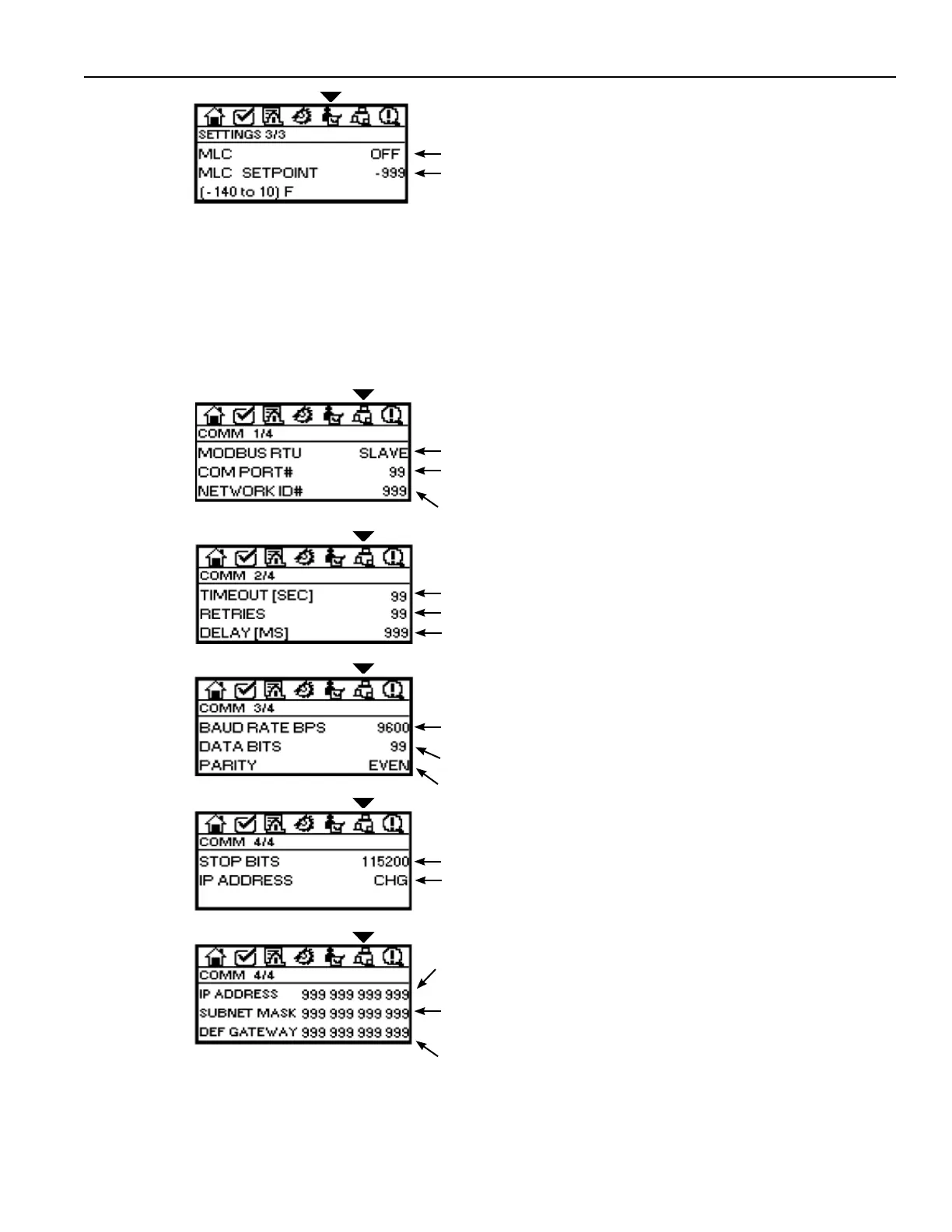
For dryers equipped with optional Moisture Load Control (MLC) functionality.
Dryer must be equipped with Dew Point Sensor:
MLC: Press +/- key to activate or de-activate MLC function. Value will
display ON when activated.
MLC Setpoint: Highlight the value and press ENTER button to choose from
pre-defi ned values.
NOTE: PurgeSync™ Function is de-activated when MLC function is active.
GENERAL
SETTINGS
SCREEN 3/3
MODBUS RTU: Controller is confi gured to be a slave.
COM PORT: Port 1 is dedicated to Communications. For information only
(non-adjustable).
NETWORK ID#: To set: press Enter Button; use numeric keys to enter
value; press Enter Button to save value.
COMMUNICATIONS
SCREEN 1/4
6.9.8 COMMUNICATIONS
Establish remote communication settings.
For information only (non-adjustable).
TIMEOUT: Default - 1 seconds.
RETRIES: Default - 3 attempts.
DELAY: Default - 10 minutes.
COMMUNICATIONS
SCREEN 2/4
BAUD RATE: Press Enter key to highlight fi eld. Press +/- to select from
preset values.
DATA BITS: Default - 8. For information only (non-adjustable).
PARITY: Default - None. For information only (non-adjustable).
COMMUNICATIONS
SCREEN 3/4
STOP BITS: Default - 1. For information only (non-adjustable).
IP ADDRESS: Press +/- key to access Setup Screen.
COMMUNICATIONS
SCREEN 4/4
IP ADDRESS: Default - 192.168.192.10. To change number, use UP/
DOWN Navigation Keys to position Cursor where change is needed, press
Enter key, use Numeral Keys to enter 3 digit number, press Enter to save.
SUBNET MASK: Default - 255.255.255.0. To change number, use UP/
DOWN Navigation Keys to position Cursor where change is needed, press
Enter key, use Numeric Keys to enter 3 digit number, press Enter to save.
DEF GATEWAY: Default - 192.168.192.254. To change number, use UP/
DOWN Navigation Buttons to position Cursor where change is needed,
press Enter Button, use Numeral Keys to enter 3 digit number, press Enter
to save.
COMMUNICATIONS
SCREEN 4/4
(Setup)




 To Next Page