6.0 PRINCIPLES OF OPERATION
ZEKS Eclipse
TM
90-5,000ZPB Desiccant Dryers
www.zeks.com
14
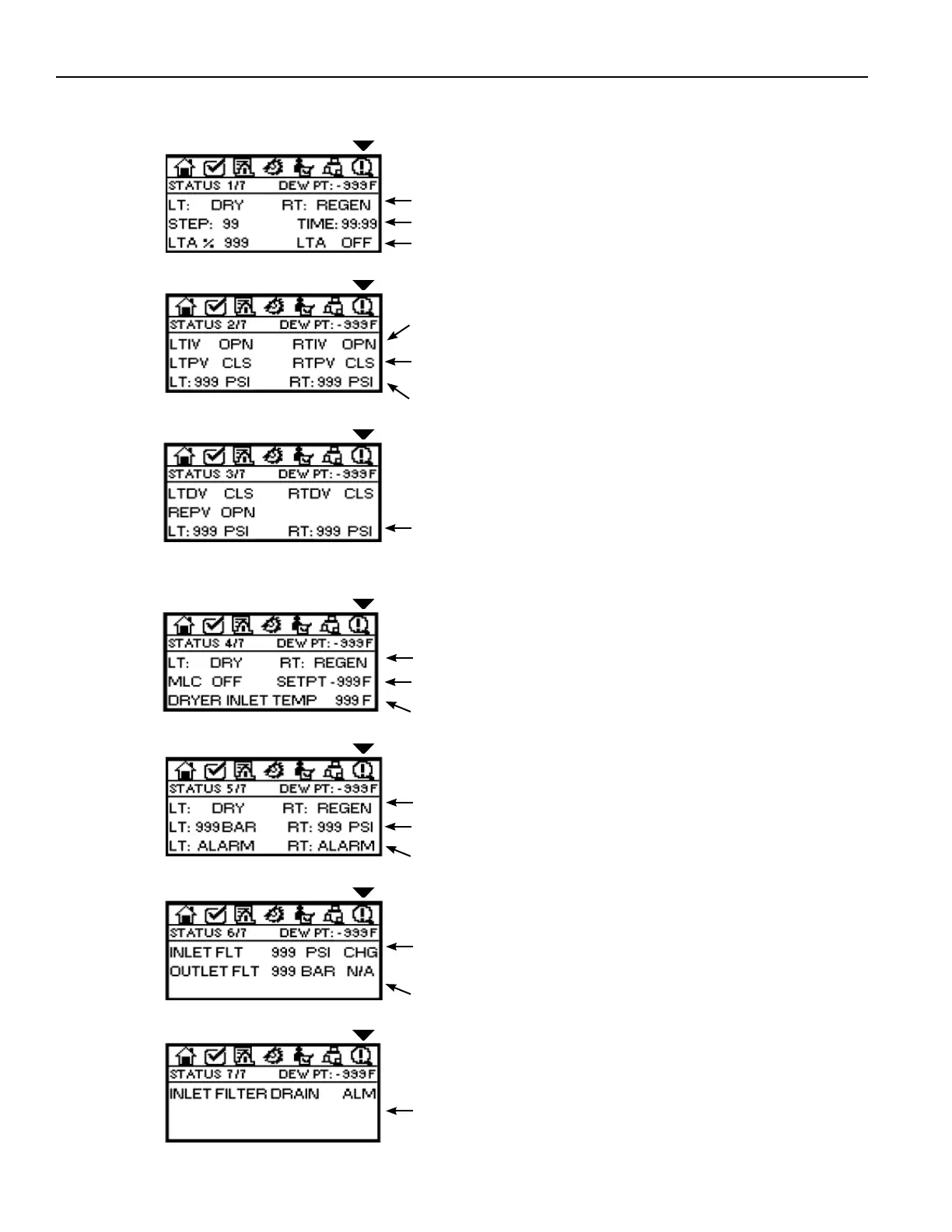
LT, RT: Left Tower and Right Tower operating status.
STEP, TIME: Step in Operating Cycle and time remaining within Step.
LTA%, Status: Load Time Average based on air compressor Load/Unload
relay output on fi xed time interval. LTA STATUS: ON or OFF - LTA function
can only be active when dew point monitoring function is not activated.
OPERATING
STATUS
SCREEN 1/7
6.9.9 OPERATING STATUS
Displays information related to sensors, valve activation, drain status, etc.
LTIV, RTIV: Position of normally-open Left Tower and Right Tower Inlet
Valves. Control outputs are de-energized when valves are open.
LTPV, RTPV: Position of normally-closed Left Tower and Right Tower Purge
Valves. Control outputs are energized when valves are open.
LT, RT: Indication of Left Tower and Right Tower Pressure (PSI) when dryer
is equipped with Fail To Shift option.
OPERATING
STATUS
SCREEN 2/7
LT, RT: Indication of Left Tower and Right Tower Pressure (PSI) when dryer
is equipped with Fail-To-Shift option.
OPERATING
STATUS
SCREEN 3/7
LT, RT: Left and Right Tower operating status - DRYING or REGENERATING
MLC, SETPT: Status of Moisture Load Control option - ON or OFF. Indication
of Setpoint: -40, -80, -100. Display of NA if option is not installed.
DRYER INLET TEMP: (Optional) Indication of compressed air temperature
at dryer Inlet. Display of NA if option is not installed.
OPERATING
STATUS
SCREEN 4/7
LT, RT: Left and Right Tower operating status - DRYING or REGENERATING
LT, RT: Left and Right Tower pressures with Fail To Shift Tower Pressure
Monitoring (Optional). Display of NA if option is not installed.
LT, RT: Display of ALARM if Left or Right Tower does not achieve proper
pressure during normal operation or at time of tower shift.
OPERATING
STATUS
SCREEN 5/7
INLET FLT: Optional Inlet Filter Delta P Alarm. Actuated by either diff erential
pressure switch or transducer. Displays: CHG for dp switch; DP value for
transducer.
OUTLET FLT: Optional Outlet Filter Delta P indication. Display of NA if
option is not installed.
OPERATING
STATUS
SCREEN 6/7
FILTER DRAIN STATUS: Displays the status of the optional Electronic No-
Air Loss Drain provided for the Inlet Filter. Display of NA if option is not
installed.
OPERATING
STATUS
SCREEN 7/7



 To Next Page