34 CM4822-001_v02
Thetermination duringthe descaling process
willdamage thecoffeemachine.Soonceyou
start the descaling process, please do not
terminateitmidway.
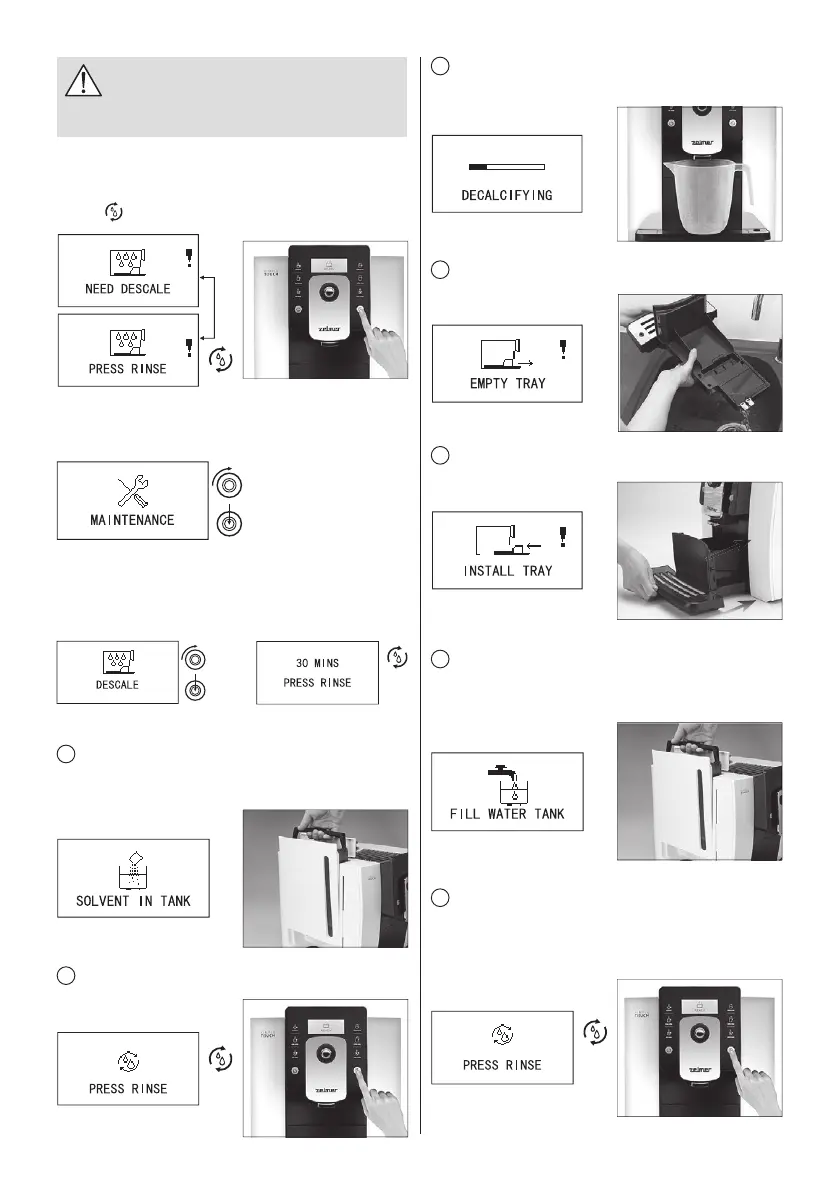
After a centain time use, if it reaches the degree of descaling,
“NEEDS DESCALE” and „PRESS RINSE” will automatically
display on the screen alternately. Now, press the cleaning
buttona
, to enter the descaling program.
Turn the rotary button to maintenance setting option, press
rotary button to enter.
Turn the rotary button to descaling option, press rotary
button to enter.
After entering the descaling program, press cleaning button
to start the descaling program; it will take 25 minutes.
PREPARE TO DESCALE THE APPLIANCE
1
Take a bag of decalci er and suf ciently dissolves it in
clean water, then put this mixed liquid to the water tank, and
reinstall the water tank to coffee machine.
2
After adding decalci er, press cleaning button to start
descaling and cleaning.
3
Put a container, of which the capacity is more than 1L,
under the coffee spout.
4
Empty tray.
5
Install tray.
6
Take the water tank out, empty the rest water and clean
it. Add puri ed water again, and reinstall it to the coffee
machine.
7
Press cleaning button to enter descaling and cleaning for
the second time. To clean the residual decalci erin water in
pipes at this time. Put a container, of which the capacity is
more than 1L, under the coffee spout.


 To Next Page