35CM4822-001_v02
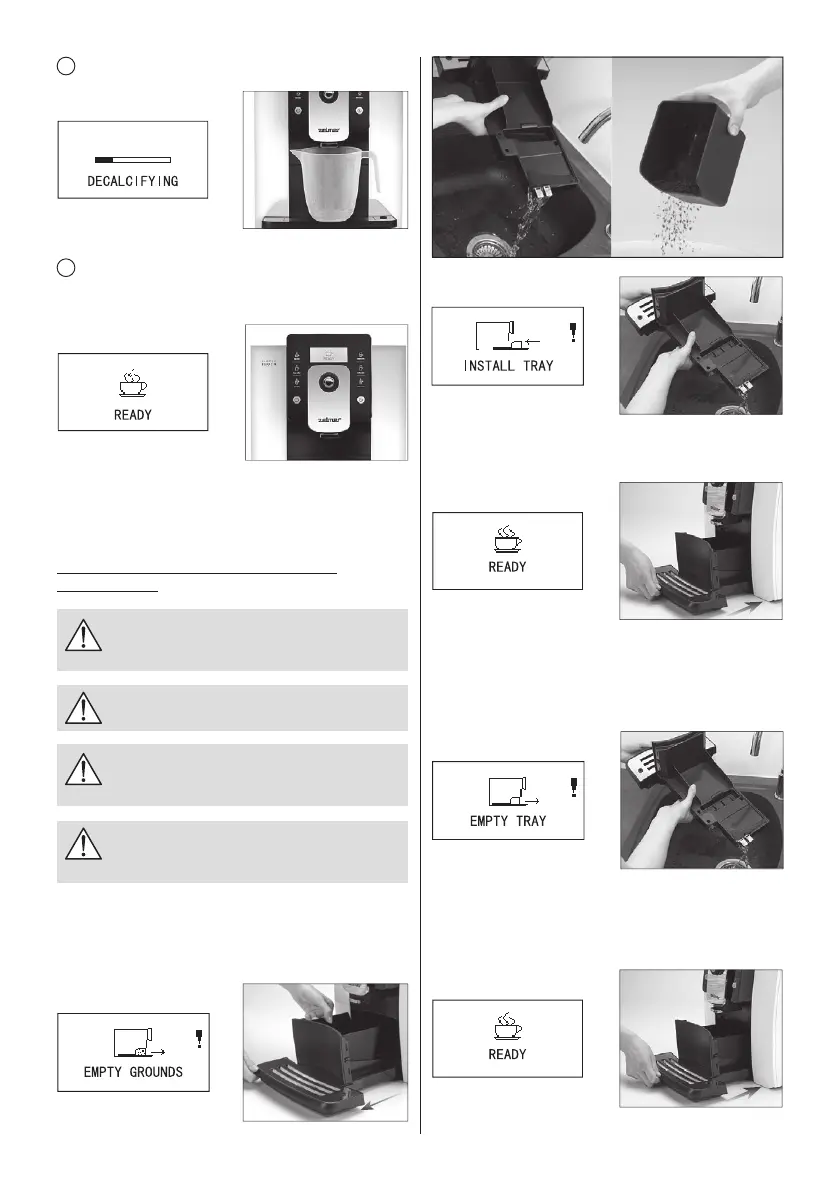
Reinstall the water drip tray to the machine, it returns to
“READY” status. You can continue using the machine.
CLEANING DRIP TRAY
If the drip tray is full, the machine will automatically indicate
”EMPTY TRAY”. Take out the water drip tray and pour the
waste water.
After clearing the waste water, reinstall the drip tray to
the coffee machine, it returns to “READY” status. You can
continue using the machine.
8
Decalcifying.
9
When the screen shows “READY”, it indicates the
descaling is completed; Now, you can continue to make
coffee.
Please empty the drip tray after the cleaning program is
completed.
CLEANING COFFEE GROUNDS CONTAINER
AND DRIP TRAY
Do not use chemical solvents and erosive
cleaneroralcoholtocleanthecoffeegrounds
containeranddriptray.
The drip tray and coffee grounds container
cannotbecleanedindishwasher.
Donotusemetalobjectstocleandirtorcoffee
precipitatetoavoidscrapingthedriptrayand
coffeegroundscontainer.
When prompted to clean the coffee grounds,
coffeegrounds must be cleaned up, or it will
causethemachinedamaged.
CLEANING COFFEE GROUNDS CONTAINER
When it cumulates to 15 cups, it will automatically indicate
“EMPTY GROUNDS”. Remove coffee grounds of the drip
tray and coffee grounds container.


 To Next Page