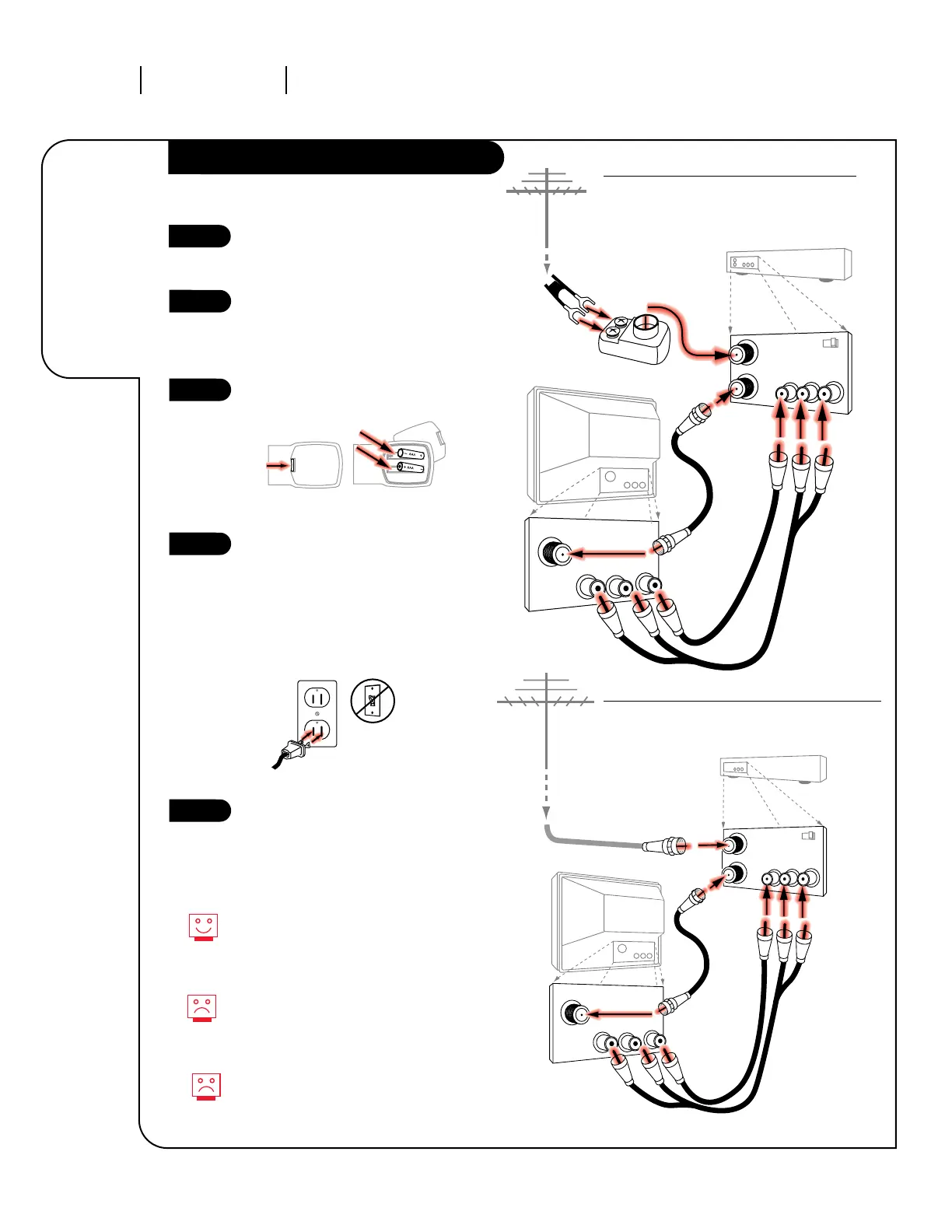
Locate the Antenna/Cable jack on
the back of your Entertainment
Machine.
Connect the cable that runs from
the wall directly to this jack,
according to the diagram to the
right.
Remove the back of the remote
and put in two AAA batteries.
Plug in your TV. Do not plug it
into a switched outlet. Your
Entertainment Machine is designed
to operate on household current,
120-volt 60 Hertz AC. Do not
attempt to operate it on DC
Current.
Go to page 8 to Auto Program your
Entertainment Machine.
206-3371-A
INSTALLATION STANDARD
PAGE 6
Connect your
off-air
antenna and
VCR to your
Entertainment
Machine.
Hook Up Antenna and VCR to your TV
Remember, when screwing
RF cables onto jacks, clockwise
tightens, and counterclockwise
loosens.
No A/V cables are included with
your Zenith Entertainment
Machine.
Without A/V cables, most VCRs will
not play videocassettes in stereo
sound.



 To Next Page