Front Panel
_=
o
.=
[] [] [] []
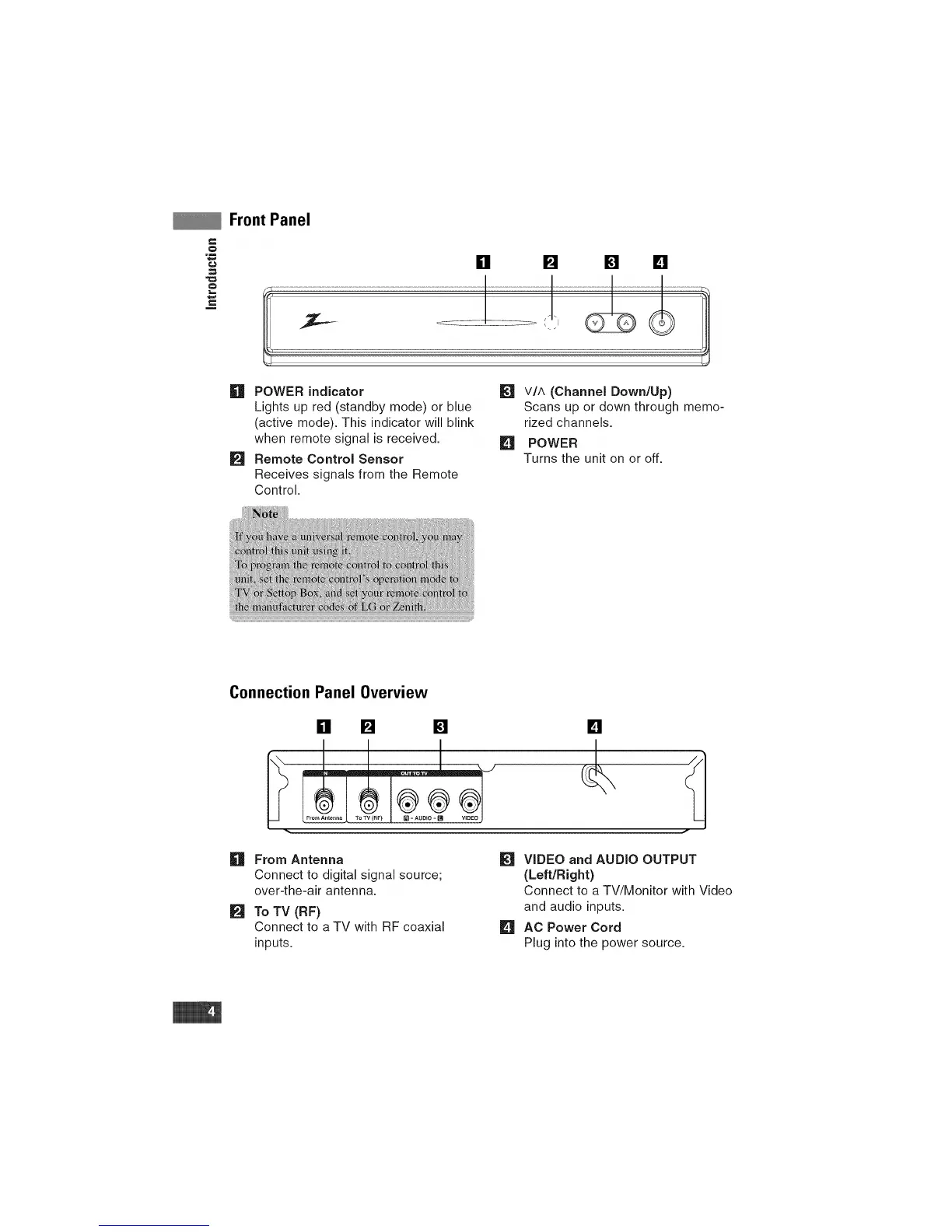
h'! POWER indicator
Lights up red (standby mode) or blue
(active mode). This indicator will blink
when remote signal is received.
FJI Remote Control Sensor
Receives signals from the Remote
Control.
t_
VIA (Channel Down/Up)
Scans up or down through memo-
rized channels.
[] POWER
Turns the unit on or off.
Connection Panel Overview
[] [] [] []
n
m
From Antenna
Connect to digital signal source;
over-the-air antenna.
To TV (RF)
Connect to a TV with RF coaxial
inputs.
VIDEO and AUDIO OUTPUT
(Left/Right)
Connect to a TV/Monitor with Video
and audio inputs.
[] AC Power Cord
Plug into the power source.


 To Next Page