EasyManua.ls Logo

Zenith VRA424 - Page 12

Zenith VRA424
40 pages
Print Icon
To Next Page IconTo Next Page
To Previous Page IconTo Previous Page
Loading...
INSTALLATIONPAGE 12
Before you
can record
programs
with VCR
Plus+®C
3
, you
must tell this
VCR the
PlusCode
TM
channels for
your area.
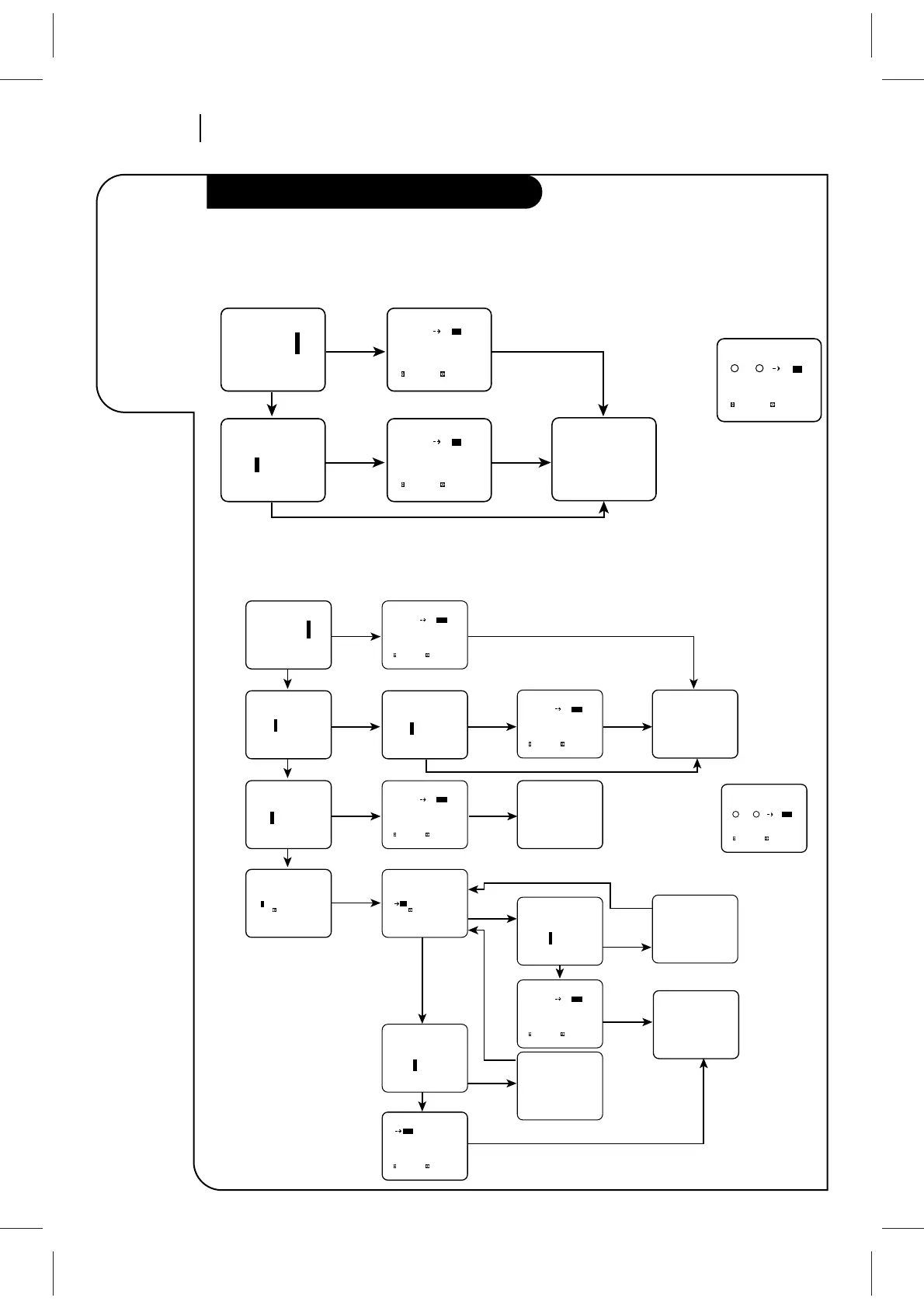
Setup for VCR Plus+®C
3
recording
On-Screen Instructions for TV Tuning Band
On-Screen Instructions for CATV or DBS Tuning Band
VCR PLUS
VCR+ program: 1
Ch Map Setup: 2
Ch Map Review: 3
Press number keys
QUIT = exit
VCR PLUS
Setup complete
Are your channels on
TV the same as in TV
listing?
1 Yes
2 No
Press number keys
QUIT = exit
Channel Map
to select to adjust
QUIT=exit
TV Ch VCR+ Ch
2 - -
3- -
4- -
5- -
6- -
7- -
Channel Map
to select to adjust
QUIT=exit
TV Ch VCR+ Ch
2 - -
3- -
4- -
5- -
6- -
7- -
Double Map
to select to adjust
QUIT=exit
TV Ch VCR+Ch 2nd VCR+Ch
2 2 - -
33 - -
4 4 - -
5 5 - -
6 6 - -
7 7 - -
START
Press VCR+
on remote
Press 0000 to show
Double Map Screen
3-Review
2-Setup
1-Yes
2-No
QUIT
QUIT
Channel mapping a
second PlusCode
Channel for
TV channel 3.
TM
Are your channels on
TV the same as in TV
listing?
1 Yes
2 No
Press number keys
QUIT = exit
Do you have a Cable
Box or DBS receiver?
1 Yes
2 No
Press number keys
QUIT = exit
Is the Cable Box or
DBS receiver connected
to VCR ‘ANT IN’?
1 Yes
2 No
Press number keys
QUIT = exit
Enter your Cable Box
or DBS receiver
output channel:
-
(Use to erase)
Press number keys
then ENTER QUIT = exit
VCR PLUS
VCR+ program: 1
Ch Map Setup: 2
Ch Map Review: 3
Press number keys
QUIT = exit
VCR PLUS
Setup complete
VCR PLUS
Setup complete
VCR PLUS
Setup complete
START
Press VCR+
on remote
Press 0000 to show
Double Map Screen
3-Review
Channel Map
to select to adjust
QUIT=exit
DBS Ch VCR+ Ch
- - - - - -
- - - - - -
- - - - - -
- - - - - -
- - - - - -
- - - - - -
2-No
ENTER
2-No
QUIT
ENTER
(1-58)
2-No
ENTER
(59-63)
1-Yes 1-Yes
1-Yes
1-Yes
1-Yes
2-Setup
2-No
QUIT
QUIT
QUIT
QUIT
QUIT
2-No
QUIT
Channel mapping a
second PlusCode
Channel for Cable
channel 3.
TM
Double Map
to select to adjust
QUIT=exit
Cable VCR+Ch 2nd VCR+Ch
1 1 - - -
2 2 - - -
33 - - -
4 4 - - -
5 5 - - -
6 6 - - -
Enter your Cable Box
or DBS receiver 'MFR'
number from list in
operating guide:
- -
(Use to erase)
Press number keys
then ENTER QUIT = exit
1 Yes
2 No
System Test
Press number keys
QUIT = exit
Did DBS receiver
tune to channel 200?
1 Yes
2 No
System Test
Press number keys
QUIT = exit
Did Cable Box tune
to channel 19?
System Test
QUIT = exit
A-Did you enter the
correct DBS receiver
'MFR" number?
and
B-Are DBS receiver and
VCR positioned
correctly?
System Test
QUIT = exit
A-Did you enter the
correct DBS receiver
'MFR" number?
and
B-Are DBS receiver and
VCR positioned
correctly?
Channel Map
to select to adjust
QUIT=exit
Cable Ch VCR+ Ch
1 - - -
2 - - -
3 - - -
4 - - -
5 - - -
6 - - -
Channel Map
to select to adjust
QUIT=exit
Cable Ch VCR+ Ch
1 - - -
2 - - -
3 - - -
4 - - -
5 - - -
6 - - -
Channel Map
to select to adjust
QUIT=exit
Cable Ch VCR+ Ch
1 - - -
2 - - -
3 - - -
4 - - -
5 - - -
6 - - -
Channel Map
to select to adjust
QUIT=exit
Cable Ch VCR+ Ch
1 - - -
2 - - -
3 - - -
4 - - -
5 - - -
6 - - -

Related product manuals