More information and FAQ on: www.zepcam.com - [T2+ IM-EN-1.0] 11
MANAGING DATA OF ZEPCAM T2+
HOW TO USE AND CHARACTERISTICS
MANAGE MY T2+
There are several ways, to view, download and manage your video. An overview is given below. For more
information go to: https://zepcam.com
Zepcam Connect is PC software available for Windows 7, 8.1 and 10. This
software is meant for single T2+ bodycam that is connected to a PC using
the single dock.
With this software you can:
● Download the videos onto your computer
● Modify the settings of a connected T2+ camera
● Offload your video to Zepcam Manager (online and on premise)
Zepcam Manager is web-based software for evidence management and is
available as cloud and on-premise software.
With this software you can:
● Manage and view videos, users and cameras
● Store and archive your videos
● View tags, place comments, create cases
● View GPS position synchronized with the video
● View loggings
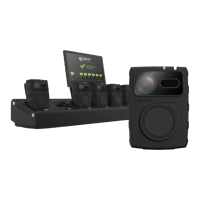
Zepcam T2+ Docking
Station (4 Bay, 8 Bay)
The Zepcam Docking Station makes recharging and data offloading of
multiple T2+ cameras possible. The docking station offloads its data to a
server and is managed by Zepcam Manager software. With the Zepcam
Docking Station you can:
● Manage a batch of cameras simultaneously
● Offload video to Zepcam Manager
● Remotely manage T2+ camera settings
● Assign different users to bodycams
[Note]: Zepcam Connect software has been provided to you by email. If you don’t have Zepcam Connect
installed on your PC/laptop, please download from Zepcam.com.
[Note]: If you would like to have a Zepcam Manager account or an on premise software installation
please contact us directly at support@zepcam.com or call us at +31-85-3010290


 To Next Page