More information and FAQ on: www.zepcam.com - [T2+ IM-EN-1.0] 12
TROUBLESHOOTING
HOW TO SOLVE PROBLEMS
If the Zepcam T2+ behaves oddly or does not respond to button presses:
● Reset the T2+ by pressing the reset button (button 6) on the back of the T2+.
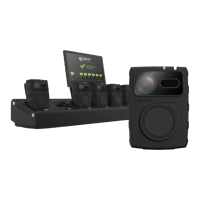
On the docking station, when the LED in front of the camera is flashing green and red, an error occurred.
Try the following:
1. Remove the T2+ from the docking station.
2. Reset the T2+ by pressing the reset button (button 6) on the back of the T2+.
3. Make sure the Zepcam T2+ is not recording when docked.
4. Put the T2+ back in the docking station at a different position.
If that didn’t work, you can try to reset the T2+ docking station. Please only do this as a last resort since it
will reset all your docking station settings to the factory reset. It will also remove all recordings that are
stored on the docking station. You can reset the T2+ docking station by using a blunt pointed object (e.g.
pencil, paperclip) to push the reset button on the docking station (the small hole on the right side of the
docking station).


 To Previous Page