18
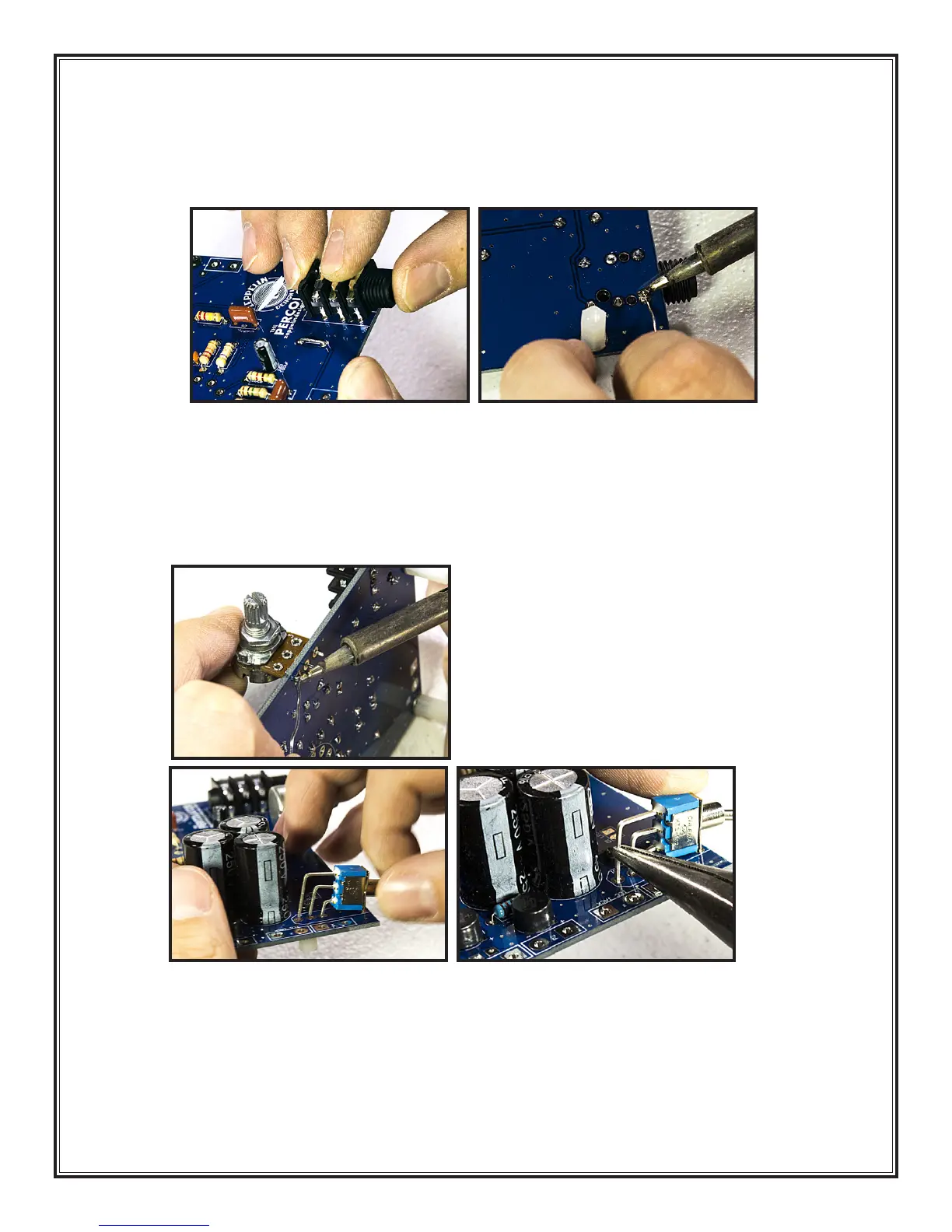
7. Input jack (Part # J1): Remove the plastic nut from the input jack and put it aside until the next
section. Snap the input jack into its holes on the circuit board.
25
Make sure you solder the leads
well.
26
The leads are too short to cut on this component so don’t bother.
8. Potentiometer (Part # VR1): Remove the nut and washer from the shaft of the pot and put them
aside until the next section. Install the potentiometer (“pot” for short) with the shaft facing away
from the board. The leads are too short to bend out, so you just have to hold the pot while you
solder at least one lead.
27
It is very important to make sure all the leads are completely seated
in their holes before soldering, otherwise the board won’t fit into the chassis properly. The leads
are too short to cut on this component too.
28 29
9. Power switch (Part # S1): Carefully install the power switch on the PCB.
28
If all the leads don’t line
up right away, very gently guide them into the holes with your needle-nose pliers.
29
When you
solder the switch, it is very important to make sure all the leads are making good connections with
the board because this component is switching high voltage. The front two pins just act as anchors
for the switch and are connected to the large piece of metal on the front of the component. Extra
heat may be needed to secure these pins properly because the large piece of metal tends to act
as a heat sink.
25 26
27



 To Next Page