- 9 -
Ed.1 05/2017
EN
6.0 - USE
6.1 - GETTING STARTED
6.2 - CONTROL PANEL
After installation, before commissioning the appliance you should perform the following
operation:
- Ensure that the unit is properly connected to the power supply
- Clean the appliance thoroughly and completely (see “Cleaning” section)
- Read all instructions for use
- Check the hob, it must always have an inclination of 1° towards the drip pan that col-
lects the liquid; pouring some water on the plate, this must ow into the drip pan.
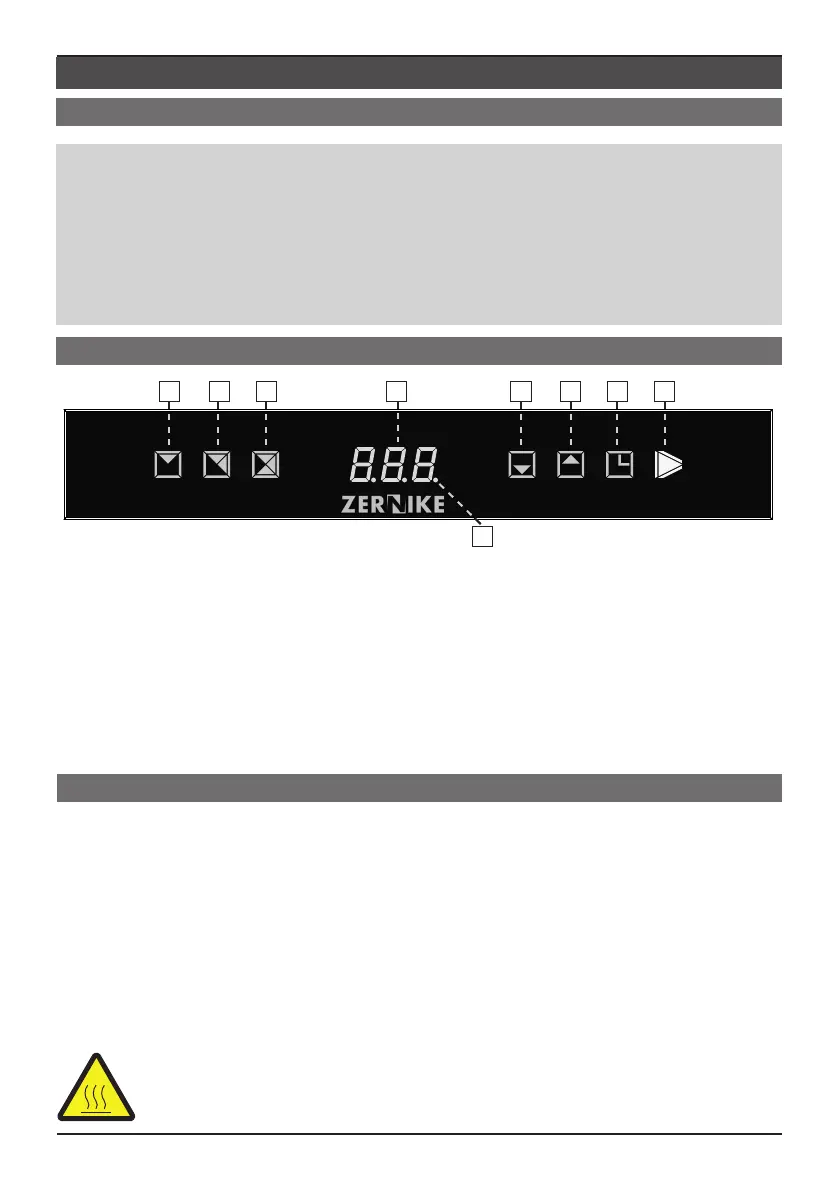
1: Preset program at 220°C
2: Preset program at 235°C
3: Preset program at 255°C
4: Value display
5: Decrease values
6: Increase values
7: Timer
8: ON/OFF / Stand-by
9: If on, it indicates that the heating elements are working
6.3 - SWITCHING ON AND OFF EQUIPMENT
- When the equipment is electrically connected, the ON / OFF button (8) is red.
- To turn on the device select and press the ON / OFF button (8) for two seconds until it
becomes green; at this point the device comes into operation.
- At the rst switching on, the hotplate sets automatically Program 2, then at the following
switching on it is automatically set to the last set temperature before it was switching off.
- To turn off select the ON / OFF button (8) for more than 2 seconds; from green it be-
cames red.
NOTE: When you switch off the equipment, if the plate temperature exceeds
60°C it warns “HOT”; please wait until the notice disappears before you clean it
with detergent FlashClean.
1 2 3 4 5 6 7 8
9


 To Next Page