General Operation
4.12
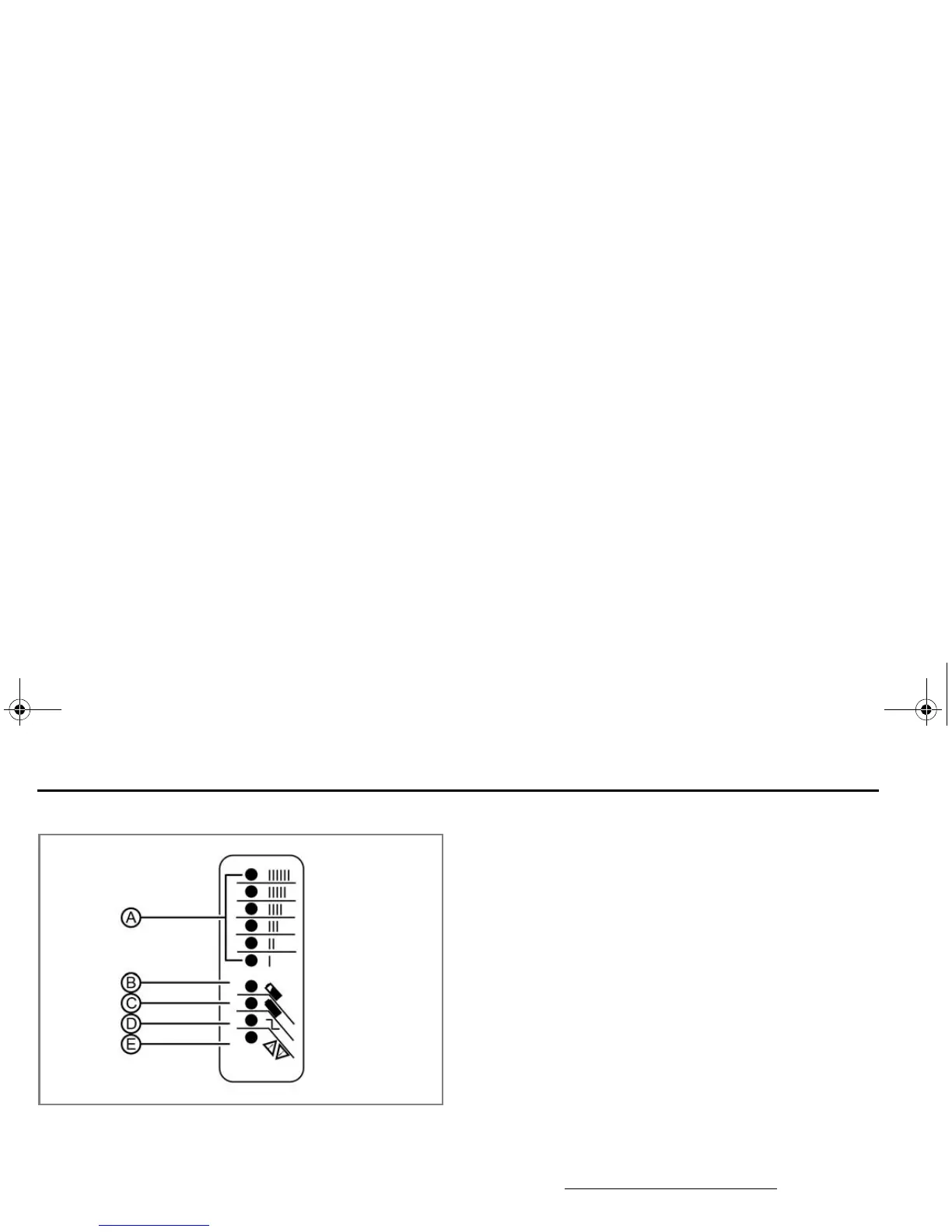
Quick Charger LED Indicators
A. Amme
ter
The Ammeter LED is an amber indicator that indicates
th
e amount of current output and should gradually
ramp down from “IIIIII” to “I”.
B. 80% Ch
arge
The 80% Charge LED is an amber indicator. If it is on
solid
, the bulk charge phase is complete, 80%
charged. Charger is now in absorption phase. If the
indicator is flashing, there are two issues that can
cause this to occur:
• T
he charger and BMS are balancing.
• T
he BMS is cutting off the charge because one or
more cells have reached maximum voltage.
C. 1
00% Charge
The 100% Charge LED is a green indicator. If it is on
solid, the charging is complete and the charger will
enter maintenance mode. If it is flashing, the
absorption phase is complete and the charger is in
finish phase.
D. AC
ON
The AC ON LED is an amber indicator. If it is on solid,
the
AC power is good. If it is flashing, the AC voltage
is low. Check for proper voltage, and if an extension
cord is being used, verify that it is the correct length.
Maximum length is 25 ft. (7.6 m) 12 AWG.
E. Fa
ult
The Fault LED is a red indicator which indicates there
i
s a charger error. If it is flashing, reset the charger
and see
“Troubleshooting”, on page 6.1.
Zero Owner's Manual (S and DS).book Page 12 Tuesday, January 20, 2015 2:37 PM



 To Next Page