BUMPER AND KICKPLATE
UNDER CASE RETURN AIR FLOW ASSEMBLY INSTRUCTIONS
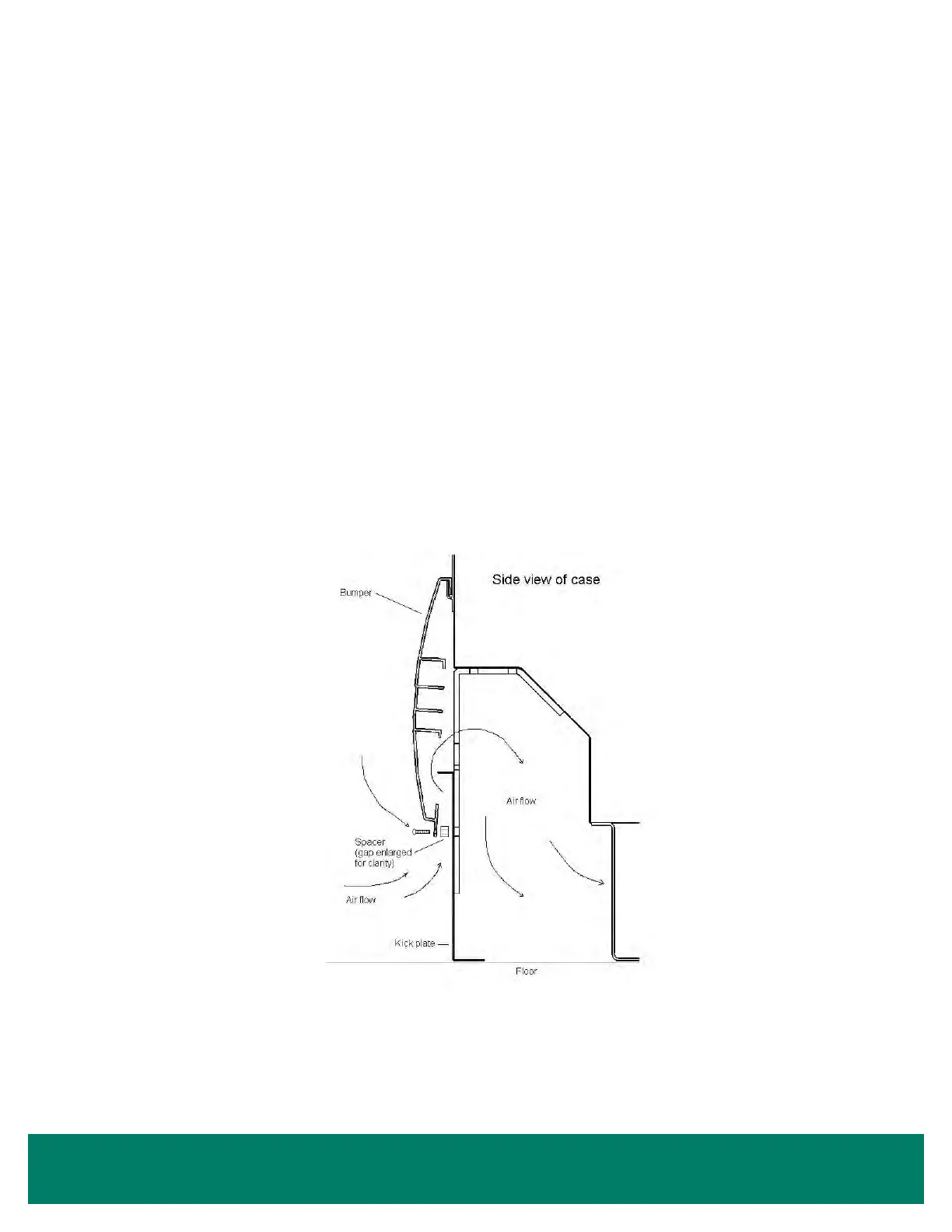
To assemble the bumper for under case return air ow (if requested), a spacer (provided) must be inserted between the bumper and
kickplate (Figure 18). The spacer is held in place with the standard black assembly screw used to attach the bumper. One
3/8" spacer is
required at each screw location (2 spacers on a 2-door, 3 spacers on a 3-door, etc.).
1. To ease installation, hook the bumper to the case and position the kickplate. Then pull the bottom edge of the bumper forward,
hold the spacer in place, and then insert the assembly screw through the bumper, spacer, kickplate, bumper bracket and into the
Tinnerman clip.
2. With the spacers in place, air will be allowed to ow between the bumper and kickplate and then underneath the case. The target
airow rate under the case should be 50 cfm/door.
Note: An optional louvered kickplate is available.
Figure 18: Bumper Air Flow
Bumper and Kickplate • 19



 To Next Page