EasyManua.ls Logo

Zerova DB Series - Page 34

Zerova DB Series
65 pages
Print Icon
To Next Page IconTo Next Page
To Previous Page IconTo Previous Page
Loading...
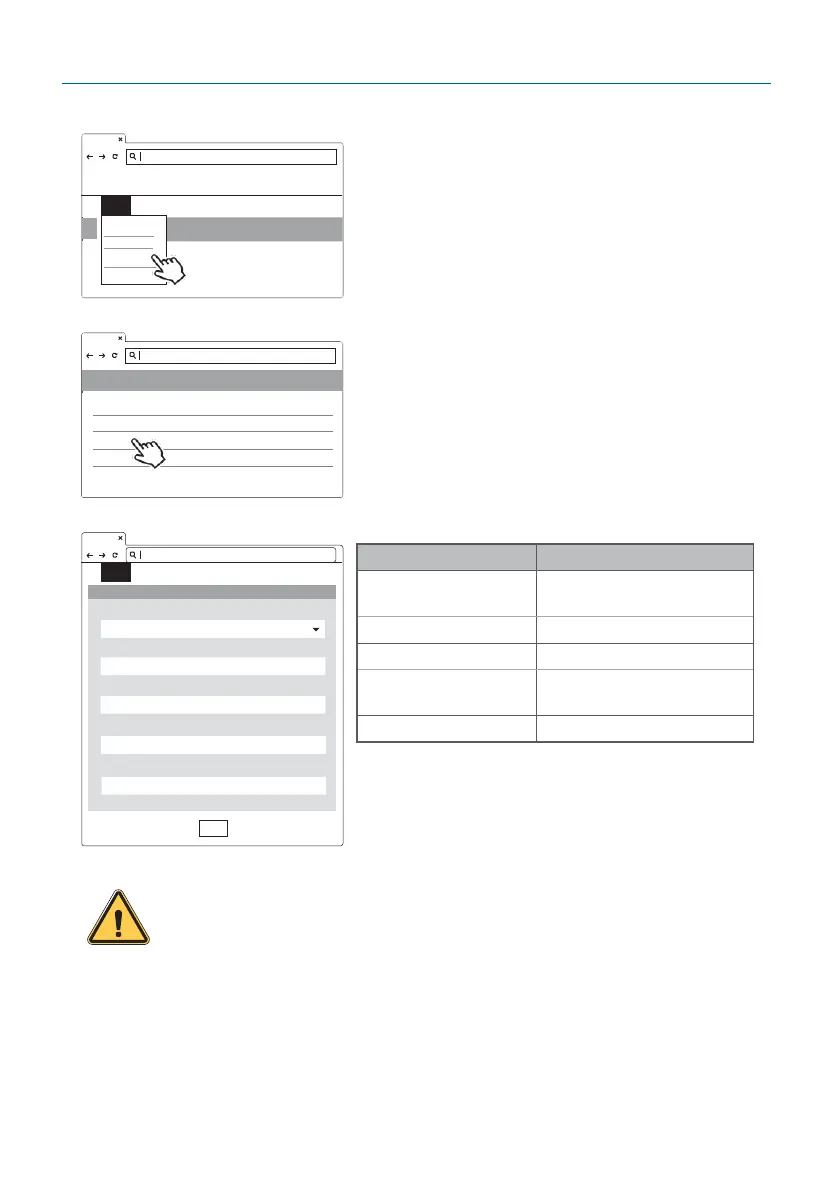
30
ystem
Wi-Fi Setting
Description
Mode
Enable(station) or disable or
set as AP mode
SSID
Service Set Identifier SSID
Password
Password to access to Wi-Fi
Wifi Target Bssid Mac
Fill in designated AP Mac if
needed
DHCP Client
DHCP client of Wi-Fi
SET UPGRADE OTHER LANGUAGE
WiFI Module
192.168.1.10
Set
Mode
SSID
Password
Wifi Target Bssid Mac
DHCP Client
Step 3.
SET -> Network.
Step 4.
Select Wi-Fi Module
Select Wi-Fi modes and ll in SSID and Password
according to your application, if not required, just
keep default.
WARNING:
Due to the different environmental conditions, it is
recommended to conduct Wi-Fi and 4G module network signal tests
before installation. The RSSI (Received Signal Strength Indication)
value suggest to be higher than -65 dBm. If it is lower than this value,
it may cause the risk of abnormal Wi-Fi or 4G connection quality
or disconnection since the influence of external interference in the
environment.

SET
UPGRADE OTHER LANGUAGE
S
System
Charging
Network
Backend
192.168.1.10
Network
Network Status
+
Ethernet
+
WiFi
+
3G/4G
+
192.168.1.10