EasyManua.ls Logo

Zerova DB Series - Page 36

Zerova DB Series
65 pages
Print Icon
To Next Page IconTo Next Page
To Previous Page IconTo Previous Page
Loading...
32
ystem
4.2.2
Setting and Enable 3G/4G Module.
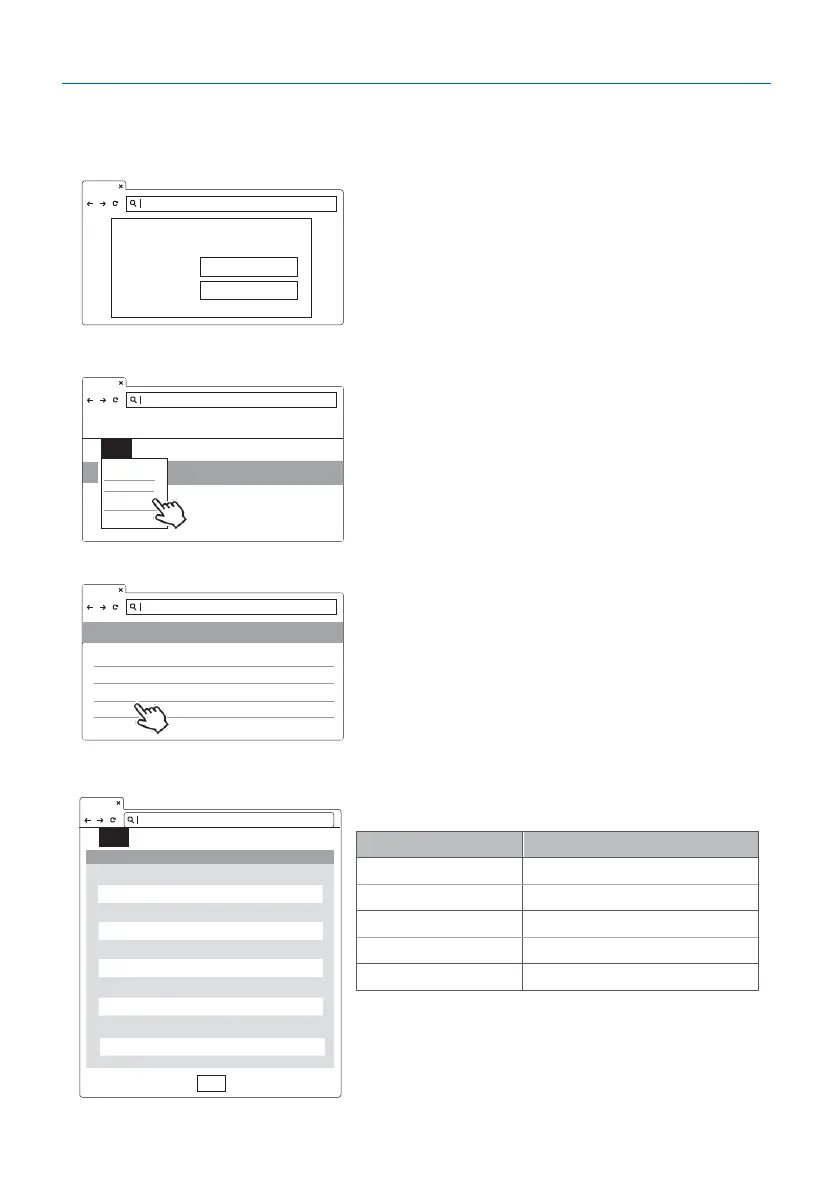
Step 1.
Please contact your SIM provider to get the
APN, PPP ID and password.
*Note: PPP ID and password maybe options
depend on your SIM provider.
Open the web page of charger and sign-in.
Step 2.
SET -> Network.
Step 3.
Network -> 3G/4G Module to ll corresponding
information into TelcomApn, TelcomChapPapid
and TelcomChapPapPwd.
Please contact your SIM provider to get the
APN, PPP ID and password if necessary.
Click
Set
to nish the setup process. The
3G/4G will be activated in shortly.

3G/4G setting
Description
Mode
Disable or enable 3G/4G
APN
Local telecom
Network Type
2G/3G/4G or auto
Chap Pap Id
Login ID authentication
Chap Pap Pwd
Login password authentication
Network
Network Status
+
Ethernet
+
WiFi
+
3G/4G
+
192.168.1.10
login https://192.168.1.10
Account admin
Password 1231231238
192.168.1.10
SET
UPGRADE OTHER LANGUAGE
S
System
Charging
Network
Backend
192.168.1.10
SET UPGRADE OTHER LANGUAGE
3G/4G
192.168.1.10
Set
Mode
APN
Network Type
Chap Pap Id
Chap Pap Pwd