TOPAZ – Technical Guidelines 16
7. TCG Auto Calibration
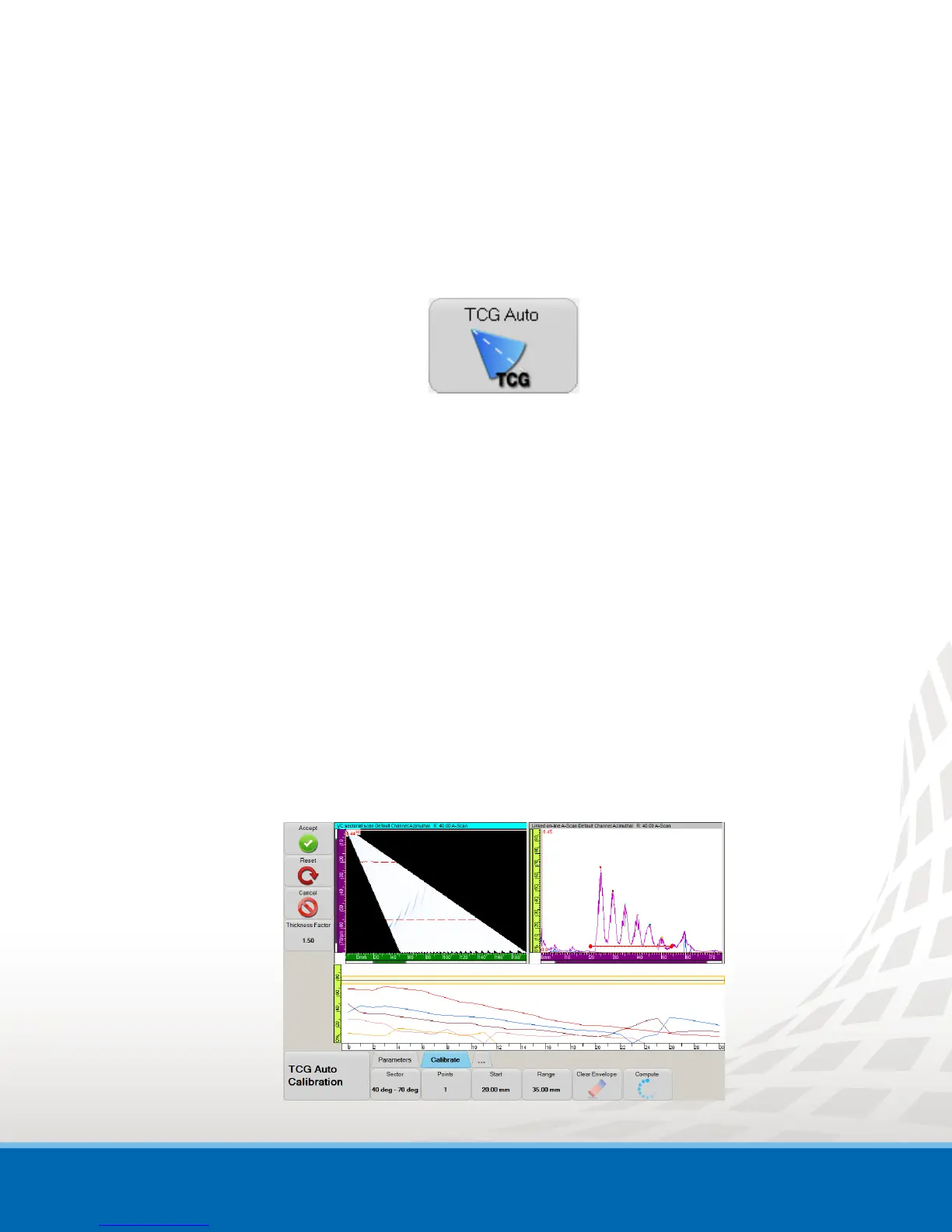
The TCG Auto calibration allows you to create multiple TCG points in one single scan, using one
detection gate with the appropriate start and range to cover all reflectors.
To create a TCG using the TCG Auto feature:
1. Go to the Calibration menu and select TCG Auto.
The TCG Auto Calibration menu appears.
2. In Parameters tab, set:
a. Reflector Type
b. Detection gate Threshold
c. Signal amplitude Target
d. Verification Tolerance for signal amplitude
e. Detection Blanking
It defines the minimum distance between the reflectors in true depth.
3. In Calibrate tab, set:
a. Set Sector
b. Set Start and Range of the detection gate.
Ensure that these values allows the detection gate to cover all reflectors
4. Scan the reflectors by moving your probe over your calibration specimen.
5. Click Compute.
All your TCG point are now created.
Figure 7-1 TCG Auto Calibration


 To Next Page