TOPAZ – Technical Guidelines 4
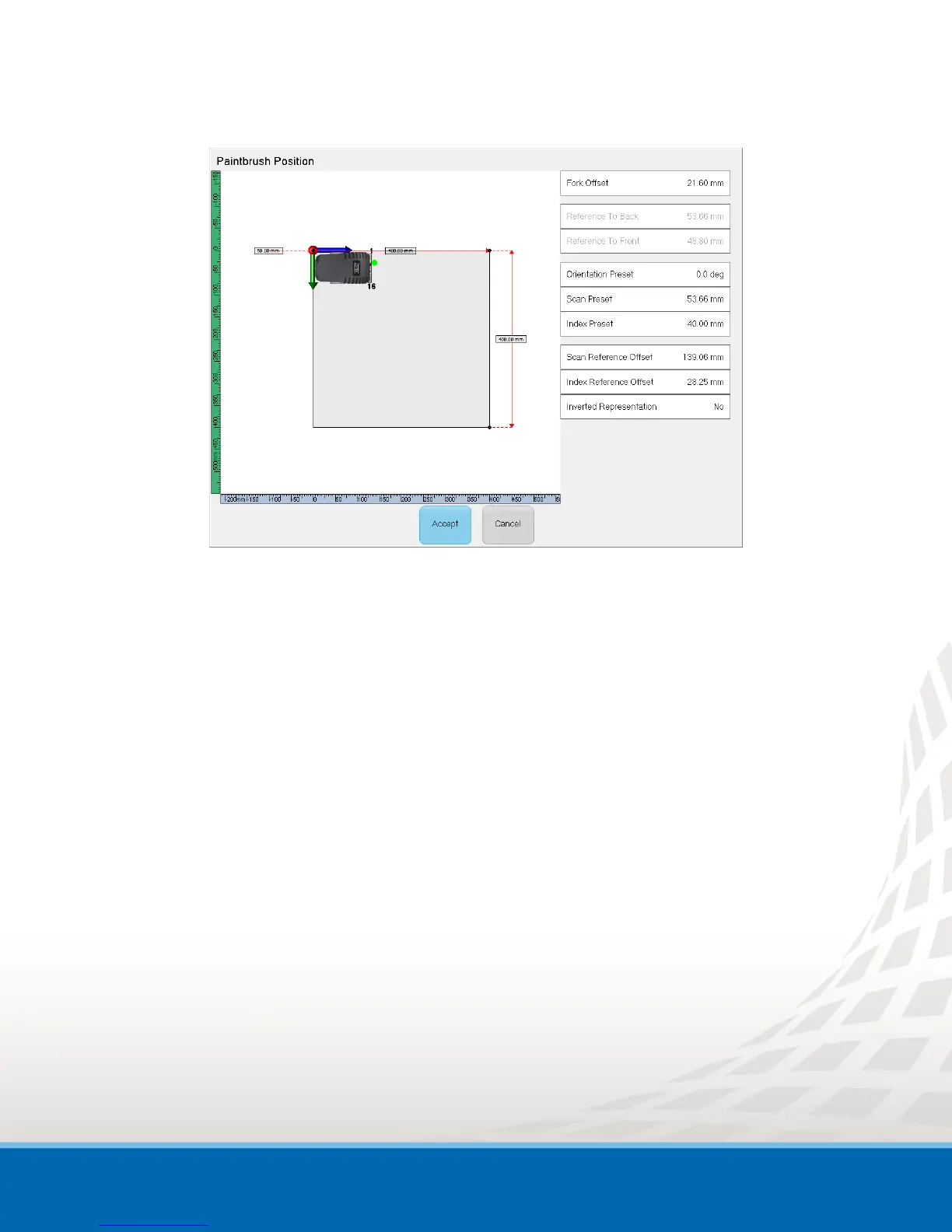
Figure 1-2 PaintBrush Position Window
d. In the PaintBrush Position window (refer to Figure 1-3):
i. Define the Fork Offset if different than default.
When PaintBrush is connected, the Fork Offset value is set automatically. The
Fork Offset value is the length of the probe holder (from the front of the
scanner to the rotation point of the wedge).
ii. Define the Orientation Preset.
Orientation of the scanner according to the scan and index axes
iii. Define the Scan Preset.
Distance between the scanner reference point and the origin of scan/index
coordinate system along the scan axis.
iv. Define the Index Preset.
Distance between the scanner reference point and the origin of scan/index
coordinate system along the index axis.
v. You can also move the PaintBrush on the display by tapping on any corner or
rotate it by tapping directly on it.


 To Next Page