TOPAZ – Technical Guidelines 3
1. PaintBrush Scanner Support
NDT PaintBrush™ is a hand held scanner with dual encoder design that allows free motion on a scan-
index inspection canvas. Not bounded by single axis motion, it allows you to freely paint over the
surface to examine for enhance wall thickness measurements. NDT PaintBrush features were integrated
to the TOPAZ™ and now available in UltraVision through the touch interface.
To create an inspection configuration with your PaintBrush scanner:
1. Start-up your TOPAZ
2. Connect the encoder feedback cable of the PaintBrush scanner to your TOPAZ;
A window will pop-up showing the detection process.
3. Define your specimen;
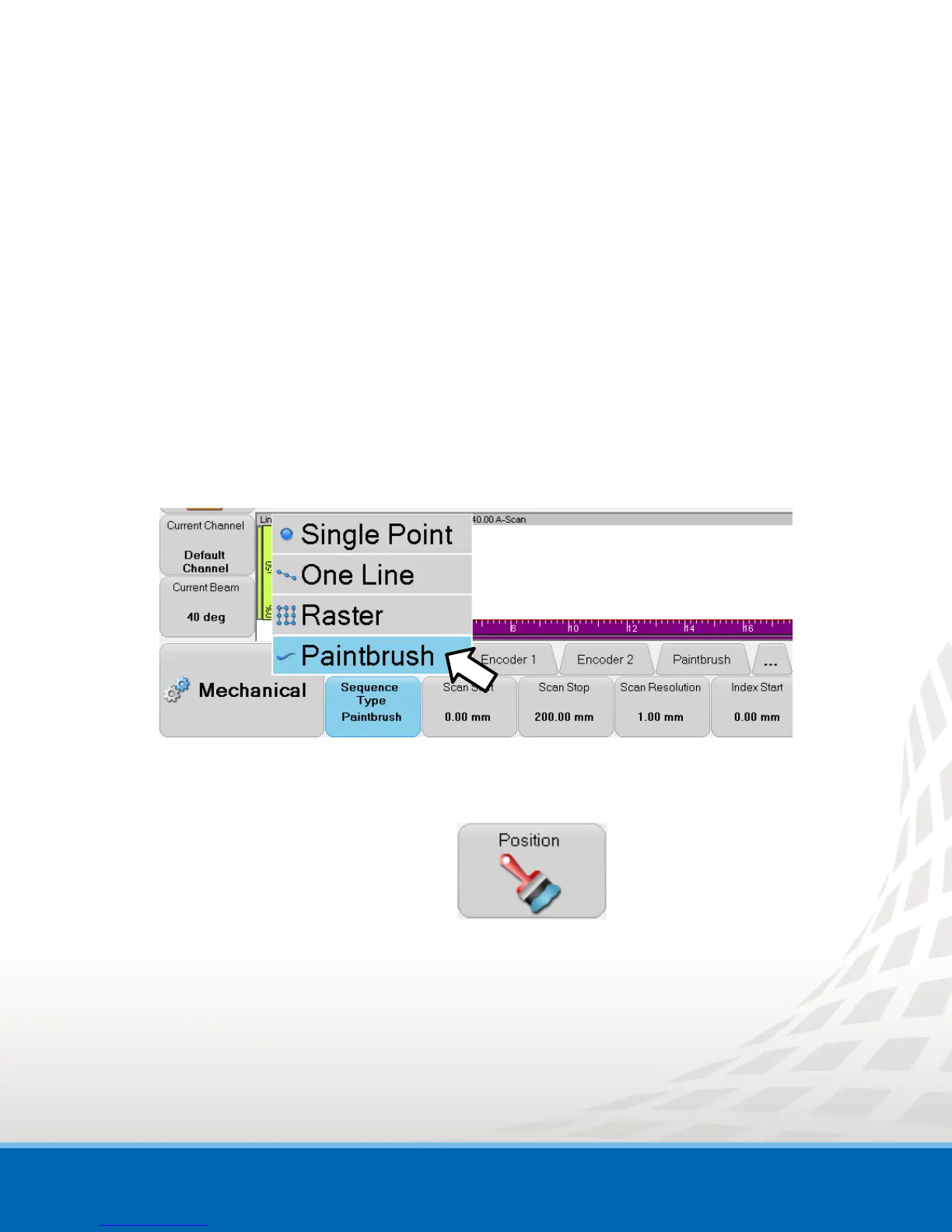
4. To define your PaintBrush inspection sequence, go to the Mechanical menu:
a. In the Sequence tab, select PaintBrush;
Figure 1-1 PaintBrush Sequence Selection
b. For the Scan and Index-axis, define the Start, Stop and Resolution of the inspection
sequence;
c. In the PaintBrush tab, click Position
The PaintBrush Position window appears.


 To Next Page