TOPAZ – Technical Guidelines 7
3. Probe Position Marker
The probe position marker is a live cursor that displays the probe’s position in real time during the
inspection. It provides a reliable and constant visual feedback for encoded scanning sequences and is
the perfect tool to ensure complete examination coverage when using your PaintBrush™ scanner.
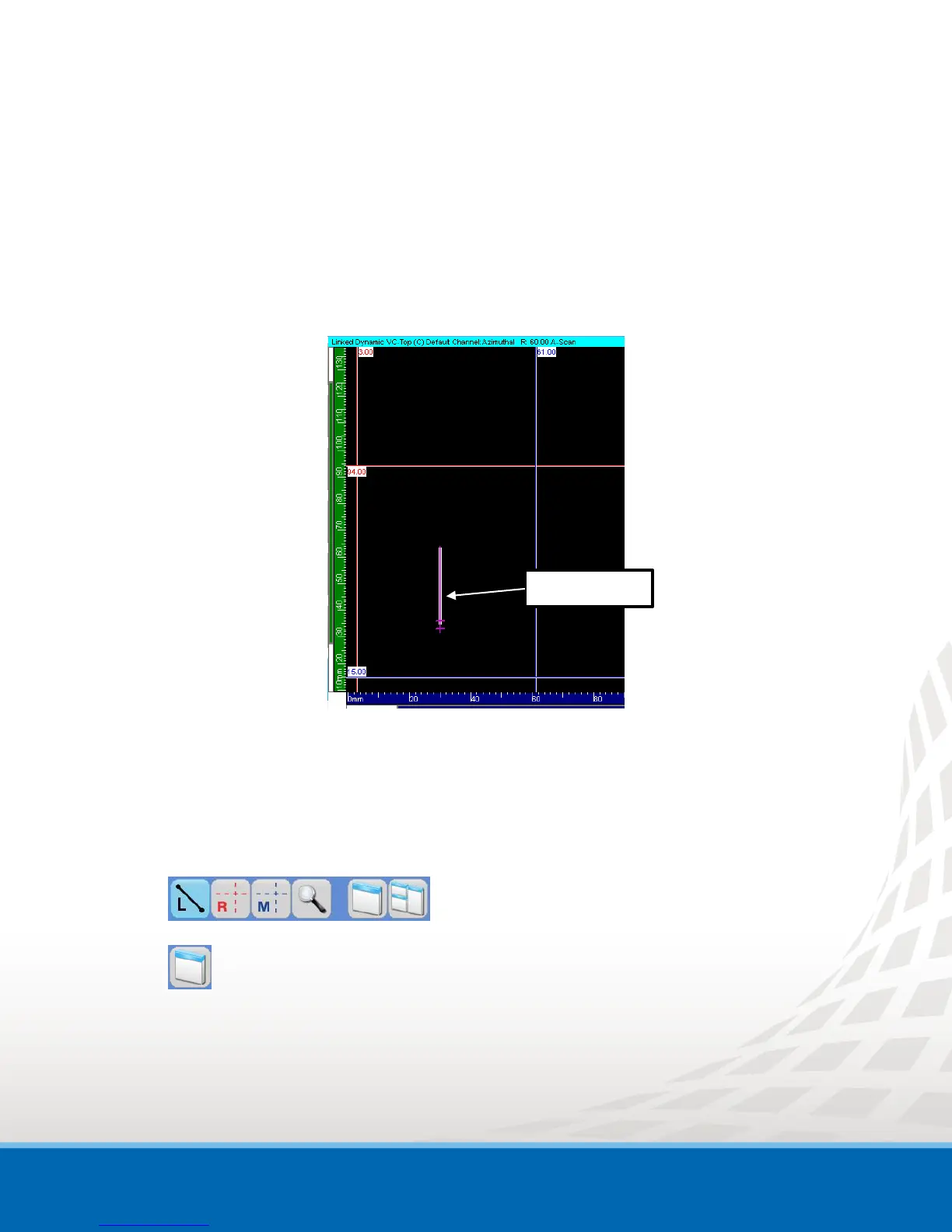
The probe cursor is displayed as a pink marker in your volumetric views (Top, Side and End).
Figure 3-1 Probe Cursor on VC-Top (C) Display for a Focal Law at 60°
The orientation and length of the Probe cursor, in the displayed view, is computed based on the
selected focal law beam orientation (refracted and skew angles). By default, the probe cursor is always
displayed in your Top, Side and End views.
To change the Probe cursor properties:
1. Click on the desired view (Top, Side or End) to display the View Settings toolbar.
2. Click View Properties.
The View Properties window appears
3. Select Probe Cursor to display the different parameter options.


 To Next Page